Solved

IFS Cloud Save button not show after duplicating record

  • February 3, 2026
  • 3 replies
  • 49 views

Forum|alt.badge.img+3

Hello,

 I'm running into an issue on the Audit List page in IFS Cloud. Users are reporting that when they Duplicate a record and populate all Required fields, they will click the save button at the top of the page, and it will cause a separate window to pop up containing all the same data. But the only button that shows is “Cancel New” but no option to save work. We are currently using IFS version 24R2.9. we were able to do this in IFS Aurena version 10.22.31.  Any advice on how to fix this issue would be greatly appreciated. 



Best answer by SSOLER

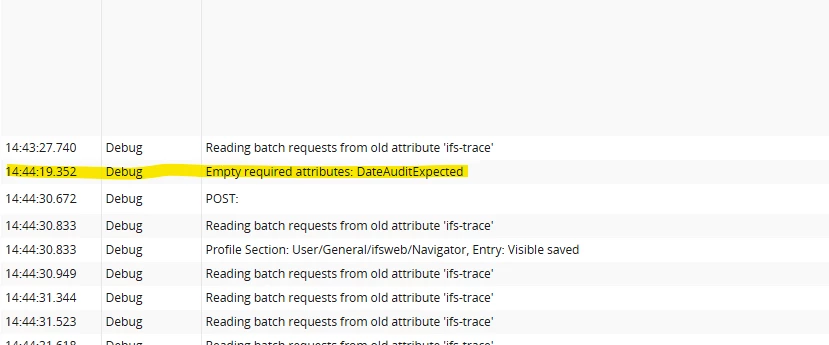
@Dhanuka_Iconique I found the fix. IFS added a new required field to the audit page. strange that no error message was given when trying to save the records. I was able to find the error by looking in the debug console. 


3 replies

Hi ​@SSOLER this is just a hunch, try turning the toggles on and then off so they get registered as false. Sometimes the duplicate doesn’t save the false value.

If that still doesn’t work, check whether the duplicate copied all the columns properly. It might be missing a mandatory field that only gets a value after you manually change another column (the validation process)


Forum|alt.badge.img+3
  • Author
  • Do Gooder (Customer)
  • February 5, 2026

@Dhanuka_Iconique Thank you for the response. i've tried that and i've also add or made changes to every field and i'm still not able to get save button to appear on the screen.


Forum|alt.badge.img+3
  • Author
  • Do Gooder (Customer)
  • Answer
  • February 5, 2026

@Dhanuka_Iconique I found the fix. IFS added a new required field to the audit page. strange that no error message was given when trying to save the records. I was able to find the error by looking in the debug console.