Solved

How can I copy a Customer Order to a different site?

  • February 8, 2023
  • 4 replies
  • 229 views

arebbeadle
Hero (Customer)
Forum|alt.badge.img+14

How can I copy a Customer Order to a different site? All parts are setup on both sites. The menu option does not allow a different site, is there any way to copy orders to another site.


Best answer by arebbeadle

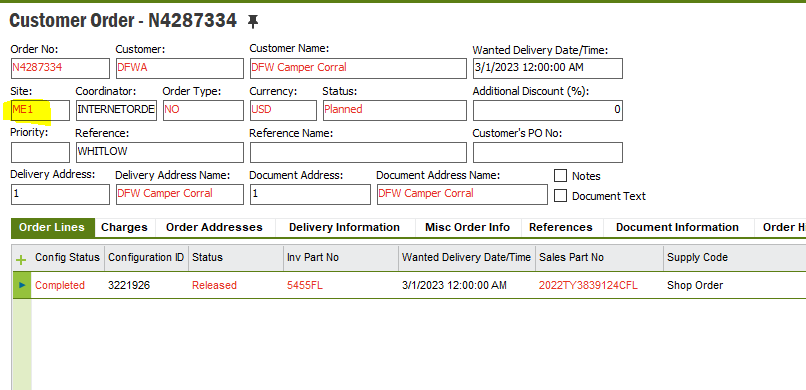
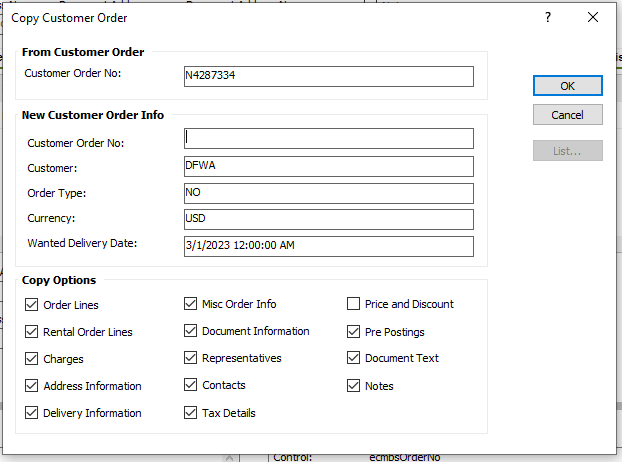
I found you can copy Order header data and orderline data between sites as long as you assign a different Order No.

Thanks,

4 replies

eqbstal
Superhero (Partner)
Forum|alt.badge.img+21
  • Superhero (Partner)
  • February 9, 2023

Really depends on the status of a customer order. My guess would be to use a migration job to export the information to a server location and another migration job picks up the information, includes the new site and there you have the same order in another site. Be aware that the other site might/is connected to another company and therefor the customer information that is company connected needs to be in place.

Another option might be to use the Replication jobs in migration jobs (I've never seen that transactional data, like customer order, is replicated), but not sure if this is the way to go.

Best would be to check about how many customer order you talk. In my view, building a possible complex migration job for less than 1000 records is a waste of time.


arebbeadle
Hero (Customer)
Forum|alt.badge.img+14
  • Author
  • Hero (Customer)
  • Answer
  • February 11, 2023

I found you can copy Order header data and orderline data between sites as long as you assign a different Order No.

Thanks,


eqbstal
Superhero (Partner)
Forum|alt.badge.img+21
  • Superhero (Partner)
  • February 12, 2023

😁Now you can mark your own answer as best answer. Thanks for this tip.


Forum|alt.badge.img
  • Do Gooder (Customer)
  • June 17, 2025

Thanks, but how can we do it? 
I didn’t find the possibility to copy customer order (header or lines) to an other site.