Up to the IFS Cloud 24R2, enumeration-type custom attributes in IFS Cloud were handled as the Text data type. Because of this, in scenarios such as page configuration filters, it was common to use simple filter expressions like:Cf_Deliverytype eq ‘TRANSIT’
What Changed in 24R2?
Starting with the IFS Cloud 24R2, the handling of enumeration-type custom attributes has been enhanced to improve data integrity and validation. These attributes are now defined using the Enumeration data type, with each attribute explicitly linked to the enumeration it refers to.
This enhancement provides:
- stronger type safety
- better validation of filter values
- improved consistency with standard attribute counterparts across APIs and configurations.
Impact on Existing Configurations
When upgrading to a version later than IFS Cloud 24R2 Early Access, customers are expected to align their existing filters with the new enumeration-based configuration standard as part of the upgrade process.
Configurations that reference enumeration-type custom attributes using text-based values should be reviewed and updated to use the new enumeration syntax. This ensures that filters continue to work correctly and take advantage of the improved data model.
This upgrade is a one-time configuration adjustment and does not require functional redesign. Once updated, the configurations will remain compatible with future releases.
Updated Filter Syntax
From 24R2 onwards, enumeration-type custom attributes used in filters must specify the fully qualified enumeration value, including its identifier.
Example:
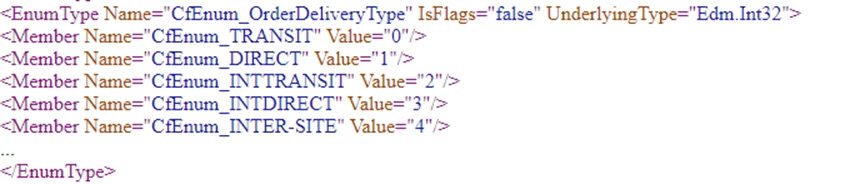
Cf_Deliverytype eq IfsApp.CancellationReasonsHandling.CfEnum_OrderDeliveryType'CfEnum_TRANSIT'
This format explicitly defines:
- the enumeration associated with the custom attribute, and
- the exact enumeration value being used.
How to Upgrade Your Filters
To upgrade existing filters:
- Identify filters that reference enumeration-type custom attributes.
- Locate any text-based comparison values (for example, TRANSIT, DIRECT, or other string values).
- Replace them with the corresponding fully qualified enumeration value.
- To find the enumeration name, and the valid identifiers for each enumeration value, refer to the metadata document of the API you are using. The metadata provides authoritative details required to update filters correctly.