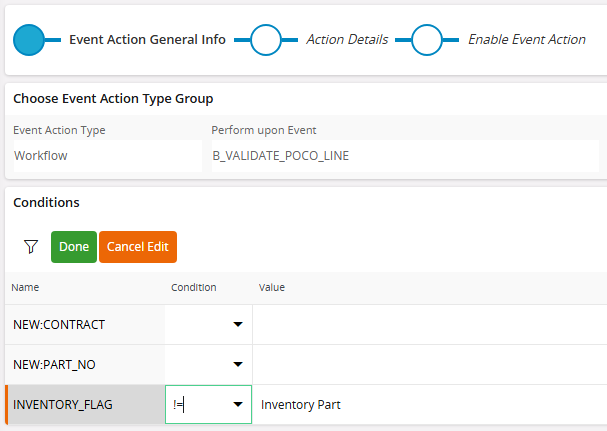
The possible values returned from this custom attribute are “Inventory Part”, “Non Inventory Part” or NULL. I would like the workflow to run when the value returned is “Non Inventory Part” or NULL. Will the following satisfy that? I worry about NULL...
Best answer by Buddhi Gunasekara
Only way I could do this was with two events for the same table with 1 event action for each. 1 event action has condition is null and other has the condition “equals (=)” for the string you want.
There is another way to use custom plsql in the event and add a custom attribute. Say the custom attribute is WF_SHOULD_FIRE. This custom attribute can resolve the logic you want using a plsql function. Then in the event action you should be able to user the conditions WF_SHOULD_FIRE = TRUE. Please note that I have not tried this.
Only way I could do this was with two events for the same table with 1 event action for each. 1 event action has condition is null and other has the condition “equals (=)” for the string you want.
There is another way to use custom plsql in the event and add a custom attribute. Say the custom attribute is WF_SHOULD_FIRE. This custom attribute can resolve the logic you want using a plsql function. Then in the event action you should be able to user the conditions WF_SHOULD_FIRE = TRUE. Please note that I have not tried this.
Only way I could do this was with two events for the same table with 1 event action for each. 1 event action has condition is null and other has the condition “equals (=)” for the string you want.
There is another way to use custom plsql in the event and add a custom attribute. Say the custom attribute is WF_SHOULD_FIRE. This custom attribute can resolve the logic you want using a plsql function. Then in the event action you should be able to user the conditions WF_SHOULD_FIRE = TRUE. Please note that I have not tried this.
I cannot believe I never thought of this before… makes total sense that two event actions would be fine since the conditions would never match. Glad I posted the question, and thank you for the answer!