Question

Error in number or value: buffer for character string too small

  • December 10, 2025
  • 6 replies
  • 41 views

Forum|alt.badge.img+5

When running a background job I’m getting the following error
ORA-06502: PL/SQL: error in number or value: buffer for character string too small




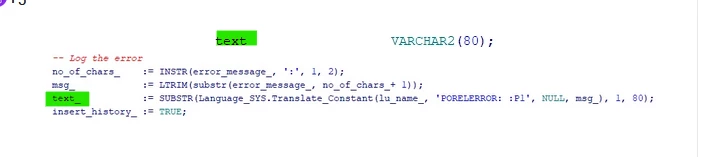
Error is due to the text_ variable. Any idea on this issue?

6 replies

JOOLSE
Hero (Employee)
Forum|alt.badge.img+11
  • Hero (Employee)
  • December 10, 2025

What is thel language you are running on. We had a similar case in our area where the customer was running Czech language and for some reaon the substrb, that we used did have more charaters than was allowed. I can see that it is substr in this case. 

Anyway I think you should report this to IFS, so a deeper look can be done.


Forum|alt.badge.img+5
  • Author
  • Sidekick (Partner)
  • December 10, 2025

@JOOLSE I’m running on Swedish language


Forum|alt.badge.img+12
  • Hero (Customer)
  • December 10, 2025

Difficult to tell why from just this small code snippet but if this simply means that the total length of text_ is over 80 characters, which is a bit strange because of the substr you’re using to limit it to 80 chars.


If you can troubleshoot and increase the text_ sizing, can you dbms_output or trace it and see what text_ size actually would be once/after your translation kicks in?


Forum|alt.badge.img+12
  • Hero (Customer)
  • December 10, 2025

Also, this might be stupid, but:


The “text” variable (no _ at the end) is set to VARCHAR2(80), but is there another definition for “text_” with an underscore ? Do you have both “text” and “text_” ?


Forum|alt.badge.img+5
  • Author
  • Sidekick (Partner)
  • December 10, 2025

@SimonTestard , No it has been cropped when I added the screenshot 🙂 variable names are same


Forum|alt.badge.img+17
  • Superhero (Partner)
  • December 10, 2025

Hi

This is related to the DB object semantics. Have You changed db objects manually using for example Oracle Sql Developer?

Try this to resolve problem:

begin

Installaion_Sys.Remove_Debug_Information();

END;


Helpful queries to understand the problem:

SELECT name, type, object_id
      FROM user_plsql_object_settings us, user_objects uo
      WHERE name != 'INSTALLATION_SYS'
      AND   us.name = uo.object_name
      AND   us.type = uo.object_type
      AND  (plsql_debug = 'TRUE'
      OR    plsql_optimize_level < 2
      OR    nls_length_semantics = 'BYTE')
      ORDER BY DECODE(type, 'PACKAGE', 10,
                            'PACKAGE BODY', 20,
                            'TRIGGER', 30,
                            'PROCEDURE', 40,
                            'FUNCTION', 50,
                            50 ), name;


SELECT 
    table_name,
    column_name,
    data_type,
    char_length,
    char_used  -- 'B' = BYTE, 'C' = CHAR
FROM 
    user_tab_columns
WHERE 
    table_name = UPPER('<TABLE_NAME>');