


Question

Customization Uplift Steps for 25R2 ?

  • November 30, 2025
  • 3 replies
  • 65 views

Forum|alt.badge.img+12

Hello,


Currently attempting to upgrade my environment from 25R1 to 25R2 and with the new EBR Compliance stuff I must admit I’m a bit stumped as to what exactly I’m supposed to be doing to uplift any custom entity I created within the Cust Layer ?


For context this is a Managed Cloud environment, so not a Remote Install.


I generated the topic branch and I’m trying to order it as an environment but the install keeps failing, I got it to pass the model generation, but now I’m getting some errors that I’m not entirely sure what the steps to do are ?


I think the customizations are super straightforward, basically a new entity model, with a .cdb file that handled the creation of the table/indexes, and both the entity and model file were uploaded to the customization repository for delivery to our use place, which has always worked flawlessly (was that the wrong thing to do?)


When attempting to install the topic-ru branch now, after doing the typical bits (update of the solutionset yaml file, etc.), I keep getting errors. Unfortunately it takes absolutely AGES to error when provisioning so I’m only making very little progress (something like 5 hours of “pending” until I can get an actual error log)…


First of all, the nzd_validator keeps telling me that my .cdbs are “not supported for online

 

Am I ACTUALLY expected to delete these CDBs  from my repository ? If so, do I need to replace them with anything ?


I am not sure whether this is a fatal error or not, because I did manage to the get model files to generate without error, the DB deployment, started, in which I start getting EBR related errors:
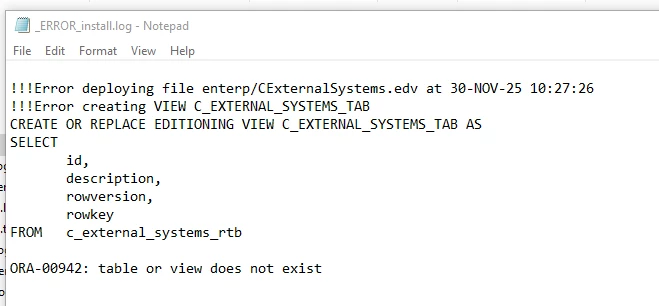


Ok so the model file clearly is generated properly as it’s trying to deploy this .edv, but the underlying RTB table has not been created yet… What do I need to do exactly ?


I’ve read the entirely of the documentation on this (https://docs.ifs.com/techdocs/25r2/060_development/027_base_server_dev/225_reduced_downtime_delivery/010_ebr_prep/), but I really can’t seem to find a simple list of steps of “what to do to properly prepare a custom entity for EBR”


In Studio Developer, the Update Readiness tool told me to “Register tables for EDR in CDB” :

 

But this isn’t clear at all, given that the nzd_validator tells me that .cdb files are not allowed for online deployment, so I’m really lost, am I supposed to modify my existing cdbs? create a new cdb specifically to prepare all tables for edr ? Delete the cdbs like the validator tells me and do something else?


Also in Studio Developer, the 25R2 Framework Preparation script tells me everything is a success, but that it hasn’t modified anything…
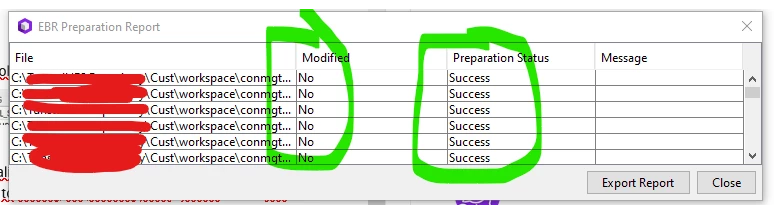


Am I suppose to use one of those drop files as briefly mentioned in the documentation ? If so, that seems a bit frightening because the contents of it does include dropping Core layer entities etc, and also I’d obviously want to make sure that once applied to my Use Place the data isn’t actually lost…


I did find this :


https://docs.ifs.com/techdocs/25r2/060_development/027_base_server_dev/225_reduced_downtime_delivery/020_code_changes/020_uptime_changes/010_migrating_cdbs/#built-in_validations


Which explains to change CDBs into .ddlsource files, which I can do, but I want to ensure this is indeed the way forward, even if I am not a “Delivery Continuity” Customer ?


(Just a bit weird that the readiness tool would say to Prepare for EBR in the .cdb files if the actual way forward is to completely delete the cdb and instead use those .ddlsource files)


Any input appreciated :)
3 replies

Forum|alt.badge.img+12
  • Author
  • Hero (Customer)
  • November 30, 2025

I realize reading through all of it again that it may be that for “Normal” Customers (offline delivery i.e. not using Delivery Continuity) you might be able to keep using CDBs and that ddlsource files are only for Delivery Continuity customers?


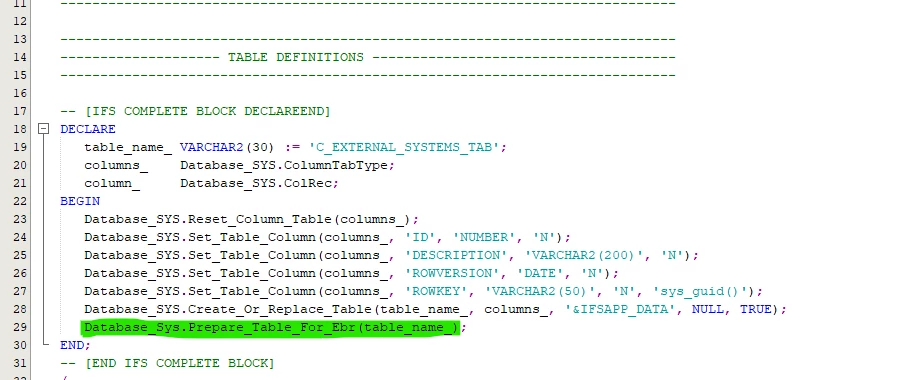
If that’s the case, am I to consider the nzd_validator to be a “non fatal” error (just telling you you won’t be able to do Online Deliveries, but offline is still ok), and the only requirement is to uplift existing Custom Table entities to EBR by appending the Prepare_For_Ebr command at the end of the CDBs for them, such as this ?


(I understand the doc says you dont need to do this for any custom fields added to Core entities as these are already uplifted for EBR by default with the upgrade files)


Forum|alt.badge.img+6
  • Hero (Employee)
  • December 1, 2025
Hi,
Let me guide you through this.
  1. For all customers upgrading to 25R2, the database must be prepared for EBR. The required steps are described here:
  2. If a customer chooses to use delivery continuity, they must then follow this guideline to uplift the codebase:
 

In your case, please create a 2520-cust.upg file and prepare your customized table for EBR by calling the method Database_SYS.Prepare_Table_For_EBR. As mentioned here.


If the component that this entity belongs to already has a 2520.upg, that is all you need to do. If it does not, please add the following line to the [ComponentUpgrade] section in the deploy.ini of your component:

25.1.0=2520-cust.upg


Regarding the error you are seeing: a customer is required to replace its CDBs with DDLSource files only if they are using delivery continuity, so this step is not needed otherwise. In your case you can ignore these errors. They are only logged and not raised as errors. 

Let me know if I you need any more help with this, We can perhaps arrange a call over Teams to go through the steps you need to follow.

Thanks,
Trewon 


Forum|alt.badge.img+12
  • Author
  • Hero (Customer)
  • December 1, 2025

Thank you very much ​@Trewon,


I’m currently trying an approach with the Prepare_Table_For_EBR command appended to the end of my CDBs like I explained above, and so far those errors seem to have disappeared from the build log, although I don’t disagree that maybe creating a dedicated upg file might be the way to go. (To be perfectly honest, up until this point I never had to customize any upg or deploy.ini files so I didn’t even know it was possible to add them to your own repo)


If that doesn’t work I might take up your very thoughtful offer of a quick teams call just to make sure I got everything right. I’ll report back with progress a bit later as it takes me around 6 hours from ordering the environment to the environment being provisioned and the error log (if the install failed) being available. Not sure if it taking this long is normal, but at least I’ve been getting the logs to help me work through my other Customization Uplifts so I’m not complaining.

