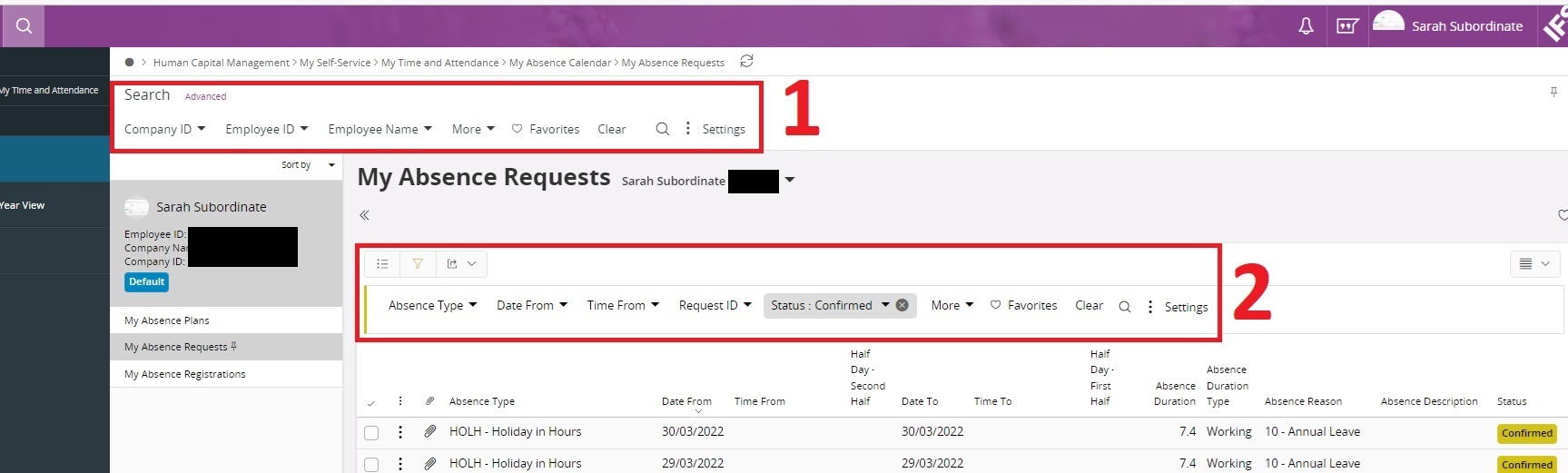
I am building navigation URLs for absence requests in Aurena. From one lobby I want to navigate to the “My Absence Requests” page - but I wish to filter the list within that page to only show Confirmed status requests.
The trouble I’m having is that the page filter (No1) doesn’t have a Status option.
I need to filter on the list Filter (No2).
Is it possible to build a filter that will accomplish this?
Best answer by Himasha Abeywickrama
Hi @TSPPRICH,
Since My Absence Requests is a sub menu of My Absence Calendar, not sure if you can directly access the list or pass parameters. However, you can use Absence Requests window and filter the data using below web access URL,
page/AbsenceManager/RequestsOverviewPage?$filter=CompanyId eq $[COMPANY_ID] and EmpNo eq $[EMP_NO] and Objstate eq IfsApp.AbsenceManagerHandling.HolidayRequestState'Confirmed'
Since My Absence Requests is a sub menu of My Absence Calendar, not sure if you can directly access the list or pass parameters. However, you can use Absence Requests window and filter the data using below web access URL,
page/AbsenceManager/RequestsOverviewPage?$filter=CompanyId eq $[COMPANY_ID] and EmpNo eq $[EMP_NO] and Objstate eq IfsApp.AbsenceManagerHandling.HolidayRequestState'Confirmed'