Question

Positive Pay File Created but Not Auto Downloading

  • October 19, 2023
  • 4 replies
  • 173 views

Forum|alt.badge.img

The positive pay configurations were set up and were working fine. All of a sudden, the positive pay files are not automatically downloading anymore. The files are still being created so they can export through the external file assistant but there is need for the automatic download. I have double checked settings, and everything looks okay. The ACH is set up as well and is triggering the automatic download just fine. Does anyone know why this would happen and how to fix it? Thanks! 

 

4 replies

Forum|alt.badge.img+1
  • Do Gooder (Customer)
  • January 2, 2024

Hello! Were you able to get this resolved? We’re running into the same issue when we create the file.


Forum|alt.badge.img+2
  • Do Gooder (Customer)
  • January 8, 2026

Hi, did you find a solution to this? We are working on upgrading to cloud currently and having a similar issue.


Forum|alt.badge.img

No resolution on this yet. Still encountering it with other clients. Will update here if the root cause is determined. 


Forum|alt.badge.img+2
  • Do Gooder (Customer)
  • January 29, 2026

Hey Samantha, I did find a solution for this that worked actually!

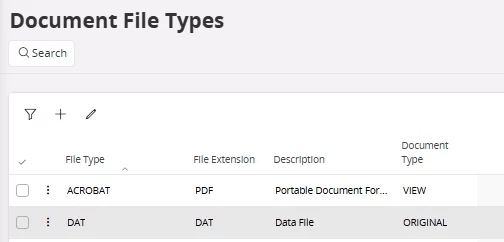
If you review the Output File Name in the Payment Methods Per Institute screen we have this listed as a .DAT file.

I added DAT as a File Type in the Document File Types screen and once we did this, the file arrived in our download folder once we completed this process.