Question

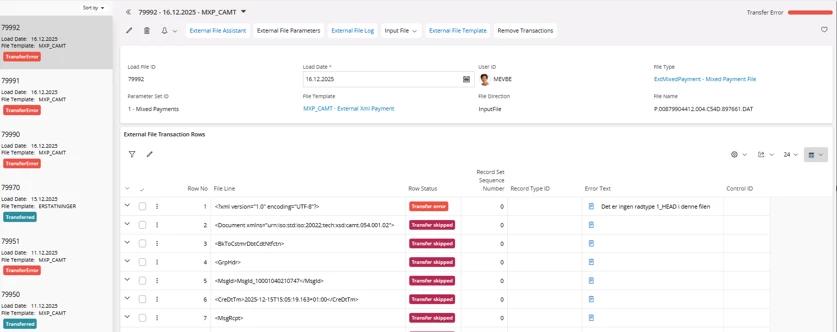
Loading bank files into 25R1su3, does not work. Error message: Row type 1_HEAD is missing.

  • December 17, 2025
  • 1 reply
  • 14 views

Osthewha
Sidekick (Customer)
Forum|alt.badge.img+8

We installed 25R1.3 in production environment this week.. and ALL bank file handling from bank to IFS Cloud stopped.  This is critical !  Anyone here who faces the same problem ?
 

1 reply

Forum|alt.badge.img+7
  • Sidekick (Partner)
  • December 17, 2025

Hi ​@Osthewha 

I did  a quick search on the error message you mentioned and below is the response i got. Please see if any of this is of help to you. I am copying the content i got during my search below. 

Common Causes

  • The bank file lacks a required header row (identified as row type 1_HEAD or similar, e.g., starting with "HEAD", "1_HEAD", or a specific code like "0" or "1" depending on the configured format).
  • The file format does not match the External File Template defined in IFS for the bank statement load.
  • Issues with file encoding, delimiters, or line endings that prevent IFS from parsing the header correctly.
  • Changes in 25R1 handling of certain formats (e.g., stricter validation for CAMT.053 XML or flat files compared to prior releases).

Solutions

  1. Verify the Bank File Structure Open the bank file in a text editor (e.g., Notepad++).
    • The first row (or a specific early row) must contain the header record with the exact row type code expected by your template (commonly "1_HEAD", "HEAD", or "0" for header in some country-specific formats).
    • If it's missing, request a corrected file from your bank or add/modify it manually if possible (ensure compliance with bank specs).
  2. Check and Adjust the External File Template in IFS Navigate to: Payment > External Files > External File Templates (or similar path in Financials).
    • Select the template used for bank statement loading (e.g., for your bank/country format).
    • Review the Row Types tab: Ensure there is a defined row type for the header (e.g., Row Type = "1_HEAD" or "HEAD", File Position = 1 or appropriate).
    • Confirm column mappings, delimiters, and record identifiers match your file exactly.
    • If needed, create a copy of the template and adjust the header row type definition.
  3. Review Application Messages and Logs After loading fails, check Application Messages for detailed errors. Also review the external file transaction log for clues on parsing issues.
  4. Test with a Sample File Use a known working sample bank file from previous successful loads (pre-25R1 if upgraded) to compare structures. If using CAMT.053 XML format, note that 25R1 introduced stricter handling (e.g., expects one statement per file in some cases). Switch to a supported CAMT version or adjust the transformer if customized.
  5. Additional Steps if Upgraded to 25R1 Some bank statement processing changes occurred in 25R1 (e.g., shift to PLSQL handling for certain formats). Check IFS Cloud 25R1 release notes (available via IFS Community or support portal) for payment/bank reconciliation updates. If the issue persists, raise a support case with Infor/IFS, providing the file template ID, sample file, and exact load method.