I have identified a discrepancy concerning a part with dual values in the system. Upon receipt of the shop order, the total cost was updated to $841.8577. However, reviewing the individual shop order part reveals the issuing total cost is only $728.9187. Could you please provide the reason for this variance.
Best answer by Thomas Peterson
Hi,
The value of the OOREC transaction is based on set up. As an example, assume cost of the MFG part (OOREC part) is a standard cost part / cost per part - with cost value of 100. Assume your actual cost - material issues, labor, OH, machine cost and any other cost totals 150. The value received into inventory will be 100. That’s because the cost is set for standard cost per part. When the shop order is closed (usually same time as OOREC) IFS will then clear the 50 (remaining WIP) and post variances.
The reason for the difference will be due to set up.
To provide another example, assume the same set up, however total shop order cost is only 50. IFS again will receive the OOREC part at 100 (due to part set up), and 50 will be booked as variances to ensure WIP = 0 when shop order is closed.
Hypothetically, if you use a cost solution that resembles actual cost, then you will not have MFG variances, and the cost will flow to inventory based on actuals.
Examples, if using weighted average cost, with cost per lot batch, that OOREC can create a new lot number and that cost value will equal the shop order value. Other options exist, for example cost per serial, function the same way.
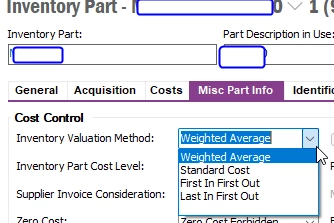
Bottom line, you can’t assume the inventory value will be the same as the shop order value. It can be, but you need a consistent set up if that’s the goal. Check the part for the OOREC transaction in terms of cost set up (what value method, and what level), This drives the result.
This is an old version of IFS. the logic has not changed.
The value method and cost level, among other, drives the values. Check your set up.
@Tharaka_Dilantha depending on how your M-110 cost template is setup, it might contain besides cost of materials (P130), machine runtime + labour + various overheads.
All of these summed up will give you the unit cost of the manufactured part.
For more details on Costing, please check out below resources:
@Tharaka_Dilantha depending on how your M-110 cost template is setup, it might contain besides cost of materials (P130), machine runtime + labour + various overheads.
All of these summed up will give you the unit cost of the manufactured part.
For more details on Costing, please check out below resources:
@Tharaka_Dilantha can you click on Cost Detail tab? It’s the one next to Accounting. There you should see the unit cost breakdown by various elements and I doubt it will be just materials :)
@Tharaka_Dilantha can you click on Cost Detail tab? It’s the one next to Accounting. There you should see the unit cost breakdown by various elements and I doubt it will be just materials :)
Hi ,I checked the transactions history.But it is same.It shows same value updated in the OOREC transaction.
The value of the OOREC transaction is based on set up. As an example, assume cost of the MFG part (OOREC part) is a standard cost part / cost per part - with cost value of 100. Assume your actual cost - material issues, labor, OH, machine cost and any other cost totals 150. The value received into inventory will be 100. That’s because the cost is set for standard cost per part. When the shop order is closed (usually same time as OOREC) IFS will then clear the 50 (remaining WIP) and post variances.
The reason for the difference will be due to set up.
To provide another example, assume the same set up, however total shop order cost is only 50. IFS again will receive the OOREC part at 100 (due to part set up), and 50 will be booked as variances to ensure WIP = 0 when shop order is closed.
Hypothetically, if you use a cost solution that resembles actual cost, then you will not have MFG variances, and the cost will flow to inventory based on actuals.
Examples, if using weighted average cost, with cost per lot batch, that OOREC can create a new lot number and that cost value will equal the shop order value. Other options exist, for example cost per serial, function the same way.
Bottom line, you can’t assume the inventory value will be the same as the shop order value. It can be, but you need a consistent set up if that’s the goal. Check the part for the OOREC transaction in terms of cost set up (what value method, and what level), This drives the result.
This is an old version of IFS. the logic has not changed.
The value method and cost level, among other, drives the values. Check your set up.
The value of the OOREC transaction is based on set up. As an example, assume cost of the MFG part (OOREC part) is a standard cost part / cost per part - with cost value of 100. Assume your actual cost - material issues, labor, OH, machine cost and any other cost totals 150. The value received into inventory will be 100. That’s because the cost is set for standard cost per part. When the shop order is closed (usually same time as OOREC) IFS will then clear the 50 (remaining WIP) and post variances.
The reason for the difference will be due to set up.
To provide another example, assume the same set up, however total shop order cost is only 50. IFS again will receive the OOREC part at 100 (due to part set up), and 50 will be booked as variances to ensure WIP = 0 when shop order is closed.
Hypothetically, if you use a cost solution that resembles actual cost, then you will not have MFG variances, and the cost will flow to inventory based on actuals.
Examples, if using weighted average cost, with cost per lot batch, that OOREC can create a new lot number and that cost value will equal the shop order value. Other options exist, for example cost per serial, function the same way.
Bottom line, you can’t assume the inventory value will be the same as the shop order value. It can be, but you need a consistent set up if that’s the goal. Check the part for the OOREC transaction in terms of cost set up (what value method, and what level), This drives the result.
This is an old version of IFS. the logic has not changed.
The value method and cost level, among other, drives the values. Check your set up.