Question

Mobile - Filter and Sort option on screens

  • July 18, 2023
  • 5 replies
  • 125 views

Forum|alt.badge.img+3

We want to add a filter and sort functionality in Mobile Device (iOS). We get the 2 statements from the previous entries:
1. Says yes, we can do that : (community link below)


2.Says no, there is no such functionality which we can config.: (community link below)


May, we know the official statement or comment on this topic? If possible, could you please inform us about the necessary steps how we can add the sort or filter option in any screen on mobile device?


BR, 

Deepali Jain

5 replies

Forum|alt.badge.img+5

 @Deepali Jain , 


Answer for this question will vary based on your requirement.

If you are using the joblist screen → You can use the example first answer within the community.

This functionality is not available for a codeless screen(custom screen) as mentioned in the second community post.


Thanks,

Hasara


Forum|alt.badge.img+3
  • Author
  • Do Gooder (Customer)
  • July 18, 2023

@Hasara Gunasiri,


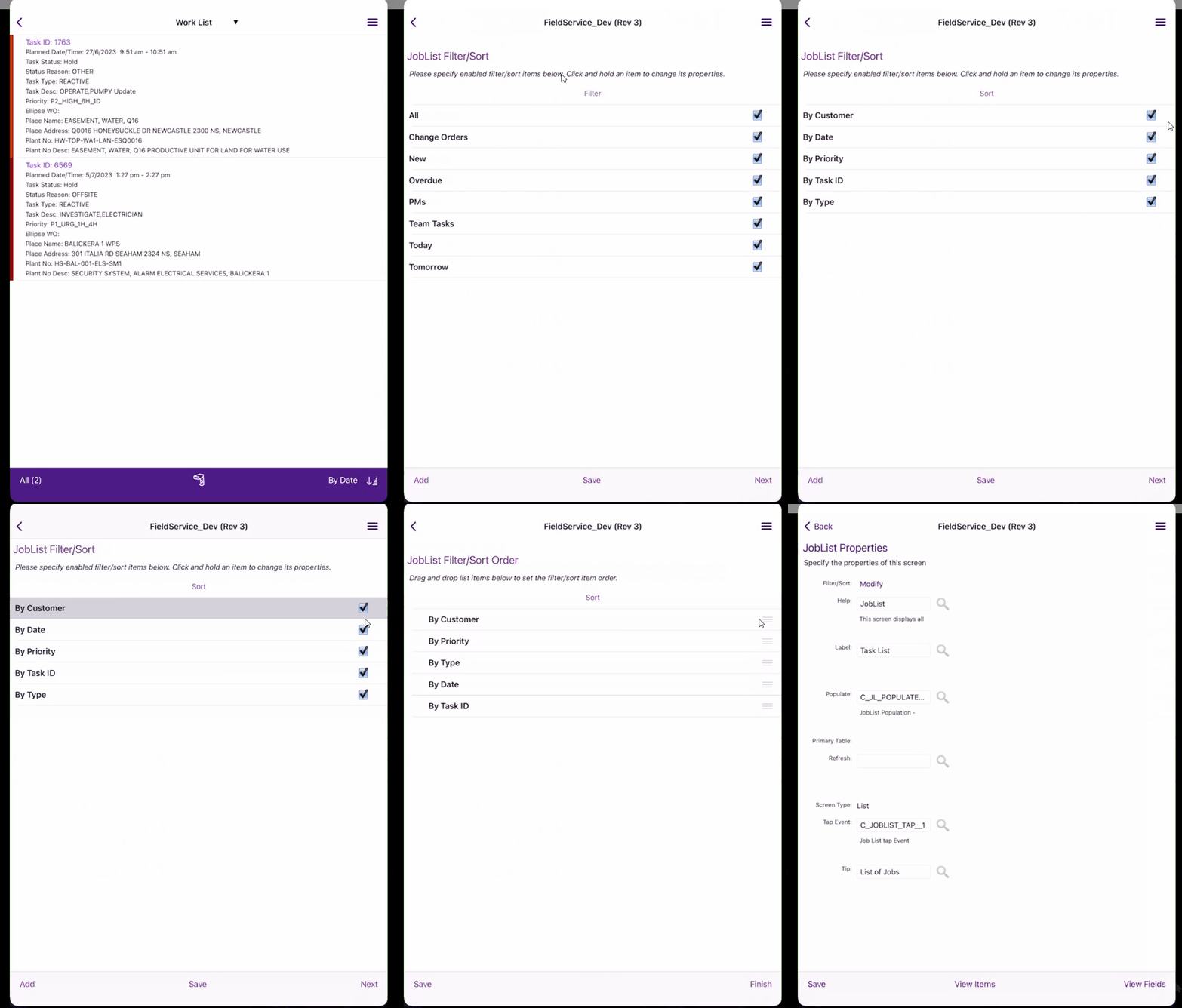
This is to inform you that we are not getting the option in the joblist also. So, kindly help us with the step-by-step guidance for it.


Thanks,

Deepali Jain


Shneor Cheshin
Superhero (Employee)
Forum|alt.badge.img+28
  • Superhero (Employee)
  • July 19, 2023

Hi @Deepali Jain 

For job list

Click the screen designer and there click the filter/sort button

For custom screens

You can filter/sort by configuring the sync rule XMLs


Cheers!


prazz
Do Gooder (Employee)
Forum|alt.badge.img+1
  • Do Gooder (Employee)
  • December 2, 2025

Hi ​@Shneor Cheshin 

Can you provide an example of how to do it in custom screens by configuring the XML files of the synchronization rules?


Shneor Cheshin
Superhero (Employee)
Forum|alt.badge.img+28
  • Superhero (Employee)
  • December 2, 2025

Hi ​@Shneor Cheshin 

Can you provide an example of how to do it in custom screens by configuring the XML files of the synchronization rules?

Please try the following. The <order_by> should handle the sorting of the records.

<hierarchy_select return_only_requested_attrs="true" max_rows="50000">
<primary_table>CUSTOM_TABLE_OR_VIEW</primary_table>
<from>
<table>CUSTOM_TABLE_OR_VIEW</table>
</from>
<attrs>
<attr>CUSTOM_TABLE_OR_VIEW.*</attr>
</attrs>
<order_by>
<desc>CUSTOM_TABLE_OR_VIEW.COLUMN_NAME</desc>
</order_by>
</hierarchy_select>

Cheers!