Question

Is it possible to mask data in FSM application

  • January 1, 2026
  • 3 replies
  • 18 views

Forum|alt.badge.img+6

Hi,

Is it possible to mask the data on FSM application, for eg: email : abcedghijkl@gmail.com should be masked and shown as a********@g****.c**. How to implement/configure this in FSM application.

3 replies

AdrianEgley
Hero (Customer)
Forum|alt.badge.img+14
  • Hero (Customer)
  • January 2, 2026

Hi,

Yes this can be achieved.

There is a screen called ‘Personal Data Protection’.

In there you set up which table and columns you would want to mask.

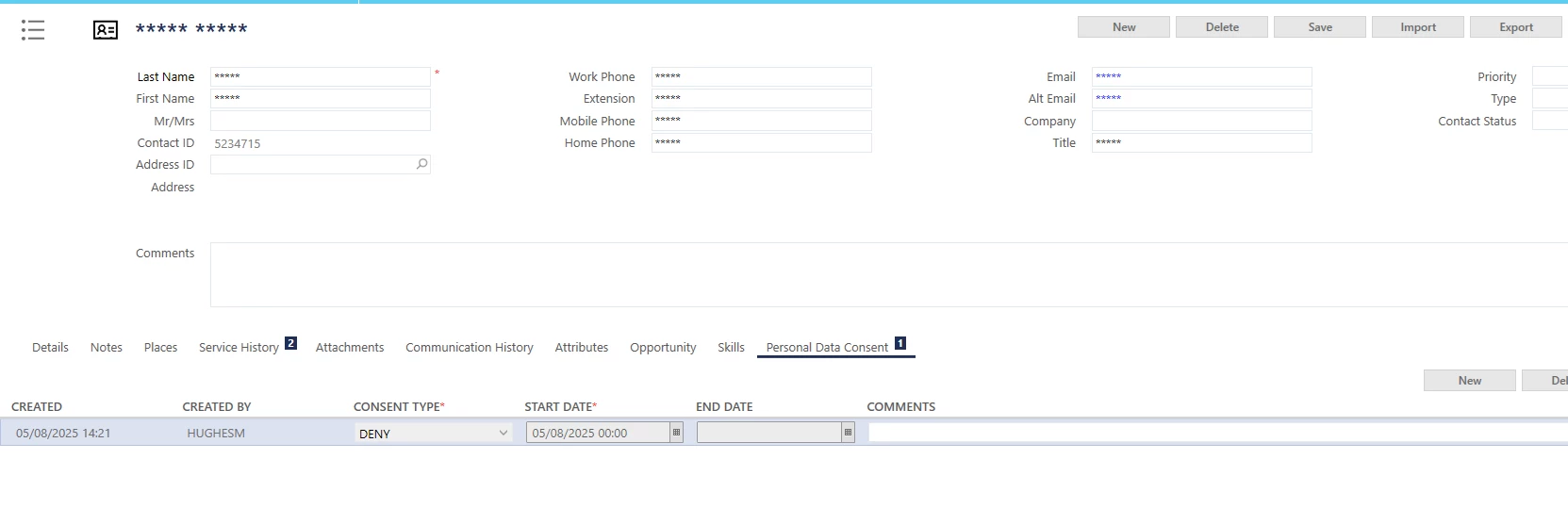
Then on the screen for say contact, you would make available in the UI the GDPR_CONSENT_EVENT record.

If you then create an event against a contact the process will mask the data.

Example below.

They’re all the fields we have set-up to be masked.

Hope this helps.

Ady


Forum|alt.badge.img+6
  • Author
  • Sidekick (Partner)
  • January 5, 2026

Hi, 

I have followed the mentioned steps for CONTACT table, but I’m getting an error like this below, when I try to perform data mask for email_address in contact table.


AdrianEgley
Hero (Customer)
Forum|alt.badge.img+14
  • Hero (Customer)
  • January 5, 2026

Hi ​@preethi.a05 ,

Just need to ensure the column you are dealing with is added to the Custom Metadata in the Studio menu.

Then add in the columns to the contact table, and set the column type.

Ady