Question

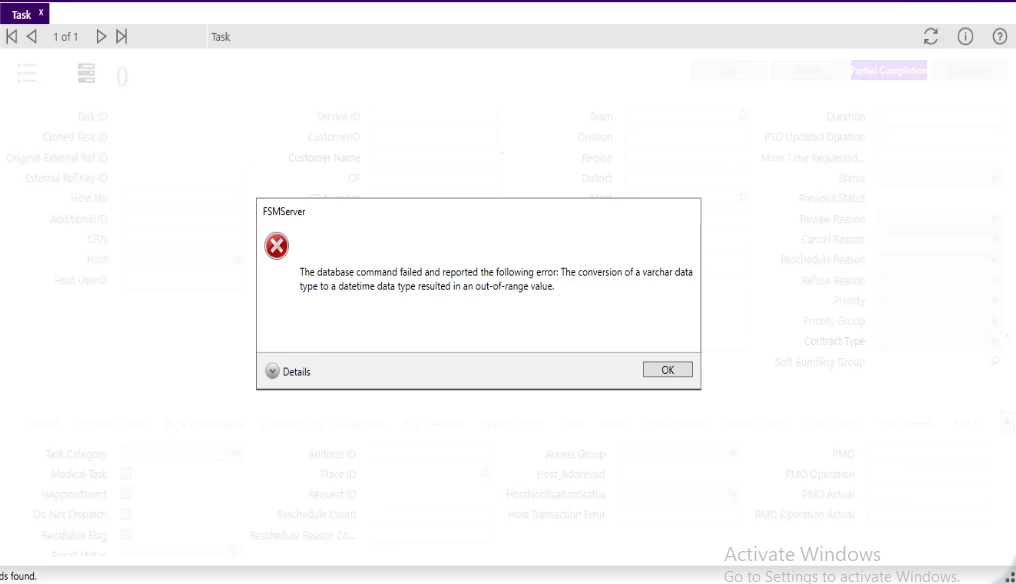
Getting database command failed error in task screen in both smart client and web client

  • January 22, 2026
  • 1 reply
  • 14 views

Forum|alt.badge.img+6

Hi,

I’m getting below error in task screen while trying to open a task_id, same error I’m getting in webclient as well.


1 reply

Shneor Cheshin
Superhero (Employee)
Forum|alt.badge.img+28
  • Superhero (Employee)
  • January 22, 2026

@preethi.a05 

This SQL Server error means SQL tried to turn a string (varchar) into a date/time value (datetime) but the string didn’t make sense for that data type or current dateformat/language, so the conversion failed before your statement could run.

Common causes

  1. Day/Month confusion (locale/dateformat)

    • Example: '31/12/2025' interpreted as MM/dd/yyyy becomes invalid (month 31).
    • The current SET DATEFORMAT or session LANGUAGE controls how ambiguous strings are parsed.
  2. Invalid or impossible dates

    • Examples: '2025-02-30', '13/01/2025' (if parsed as MM/dd).
  3. Out-of-range for the data type

    • datetime valid range: 1753-01-01 to 9999-12-31
    • smalldatetime valid range: 1900-01-01 to 2079-06-06
    • Dates outside these ranges will fail.
  4. Implicit conversion from mixed/dirty data

    • A varchar column contains a few non-date values like 'N/A', '—', '', or time-only strings.
  5. Using ambiguous formats

    • Strings like '01/02/2025' depend on session settings; '2025-01-02' is safer for datetime2 but can still be ambiguous for datetime in some contexts. The safest for datetime is 'YYYYMMDD'.

!--scriptorstartfragment-->

SELECT *

FROM YourTable

WHERE TRY_CONVERT(datetime, YourVarcharDate) IS NULL

      AND YourVarcharDate IS NOT NULL AND LTRIM(RTRIM(YourVarcharDate)) <> ''!--scriptorendfragment-->