Question

explicit call | button click

  • January 9, 2026
  • 7 replies
  • 35 views

Forum|alt.badge.img+1

Hi, I am working on an enhancement where the logic should execute on the click of a button.

In the Web Client, this is implemented using executePerform in the Client Script.

Now, I need to implement the same functionality in the Smart Client. However, Smart Client does not have a built-in feature to trigger a perform. I tried creating a Business Rule for an explicit call, but I am not sure how to proceed. Could someone explain how to use an explicit call in a Business Rule?


Or is there any other way to trigger the functionality on button click? Please let me know.

7 replies

Forum|alt.badge.img+10
  • Hero (Employee)
  • January 9, 2026

Hi ​@monika,

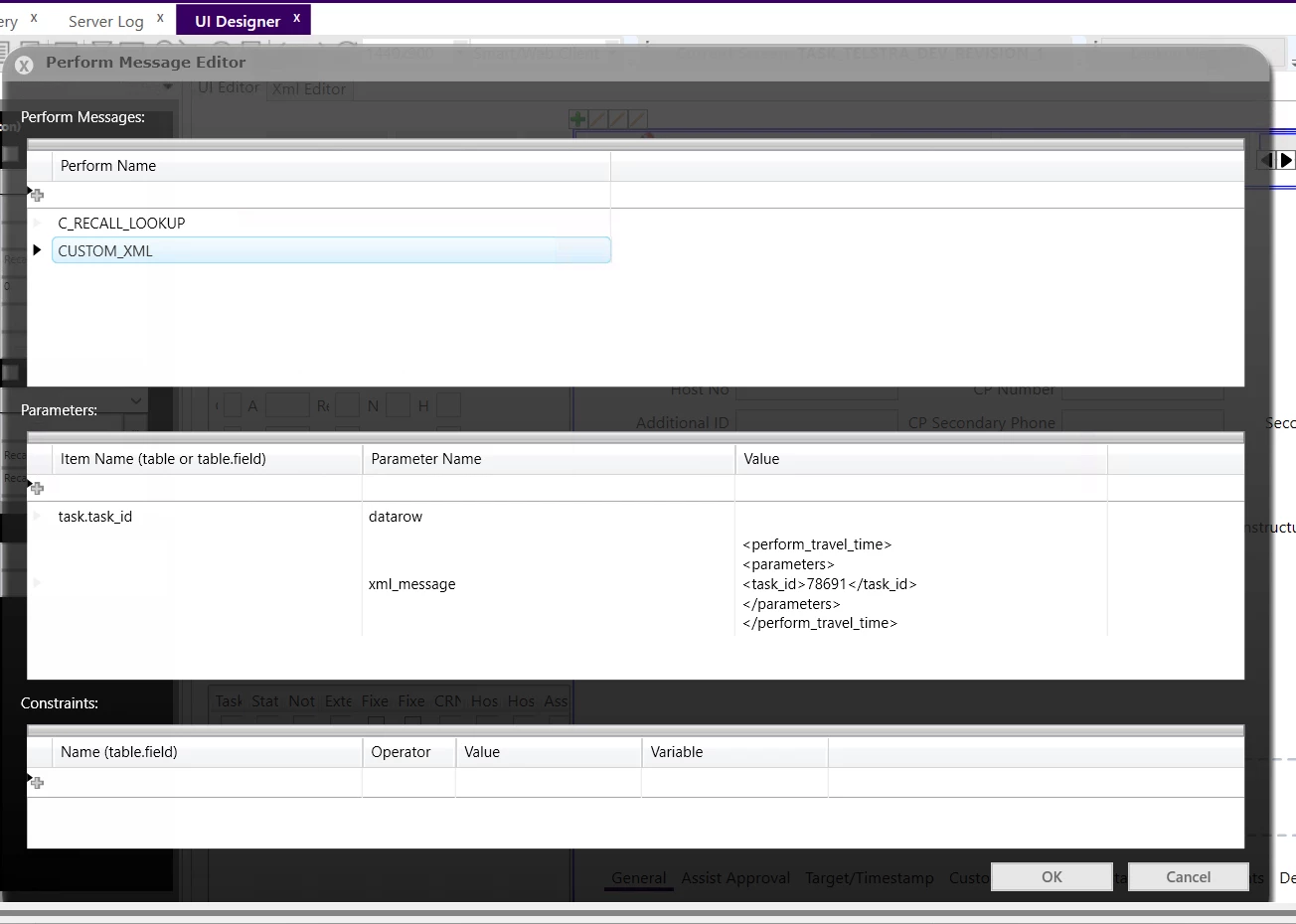
I believe you might be able to do what you want by creating a custom button and then adding xml behind it. 

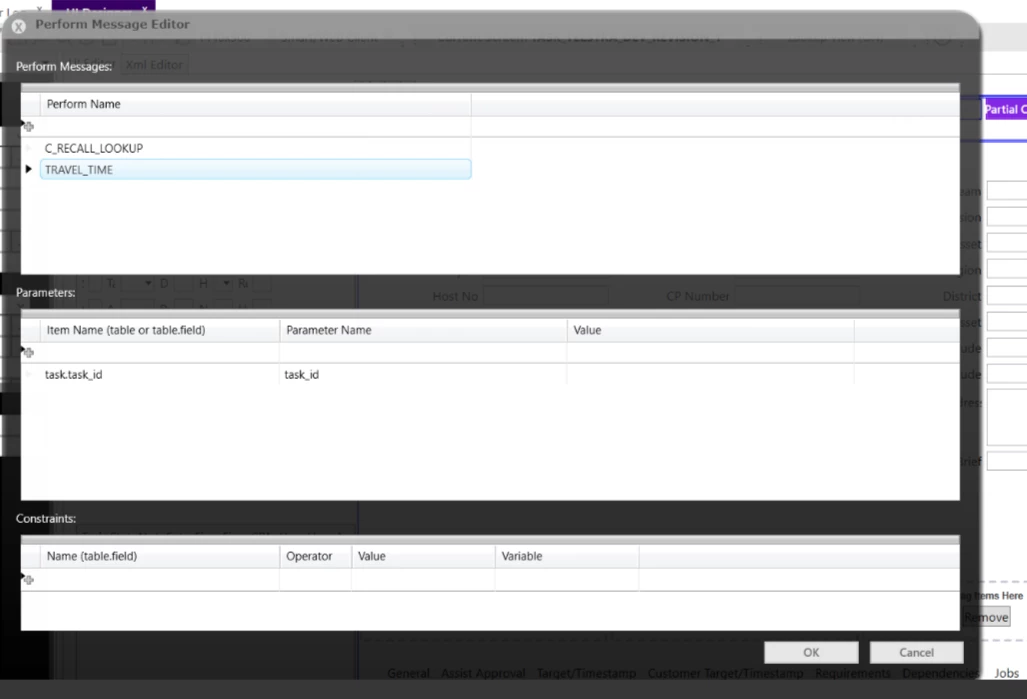
Take a look at the attachment, I think it will provide you with a direction forward.

Best Regards,

Morris


Shneor Cheshin
Superhero (Employee)
Forum|alt.badge.img+28
  • Superhero (Employee)
  • January 11, 2026

Hi ​@monika 

How about using a business rule after insert or after update? That will trigger the MPM for you.

Cheers!


Forum|alt.badge.img+1
  • Author
  • Do Gooder (Partner)
  • January 12, 2026

Hi ​@monika,

I believe you might be able to do what you want by creating a custom button and then adding xml behind it. 

Take a look at the attachment, I think it will provide you with a direction forward.

Best Regards,

Morris

Hi ​@Morris, Thankyou for sharing the knowledge, but it is not working for me.

I have tried using XML (perform_..._xml) also, both are not working for me.


Forum|alt.badge.img+1
  • Author
  • Do Gooder (Partner)
  • January 12, 2026

Hi ​@monika 

How about using a business rule after insert or after update? That will trigger the MPM for you.

Cheers!

Hi ​@Shneor Cheshin, business rule should be trigger after clicking on button.

(Not using any insert or after update)


Forum|alt.badge.img+10
  • Hero (Employee)
  • January 12, 2026

Hi ​@monika ,

I take it that the 2 performs that are being used in the example above are custom MPMs? You should try using a baseline mpm first to make sure the setup is correct. also I think that if there are 2 performs listed as shown above that FSM would not know which one to try and use.


Best Regards,

Morris


Shneor Cheshin
Superhero (Employee)
Forum|alt.badge.img+28
  • Superhero (Employee)
  • January 12, 2026

Hi ​@monika 

How about using a business rule after insert or after update? That will trigger the MPM for you.

Cheers!

Hi ​@Shneor Cheshin, business rule should be trigger after clicking on button.

(Not using any insert or after update)


Hi ​@monika 

I understand that. But to workaround the limitations of the smart client, I suggested a different approach.

Button click → Update record → Trigger BR.

Cheers!


Forum|alt.badge.img+1
  • Author
  • Do Gooder (Partner)
  • January 13, 2026

Hi ​@monika 

How about using a business rule after insert or after update? That will trigger the MPM for you.

Cheers!

Hi ​@Shneor Cheshin, business rule should be trigger after clicking on button.

(Not using any insert or after update)


Hi ​@monika 

I understand that. But to workaround the limitations of the smart client, I suggested a different approach.

Button click → Update record → Trigger BR.

Cheers!


Hi Shneor,

thank you for the solution. However, in my case, I cannot perform Button Click → Update Record → Trigger BR, because currently, after the button click, it only calls a view and displays details. This means no update is made in the database on button click.

I want to make some changes, so in between calling the view and the button click, I need to trigger the logic written in the backend .NET code. Therefore, I cannot use BR after/before insert or update.


button click - > trigger .net logic -> view table appears