


I have a requirement to insert an Task Event when TASK.PLAN_START_DATE is changed in mobile DebriefOverview screen.
I have tried to achieve it by:
- Create a custom.old_plan_start_date field.
- In DebriefOverview Refresh event, I set a client script which will also set this:
// 405789 START
var planStartDttm = getControlValue("task", "plan_start_dttm");
setControlValue("custom", "old_plan_start_dttm", planStartDttm);
// 405789 FINISH - In task.plan_start_date, on “Value Changed” event I set a client script which look like this:
var taskId = getCurrentKeys("task", "task_id");
var oldPlanStartDttm = getControlValue("custom","old_plan_start_dttm");
var newPlanStartDttm = getControlValue("task","plan_start_dttm");

if (oldPlanStartDttm != newPlanStartDttm)
{

	var eventTaskKey = generatePrimaryKey("task_event");
	var eventTaskKey = generateDataTransaction("task_event", "INSERT","");
	eventTaskKey = addToDataTransaction(eventTaskKey, "event_sequence", eventTaskKey);
	eventTaskKey = addToDataTransaction(eventTaskKey, "task_id", taskId);
	eventTaskKey = addToDataTransaction(eventTaskKey, "user_def_dttm1", oldPlanStartDttm);
	eventTaskKey = addToDataTransaction(eventTaskKey, "user_def_dttm2", newPlanStartDttm);
	eventTaskKey = addToDataTransaction(eventTaskKey, "event_type", "CHANGE");
	eventTaskKey = addToDataTransaction(eventTaskKey, "description", "Plan Start Date has changed");
	saveDataTransaction(eventTaskKey, getMessage("Task Event", "Plan Start Date has changed"));
	saveChanges();
	// saveChanges(false,false,false);
    // saveChanges(true,false,false);

	setControlValue("custom","old_plan_start_dttm",newPlanStartDttm);

	alert("The Plan Start Date is changed, an event will be created.");

}
This script can create the expected Task Event, but unfortunately the NEXT and SAVE buttons are not responsive anymore.
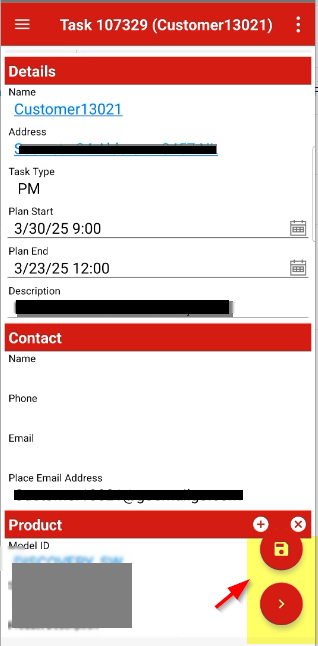
Anything I have to add in above script to be able to make those buttons active again?
What I observed, when no change in the task.plan_start_date, the buttons are responsive (work normally).
Is it not possible to have INSERT statement in change event of mobile?
I am trying to avoid creating Business Rules for this action, as the requirement is only necessary for modification in mobile app. I am trying to achieve it only using client script if possible.