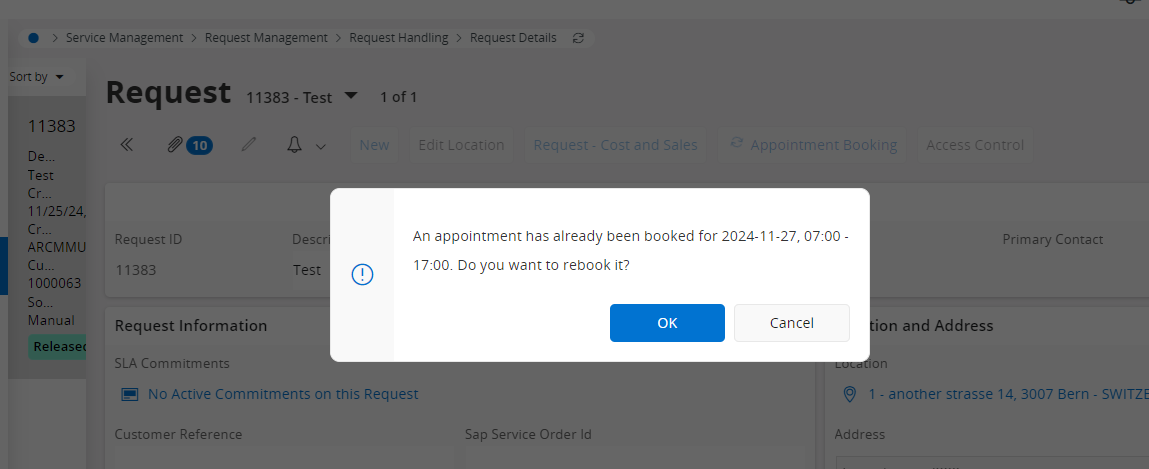
I have a question regarding the appointment booking process. I am using FSM (IFS Cloud 24R1) integrated with PSO.
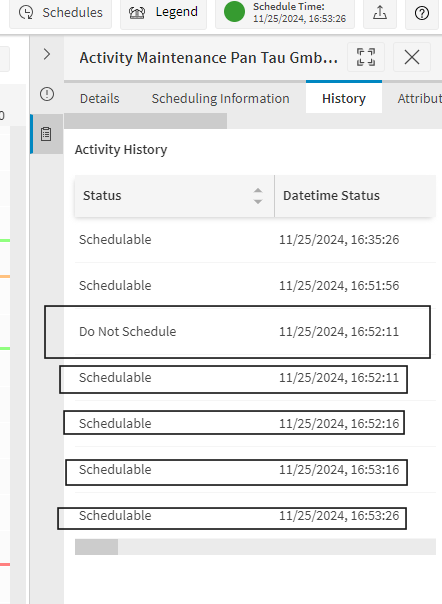
According to the documentation (Scheduling Demystified 24R1 - page 163), once I click on the ,,Request,, button in appointment booking page, the activity status in PSO should change to ,,do not schedule,,,. In my environment, this does not happen. The activity remains allocated, it does not change its status. Am I missing a parameter or what could be the cause?
Thank you in advance!
Best Regards,
Miruna
Best answer by Alexander Heinze
Maybe there is a misunderstanding of the “Schedulable” status. Even an appointment-booked activity is still Schedulable, it just has a more limited availability window (the slot you booked) and a higher base value (to make sure it stays on the schedule). If you have an AM or PM slot for a 30’ task, PSO still has some flexibility to move the allocation around.
That also means that if the increased base value is lower than the ones of other (maybe emergency) activities, it could still be unscheduled.
Hi Miruna, that status change occurs immediately when you request slots, you should see both in the same audit message in PSO. As soon as you book or reject the slot, the status should be returned to Unallocated. Are you not seeing this?
I created a new service request. The work task went in PSO, it was in schedulable (allocated) status. I clicked on Appointment Booking function, I requested app booking, I clicked on the best offer suggested and still the activity is in schedulable (allocated) status in PSO. I noticed that the activity had the status ,,Do Not Schedule,,, for not even a second.
Appointment booking is already done but still the PSO status is ,,schedulable,, Something's not right, correct?
As the Request Work Task that you are booking seems to be in Released Status, it will only go to “do not schedule” during the appointment request process, and then go back to schedulable - don’t you want the activity to be put in the schedule? What’s the scenario you are testing for?
Maybe there is a misunderstanding of the “Schedulable” status. Even an appointment-booked activity is still Schedulable, it just has a more limited availability window (the slot you booked) and a higher base value (to make sure it stays on the schedule). If you have an AM or PM slot for a 30’ task, PSO still has some flexibility to move the allocation around.
That also means that if the increased base value is lower than the ones of other (maybe emergency) activities, it could still be unscheduled.