Is it possible to filter the available options of a custom lookup field when the lookup list is custom-defined.
Specifically, I would like to know whether custom lookup lists support any kind of filtering logic, or if filtering is only supported when the lookup source is a system table.
If this is not supported, is there an officially recommended approach for handling conditional options in custom lookup fields?
Thanks.
Best answer by Richard Ellingsen
Hi @ManafOmari01
Having read your question and follow-up clarifications, I think I have an idea of what you’re trying to achieve. While this isn’t exactly what you asked for, it might serve as a workaround.
To start off, here’s my understanding of your issue:
You keep using contactUser, by this I’m assuming you mean an end user (someone outside your organization) and by technicians you mean all or some employees in your organizaition (with access to both assyst Self service portal and Assyst portal).
You want to filter the options presented in the service offering but have both end users and internal users utilize the same service offering.
You’ve tried using custom lookups but are open to other methods to get the desired outcome.
You want the end user to only see a select few options in the lookup, while if a technician is filling out the same form, all options should be presented.
If the event form is populated by a technician on behalf of an end user, you still want the lookup to only show the limited selection.
I’m sorry if this is an incorrect assessment of the issue, but the rest of this answer will be based on these assumptions. Note that these assumptions are not hard cut-offs, and there might still be ways to get the desired outcome, though this exact example and idea might not work “out of the box.”
Some groundwork
There don’t seem to be any examples on the wiki showing how (or if it’s even possible) to do a lookup filter expression to restrict options from a custom lookup. Nor do lookup filter expressions currently (to my knowledge) support outer conditional statements.
However, there might be a set of workarounds which, used together, could get you what you need.
Workaround Part 1 – Items as lookups
Instead of using a custom lookup, you could use a system lookup field set for items, which then can be used as an alternative selection method in the from.
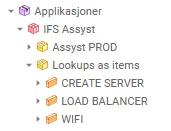
Create a product in your CMDB called LOOKUPS AS ITEMS
Populate that product with items called WIFI, LOAD BALANCER, and CREATE SERVER.
Add a single-select system lookup field set to Item on the form used by your service offering.
This would enable you to write a normal lookup filter expression to retrieve the list of items instead of custom lookup values, sidestepping the lack of custom lookup value support.
Note that these items do not need Incident Logging, Incident Cause, etc. to be enabled for this lookup method to work, and these would thus not have to “clutter” the event logging or close action item lookups.
Workaround Part 2 – If statements using “UNION ALL” in HQL
To limit the options presented depending on the affected user’s alias, you could use a lookup filter expression that consists of two parts:
One part that is always included (default options for both end users and technicians).
A second part with conditional logic baked into the query itself.
This part here is a modified version of an idea presented by @morevalueit as a reply to a question about if statements:
Example based on your requirement:
First part (default option):
select Item.id
from item as Item
where Item.product.shortCode = 'LOOKUPS AS ITEMS' and Item.shortCode = 'WIFI'
Second part (technician-specific options):
select Item.id
from item as Item
where Item.product.shortCode = 'LOOKUPS AS ITEMS'
and (Item.shortCode = 'CREATE SERVER' OR Item.shortCode = 'LOAD BALANCER')
and @*@$new.affectedUser.userAlias.servDept.shortCode@*@ LIKE 'TECHNICIAN%'
The last part of this second query can be extended by adding more OR Item.shortCode = ... segments inside the parentheses to include additional items for technicians.
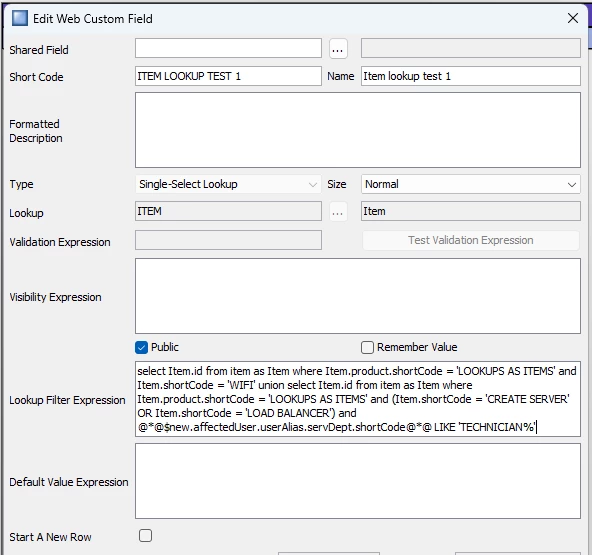
Finally, combine the two queries using UNION for the full lookup filter expression:
select Item.id
from item as Item
where Item.product.shortCode = 'LOOKUPS AS ITEMS'
and Item.shortCode = 'WIFI'
union
select Item.id
from item as Item
where Item.product.shortCode = 'LOOKUPS AS ITEMS'
and (Item.shortCode = 'CREATE SERVER' OR Item.shortCode = 'LOAD BALANCER')
and @*@$new.affectedUser.userAlias.servDept.shortCode@*@ LIKE 'TECHNICIAN%'
You could also apply similar logic for end users, but then you’d need to maintain both sides of the query if defaults change later.
These ideas put together you could do something like this:
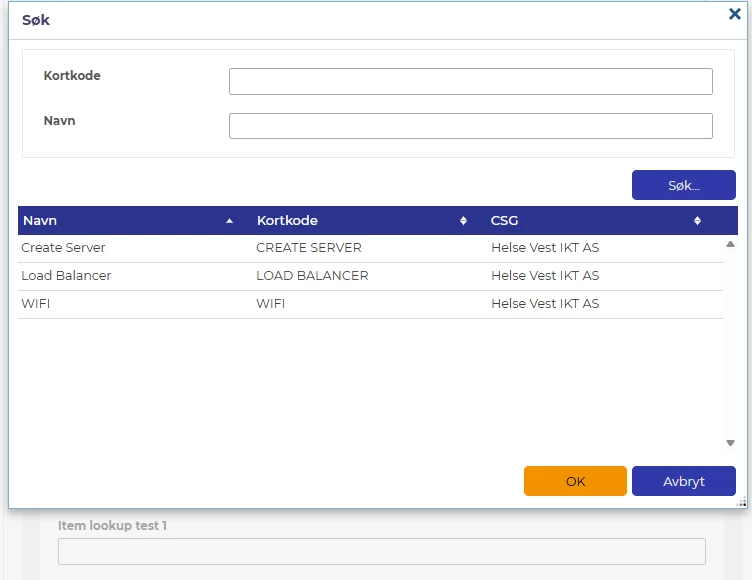
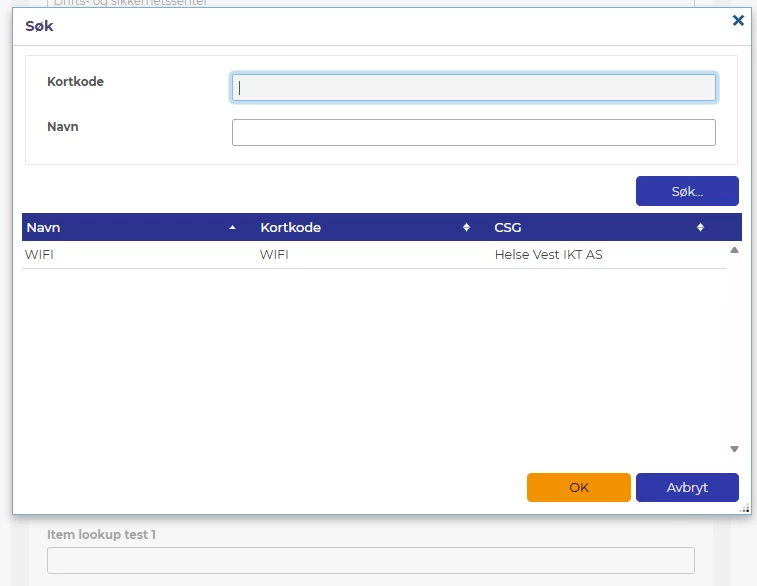
Lookup items put in a suitable location in the CMDBThe lookup filter expression added to an example event formThe result where a technician is the affected userThe same form where the affected user does not have the technician alias user
This example was created using assyst 24R2, but it should work just as well in 25R1 and 25R2. I’m not entirely sure if there are any performance implications when using this UNION method. If anyone knows of potential issues, considerations to be made or has suggestions for improvements, I’d be more than happy to be corrected.
Hope this helps point you in the right direction! If you run into any issues or want to explore alternative approaches, feel free to reach out I’d be happy to brainstorm further.
A Lookup Filter Expression can be applied to Single Select Lookup and Multi Select Lookup fields (System or Custom fields).
Within a Lookup Filter Expression, you can refer to a Single Select Lookup (system or custom field).
I hope this helps.
Best regards,
Caroline
Hello Caroline,
Thank you for your reply.
I would like to clarify my requirement more clearly.
I have a custom single-select lookup field that contains specific options (for example: Load Balancer, WiFi, Create Server). What I need is to control which options inside this lookup list are visible, based on the type of the Affected User.
If the affected user is a technician (not a Contact User), all options in the list should be visible.
If the affected user is a Contact User, only one option inside the list (for example WiFi) should be visible, and the other options should be hidden.
The lookup field itself should always be visible; only the options within the list should change.
Could you please confirm if filtering individual options within a custom lookup is supported, and what the recommended approach would be?
Could you clarify your scenario : If the affected user is a technician not a Contact User, or a Contact User??? Affected user is a contact user in assyst. What is the criteria you are using here? You need to have an option, a setting on the Contact User form to base your filter on.
Could you clarify your scenario : If the affected user is a technician not a Contact User, or a Contact User??? Affected user is a contact user in assyst. What is the criteria you are using here? You need to have an option, a setting on the Contact User form to base your filter on.
Let me clarify my requirement more precisely, as it is related to SVD and the Alias of the Affected User.
I have a custom single-select lookup field that contains several predefined options. What I need is to show or hide specific options inside this custom lookup based on the SVD assigned to the Alias of the Affected User.
More specifically:
If the Affected User’s Alias is associated with a technician SVD, the custom lookup should display all available options.
If the Affected User’s Alias is associated with a Contact User SVD, the custom lookup should display only specific options, while the remaining options should be hidden.
The lookup field itself should always be visible; only the options within the custom lookup list should be filtered based on the SVD of the Alias linked to the Affected User.
Could you please confirm whether this type of value-level filtering on a custom lookup based on Alias/SVD is supported in assyst, and what the recommended approach would be?
Having read your question and follow-up clarifications, I think I have an idea of what you’re trying to achieve. While this isn’t exactly what you asked for, it might serve as a workaround.
To start off, here’s my understanding of your issue:
You keep using contactUser, by this I’m assuming you mean an end user (someone outside your organization) and by technicians you mean all or some employees in your organizaition (with access to both assyst Self service portal and Assyst portal).
You want to filter the options presented in the service offering but have both end users and internal users utilize the same service offering.
You’ve tried using custom lookups but are open to other methods to get the desired outcome.
You want the end user to only see a select few options in the lookup, while if a technician is filling out the same form, all options should be presented.
If the event form is populated by a technician on behalf of an end user, you still want the lookup to only show the limited selection.
I’m sorry if this is an incorrect assessment of the issue, but the rest of this answer will be based on these assumptions. Note that these assumptions are not hard cut-offs, and there might still be ways to get the desired outcome, though this exact example and idea might not work “out of the box.”
Some groundwork
There don’t seem to be any examples on the wiki showing how (or if it’s even possible) to do a lookup filter expression to restrict options from a custom lookup. Nor do lookup filter expressions currently (to my knowledge) support outer conditional statements.
However, there might be a set of workarounds which, used together, could get you what you need.
Workaround Part 1 – Items as lookups
Instead of using a custom lookup, you could use a system lookup field set for items, which then can be used as an alternative selection method in the from.
Create a product in your CMDB called LOOKUPS AS ITEMS
Populate that product with items called WIFI, LOAD BALANCER, and CREATE SERVER.
Add a single-select system lookup field set to Item on the form used by your service offering.
This would enable you to write a normal lookup filter expression to retrieve the list of items instead of custom lookup values, sidestepping the lack of custom lookup value support.
Note that these items do not need Incident Logging, Incident Cause, etc. to be enabled for this lookup method to work, and these would thus not have to “clutter” the event logging or close action item lookups.
Workaround Part 2 – If statements using “UNION ALL” in HQL
To limit the options presented depending on the affected user’s alias, you could use a lookup filter expression that consists of two parts:
One part that is always included (default options for both end users and technicians).
A second part with conditional logic baked into the query itself.
This part here is a modified version of an idea presented by @morevalueit as a reply to a question about if statements:
Example based on your requirement:
First part (default option):
select Item.id
from item as Item
where Item.product.shortCode = 'LOOKUPS AS ITEMS' and Item.shortCode = 'WIFI'
Second part (technician-specific options):
select Item.id
from item as Item
where Item.product.shortCode = 'LOOKUPS AS ITEMS'
and (Item.shortCode = 'CREATE SERVER' OR Item.shortCode = 'LOAD BALANCER')
and @*@$new.affectedUser.userAlias.servDept.shortCode@*@ LIKE 'TECHNICIAN%'
The last part of this second query can be extended by adding more OR Item.shortCode = ... segments inside the parentheses to include additional items for technicians.
Finally, combine the two queries using UNION for the full lookup filter expression:
select Item.id
from item as Item
where Item.product.shortCode = 'LOOKUPS AS ITEMS'
and Item.shortCode = 'WIFI'
union
select Item.id
from item as Item
where Item.product.shortCode = 'LOOKUPS AS ITEMS'
and (Item.shortCode = 'CREATE SERVER' OR Item.shortCode = 'LOAD BALANCER')
and @*@$new.affectedUser.userAlias.servDept.shortCode@*@ LIKE 'TECHNICIAN%'
You could also apply similar logic for end users, but then you’d need to maintain both sides of the query if defaults change later.
These ideas put together you could do something like this:
Lookup items put in a suitable location in the CMDBThe lookup filter expression added to an example event formThe result where a technician is the affected userThe same form where the affected user does not have the technician alias user
This example was created using assyst 24R2, but it should work just as well in 25R1 and 25R2. I’m not entirely sure if there are any performance implications when using this UNION method. If anyone knows of potential issues, considerations to be made or has suggestions for improvements, I’d be more than happy to be corrected.
Hope this helps point you in the right direction! If you run into any issues or want to explore alternative approaches, feel free to reach out I’d be happy to brainstorm further.
As an addendum: Just after posting the original method using UNION, a simpler approach became apparent 😅.
Instead of using UNION (which is only necessary if you need to apply separate conditional logic to both result sets), you can likely achieve the same outcome with a single query. This can be done by presenting the default condition first, while including the conditional entries bundled with the affectedUser parameter. This will similarly also ensure the default is always included, while some entries are only be included if the parameter evaluates as true.
An example for your case could be a lookup filter expression like this:
select Item.id
from item as Item
where Item.product.shortCode = 'LOOKUPS AS ITEMS'
  and (
    Item.shortCode = 'WIFI'
    or (
      Item.shortCode in ('CREATE SERVER', 'LOAD BALANCER')
      and @*@$new.affectedUser.userAlias.servDept.shortCode@*@ LIKE 'TECHNICIAN%'
        ))
Having read your question and follow-up clarifications, I think I have an idea of what you’re trying to achieve. While this isn’t exactly what you asked for, it might serve as a workaround.
To start off, here’s my understanding of your issue:
You keep using contactUser, by this I’m assuming you mean an end user (someone outside your organization) and by technicians you mean all or some employees in your organizaition (with access to both assyst Self service portal and Assyst portal).
You want to filter the options presented in the service offering but have both end users and internal users utilize the same service offering.
You’ve tried using custom lookups but are open to other methods to get the desired outcome.
You want the end user to only see a select few options in the lookup, while if a technician is filling out the same form, all options should be presented.
If the event form is populated by a technician on behalf of an end user, you still want the lookup to only show the limited selection.
I’m sorry if this is an incorrect assessment of the issue, but the rest of this answer will be based on these assumptions. Note that these assumptions are not hard cut-offs, and there might still be ways to get the desired outcome, though this exact example and idea might not work “out of the box.”
Some groundwork
There don’t seem to be any examples on the wiki showing how (or if it’s even possible) to do a lookup filter expression to restrict options from a custom lookup. Nor do lookup filter expressions currently (to my knowledge) support outer conditional statements.
However, there might be a set of workarounds which, used together, could get you what you need.
Workaround Part 1 – Items as lookups
Instead of using a custom lookup, you could use a system lookup field set for items, which then can be used as an alternative selection method in the from.
Create a product in your CMDB called LOOKUPS AS ITEMS
Populate that product with items called WIFI, LOAD BALANCER, and CREATE SERVER.
Add a single-select system lookup field set to Item on the form used by your service offering.
This would enable you to write a normal lookup filter expression to retrieve the list of items instead of custom lookup values, sidestepping the lack of custom lookup value support.
Note that these items do not need Incident Logging, Incident Cause, etc. to be enabled for this lookup method to work, and these would thus not have to “clutter” the event logging or close action item lookups.
Workaround Part 2 – If statements using “UNION ALL” in HQL
To limit the options presented depending on the affected user’s alias, you could use a lookup filter expression that consists of two parts:
One part that is always included (default options for both end users and technicians).
A second part with conditional logic baked into the query itself.
This part here is a modified version of an idea presented by @morevalueit as a reply to a question about if statements:
Example based on your requirement:
First part (default option):
select Item.id
from item as Item
where Item.product.shortCode = 'LOOKUPS AS ITEMS' and Item.shortCode = 'WIFI'
Second part (technician-specific options):
select Item.id
from item as Item
where Item.product.shortCode = 'LOOKUPS AS ITEMS'
and (Item.shortCode = 'CREATE SERVER' OR Item.shortCode = 'LOAD BALANCER')
and @*@$new.affectedUser.userAlias.servDept.shortCode@*@ LIKE 'TECHNICIAN%'
The last part of this second query can be extended by adding more OR Item.shortCode = ... segments inside the parentheses to include additional items for technicians.
Finally, combine the two queries using UNION for the full lookup filter expression:
select Item.id
from item as Item
where Item.product.shortCode = 'LOOKUPS AS ITEMS'
and Item.shortCode = 'WIFI'
union
select Item.id
from item as Item
where Item.product.shortCode = 'LOOKUPS AS ITEMS'
and (Item.shortCode = 'CREATE SERVER' OR Item.shortCode = 'LOAD BALANCER')
and @*@$new.affectedUser.userAlias.servDept.shortCode@*@ LIKE 'TECHNICIAN%'
You could also apply similar logic for end users, but then you’d need to maintain both sides of the query if defaults change later.
These ideas put together you could do something like this:
Lookup items put in a suitable location in the CMDBThe lookup filter expression added to an example event formThe result where a technician is the affected userThe same form where the affected user does not have the technician alias user
This example was created using assyst 24R2, but it should work just as well in 25R1 and 25R2. I’m not entirely sure if there are any performance implications when using this UNION method. If anyone knows of potential issues, considerations to be made or has suggestions for improvements, I’d be more than happy to be corrected.
Hope this helps point you in the right direction! If you run into any issues or want to explore alternative approaches, feel free to reach out I’d be happy to brainstorm further.
Cheers, Richard
Hi,
Thank you very much for taking the time to write such a detailed and thoughtful response.
You’ve understood my requirement exactly — your assessment of the scenario is spot on, including the distinction between Contact Users (end users) and technicians, and the need to control lookup options regardless of who is filling the form, even when a technician logs the event on behalf of an end user.
The proposed workaround using Items as lookups is genuinely insightful and practical. Treating lookup values as CMDB Items to leverage standard lookup filter expressions is a very clever approach and neatly sidesteps the limitations around custom lookup value filtering. This is precisely the kind of solution I was hoping to uncover.
I also appreciate the explanation around structuring conditional logic directly within the HQL (for example using UNION-based logic). Even if it requires some careful design, it opens up a lot of flexibility and is a solid workaround given the current platform capabilities.
Thank you again — this is an excellent solution and extremely helpful. It will definitely help not only me, but others facing similar requirements.