Question

How to install back to origional equipment?

  • January 26, 2026
  • 2 replies
  • 15 views

Forum|alt.badge.img+16

Hi,


We are in APP10. We don’t have VIM module installed. we don’t have CRO. We are testing component repair using Repair Work Order.


We can take the component off from its parent using repiar work order, after repair, wondering how to install it back to the original equipment structure?


Thank you.


2 replies

ereslk
Hero (Employee)
Forum|alt.badge.img+8
  • Hero (Employee)
  • January 26, 2026

Hi Ronhu,

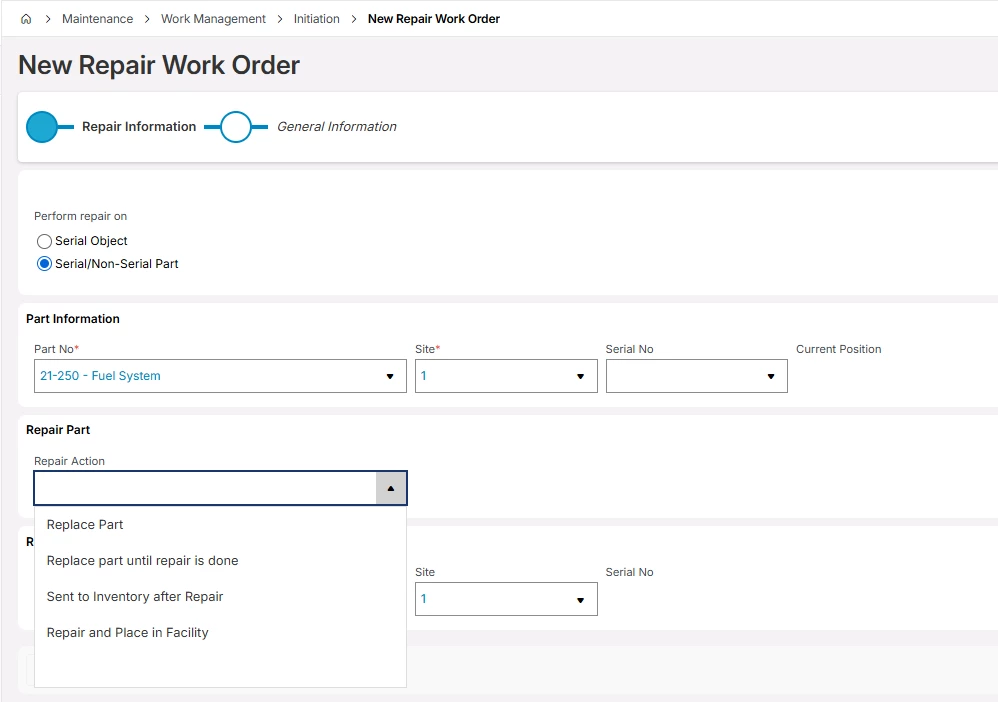
If you need to install the repaired part back in facility you can use the Repair and Place in Facility Repair Option at the creation of Repair Work Order.


This will create an additional wok task and a material line to issue it once repaired and returned to inventory. When issuing the part you could specify the Superior Object and Site in the Material line where you want to place it. Upon issuing the part, it will be placed under the parent Object selected.

If not the other option would be, once repaired to create a new material line for the part on the work task. Issue it. navigate to Report In Work order ( Conclude WO in Aurena) select Place Serial in Equipment Structure option.

Define the parent object you want to place it and save.

Hope this answer your question.

Best Regards

Eresha


Forum|alt.badge.img+16
  • Author
  • Hero (Customer)
  • January 26, 2026

@ereslk Thank you for  your reply. it does work. system created the 3rd task to install the component back to parent object though you have to specify the parent object.


I have another question, what if my repair is just a replacement? use option “Repair and Place in Facility” only sticks to your origional component(you can only repair and install it back for the origonal component), not allowing to replace a new serial component.


Thank you.