

Solved

Schedules Task: Transferring Mobile Work Orders

  • February 21, 2023
  • 2 replies
  • 63 views

Forum|alt.badge.img+10

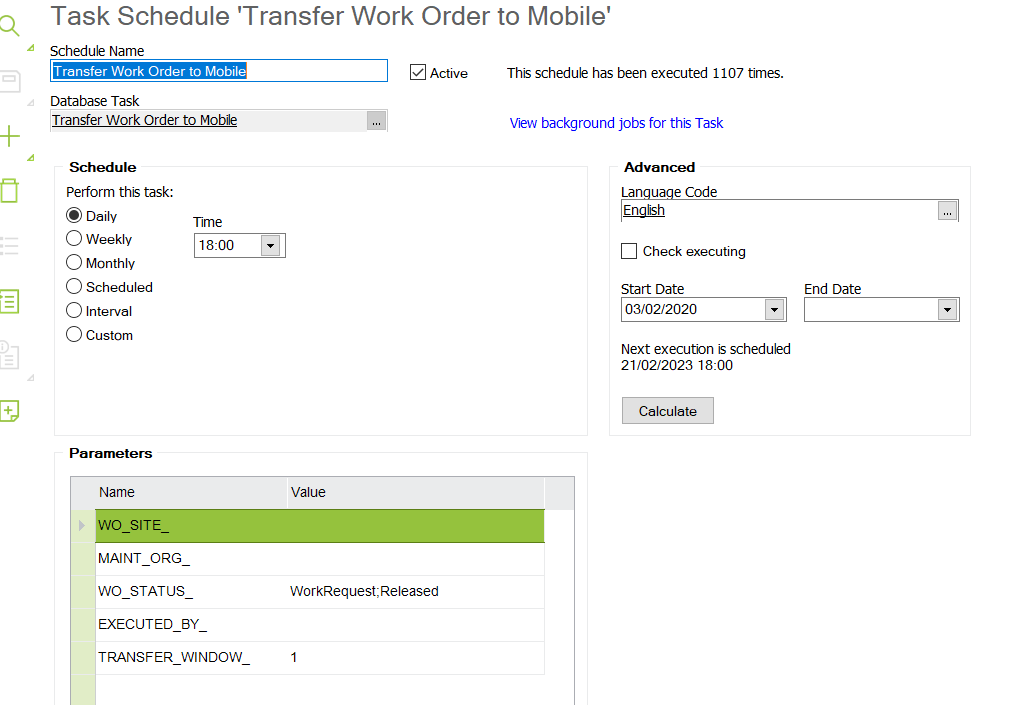
Good Morning - I am receiving daily error codes for a scheduled task to transfer work orders to mobile app at 18:00hrs. The error message is saying ‘Invalid WO Status’. Can anyone advise if there is an anomaly  with the set up below - Many thanks for your help.
 

Best answer by Bandula

Hi,

In this App9 code having multiple values for WO state is not supported.

So you can define 2 separate schedules for both states. Make sure input state in Uppercase. 


This the validation in the code.


  -- validate status
      IF (wo_status_ NOT IN('PREPARED','FAULTREPORT','ONROUTE', 'STARTED','WORKREQUEST','RELEASED','OBSERVED','UNDERPREPARATION','ASSIGNED','ACCEPTED' )) THEN  
          Error_SYS.Appl_General(lu_name_, 'TRANSWOSTATUS: Invalid Wo Status.');
      END IF;


2 replies

Bandula
Hero (Employee)
Forum|alt.badge.img+12
  • Hero (Employee)
  • Answer
  • February 21, 2023

Hi,

In this App9 code having multiple values for WO state is not supported.

So you can define 2 separate schedules for both states. Make sure input state in Uppercase. 


This the validation in the code.


  -- validate status
      IF (wo_status_ NOT IN('PREPARED','FAULTREPORT','ONROUTE', 'STARTED','WORKREQUEST','RELEASED','OBSERVED','UNDERPREPARATION','ASSIGNED','ACCEPTED' )) THEN  
          Error_SYS.Appl_General(lu_name_, 'TRANSWOSTATUS: Invalid Wo Status.');
      END IF;


Forum|alt.badge.img+10
  • Author
  • Sidekick (Customer)
  • February 21, 2023

Many thanks for your assistance - much appreciated. Thank you

