Solved

Database error: Invalid column name 'reg_type'

  • July 23, 2021
  • 4 replies
  • 294 views

Forum|alt.badge.img+9

When using Request, the server reported an error: “ Invalid column name ‘reg_type’
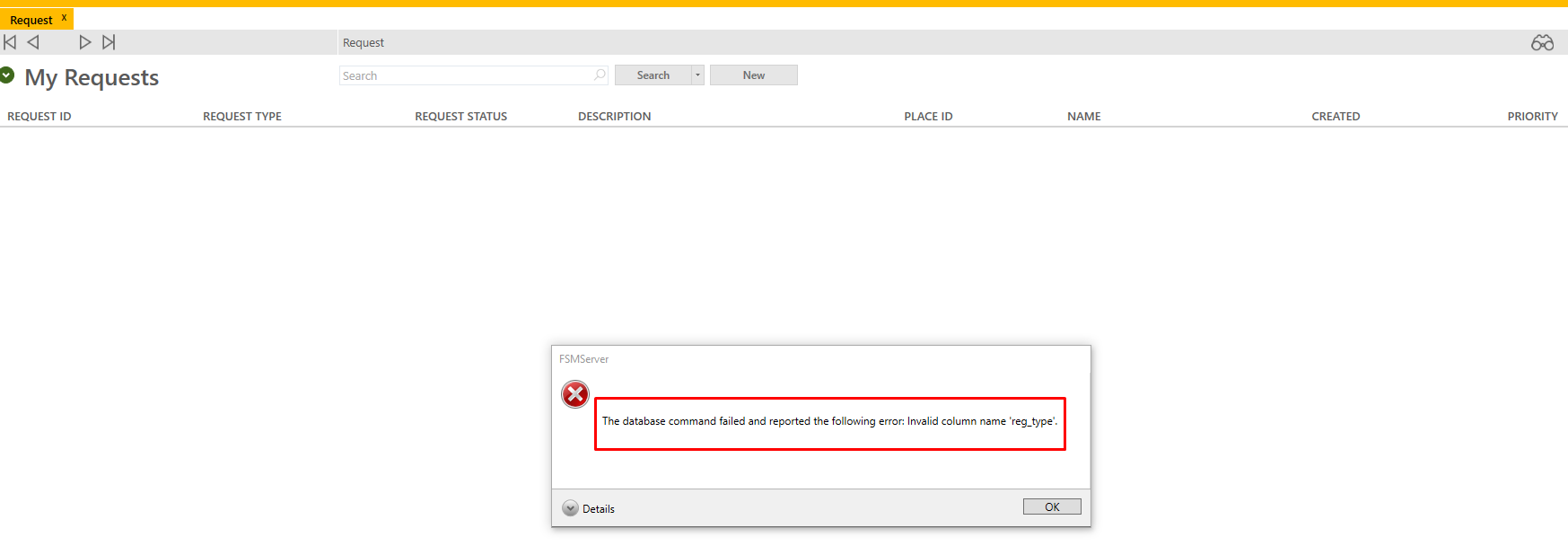


Detail in error:

<hierarchy_select max_string_length="64">
  <attrs>
    <attr>request.request_id</attr>
    <attr>request.req_type</attr>
    <attr>request.req_status</attr>
    <attr>request.cust_prob_descr</attr>
    <attr>request.place_id</attr>
    <attr>place.name</attr>
    <attr>place.place_id</attr>
    <attr>request.created_dttm</attr>
    <attr>request.priority</attr>
  </attrs>
  <primary_table>request</primary_table>
  <from>
    <table>request</table>
  </from>
  <authentication>
    <session_info>
      <token_id>z75X6xGDQWEYpJuZlUBn31ZNKQXgZ6wJEA6iwhnWhUS7tmcoL2Ku+/8LZ8DUDCoOAZpvy80uOY0VLs9z5R3H4NHvq7rR3LWjIi12UUd0ZxeipO5Wi+yNumG0y0jRvccZ</token_id>
      <session_id>2O60dSXKWS294jWCPhRUl7FqE0Fzph27dg+g3OdkPrnT6OkTCaXYKf9/GbiN9sim6YD9hk+YcuMfU+qOCYJTkw==f4+rP3Hg3YzcyEtxtEvETw==g3YW/QTPxrpcEtJ4CMAomQ==</session_id>
      <tenant_name>
      </tenant_name>
      <workstation>
      </workstation>
    </session_info>
  </authentication>
  <where>
    <data_constraint>
      <constraint>
        <left_operand>request.status</left_operand>
        <operator>EQ</operator>
        <right_operand>OP</right_operand>
      </constraint>
      <parens>
        <constraint>
          <left_operand>request.internal_type</left_operand>
          <operator>NE</operator>
          <right_operand>W</right_operand>
        </constraint>
        <constraint>
          <left_operand>request.internal_type</left_operand>
          <operator>NE</operator>
          <right_operand>R</right_operand>
        </constraint>
      </parens>
    </data_constraint>
    <join_constraint>
      <constraint>
        <left_operand>request.place_id</left_operand>
        <operator>left_outer</operator>
        <right_operand>place.place_id</right_operand>
      </constraint>
    </join_constraint>
  </where>
  <order_by>
    <asc>request.reg_type</asc>
    <asc>request.reg_type</asc>
  </order_by>
</hierarchy_select>

<request_hierarchy_select_result>
  <result type="Exception">
    <error>
      <system_error>
        <severity>ERROR</severity>
        <message>The database command failed and reported the following error: Invalid column name 'reg_type'.</message>
      </system_error>
    </error>
  </result>
</request_hierarchy_select_result>

Best answer by Lee Pinchbeck

Hi @ConAlberM,

The issue is not in any of the requests themselves it is in the scripting that is running when the screen is used.

I imagine some custom scripting has been written and put in place for requests as I am not aware of this occurring in a baseline setup.

The script could be on UI designer or on a XML Business Rule most likely but there should be a track of any custom scripting that has been done as part of the project. You just need to locate the typo and correct it.

Kind regards,

Lee Pinchbeck

This topic has been closed for replies.

4 replies

Lee Pinchbeck
Ultimate Hero
Forum|alt.badge.img+24

Hi @ConAlberM,

How the ordering was created is incorrect. The correct field is req_type with a Q but the ordering shows request.reg_type with a G.

If you re-do the ordering the error should disappear.

Kind regards,

Lee Pinchbeck


Forum|alt.badge.img+9
  • Author
  • Hero (Partner)
  • July 27, 2021

Hi Lee,


thanks for your responda, I can not open any request, when try look for the request the error show.


Do you have any other idea how to fix it?


Lee Pinchbeck
Ultimate Hero
Forum|alt.badge.img+24
  • Ultimate Hero
  • Answer
  • July 27, 2021

Hi @ConAlberM,

The issue is not in any of the requests themselves it is in the scripting that is running when the screen is used.

I imagine some custom scripting has been written and put in place for requests as I am not aware of this occurring in a baseline setup.

The script could be on UI designer or on a XML Business Rule most likely but there should be a track of any custom scripting that has been done as part of the project. You just need to locate the typo and correct it.

Kind regards,

Lee Pinchbeck


Forum|alt.badge.img+9
  • Author
  • Hero (Partner)
  • July 27, 2021

Lee,

Thanks for sharing your knowledges.


Kind Regards,