Several tests were done on the AURENA Time Registration view to query the employees list.
Kindly remark the following point when querying data:
To look for an employee based on the Internal Display Name, currently using the character % as wildcard.
During tests, it was remarked that in the advanced query generated by IFS, the '%' is replaced by '~' and it seems that the '~' is more efficient.
What is the IFS recommendation on filtering in AURENA: Shall we use % or ~ as the wildcard
Thank you and Best regards, Kalhari.
Best answer by Gayathrie Thiruvalluvar
Hi Kalhari,
In Aurena, if the user wants to search employees whose name contains part of the search criteria [eg: contains “Alain”] instead of searching with wildcards [as Alain%], the user can use the ‘tilde’ sign [~] to search [eg: ~Alain].
Since it will then fetch names where the searched term is present in any part [beginning, middle and end], user will get more results.
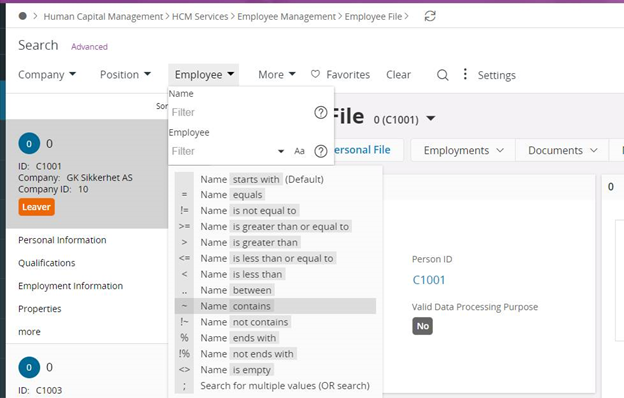
These various search options in Aurena can be identified by clicking the “?” mark in the search fields. [Refer image, copied from Employee File window]
In Aurena, if the user wants to search employees whose name contains part of the search criteria [eg: contains “Alain”] instead of searching with wildcards [as Alain%], the user can use the ‘tilde’ sign [~] to search [eg: ~Alain].
Since it will then fetch names where the searched term is present in any part [beginning, middle and end], user will get more results.
These various search options in Aurena can be identified by clicking the “?” mark in the search fields. [Refer image, copied from Employee File window]