

Hi,
In what way do the employee need to clock in to reach the Present Status = Business Travel ?
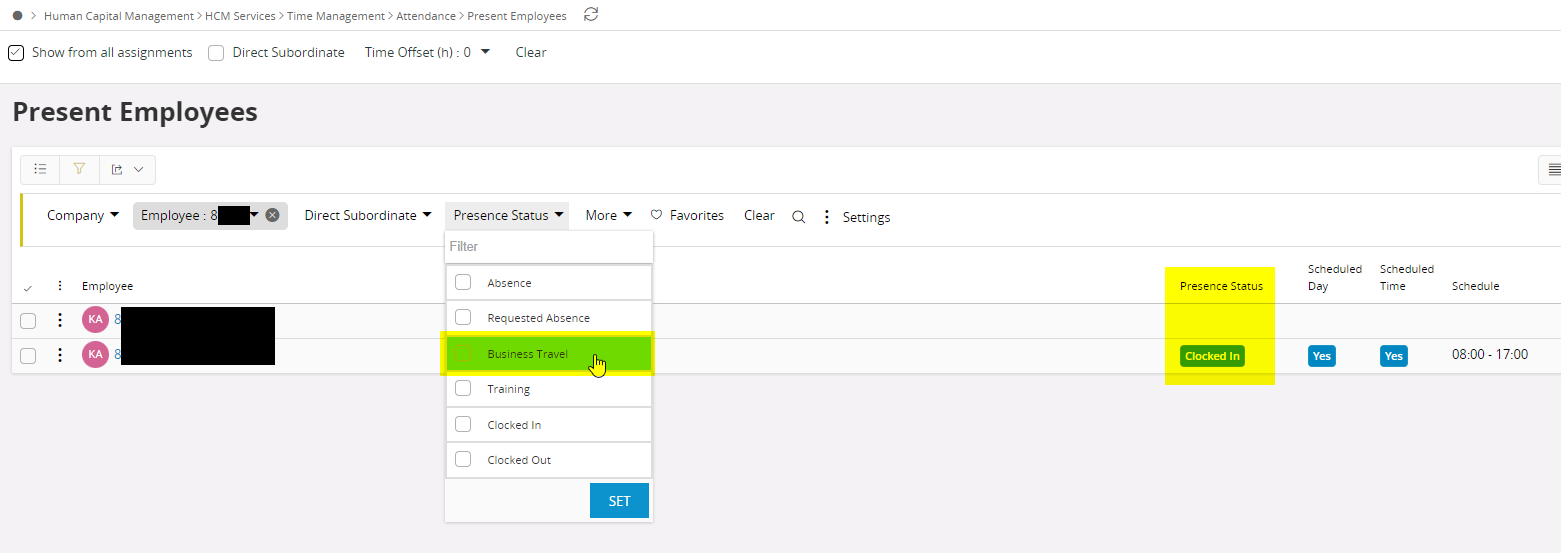
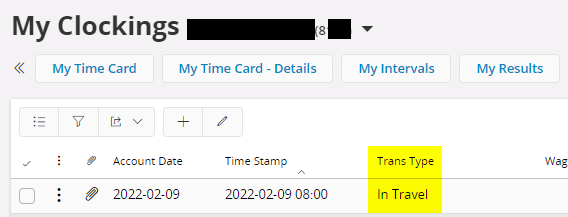
I tried to do a clocking with Trans Type = In Travel but that only generate Presence Status = Clocked In
Regards,
Karolina

Hi,
In what way do the employee need to clock in to reach the Present Status = Business Travel ?
I tried to do a clocking with Trans Type = In Travel but that only generate Presence Status = Clocked In
Regards,
Karolina
Best answer by Anjaleen Davidson
Hi Karolina
Seems like by changing only the Trans Type cannot get Presence Status as ‘Business Travel’. I also tried couple of combinations even with Wage codes but ‘Presence Status’ gets values ‘Absence’, ‘Clocked In’ or ‘Clocked Out’. Therefore I’ve checked the relevant method behind this process Time_Pers_Diary_Clock_Util_API.Get_Presence_Status.
According to the code structure it searches in several tables using employee_no and company_id. This method returns only one of these values ‘A’, ‘R’, ‘I’ or ‘O’ respectively denotes ‘Absence’, ‘Requested Absence’, ‘Clocked In’ and ‘Clocked Out’. So the other two options ‘B’ and ‘T’ respectively ‘Business Travel’ and ‘Training’ are not considered in this method. This denotes through manual changes Presence Status ‘B’ or ‘T’ cannot be achieved. I believe there could be other system processes involved.
Hope this info is useful.
Best Regards,
Anjaleen
Enter your E-mail address. We'll send you an e-mail with instructions to reset your password.

