


Question

How to format a field in an email event action?

  • March 24, 2021
  • 3 replies
  • 374 views

Forum|alt.badge.img+6

Hi,

Is there a way to format a field on the body of a message to display in a certain format? For example I’m using one of the available fields and its a number but would like to format to show on the email as currency. When the email is sent it’s displayed 56346 instead of 56,346. See screen shot below
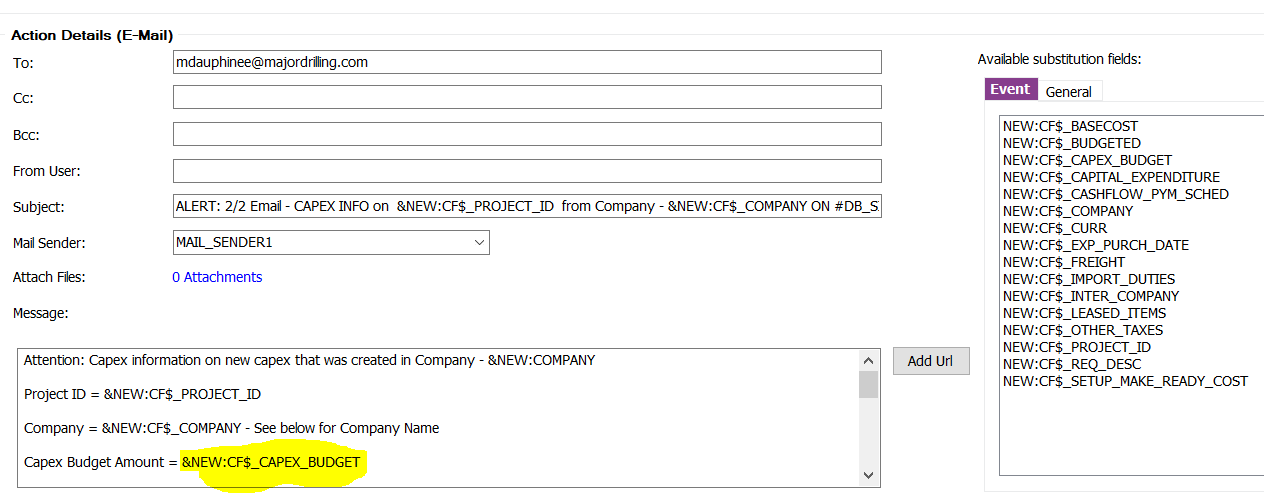
 

Thanks

Maggie

This topic has been closed for replies.

3 replies

Kasun Balasooriya
Superhero (Employee)
Forum|alt.badge.img+20

Hi,

I believe this has already been discussed in the following threads: 

HTML based email from PDF_REPORT_CREATED | IFS Community

Logo in email Signature triggered from IFS | IFS Community


Thanks,

Kasun


Forum|alt.badge.img+6
  • Author
  • Do Gooder (Customer)
  • March 24, 2021

Hi,

Added more detail and screen shot of what I was looking for in the original post. Hope that makes more sense. The links you displayed i don’t think are what i’m looking for.

Thanks

Maggie


VivekBhandiwad
Hero (Partner)
Forum|alt.badge.img+8

Hi MDGDAUPHINEE

What you have done, is managed the content inside the Event Action body, as a TEXT, hence the numeric is very generic number. 


if this is a custom Event, then pre-format the values in the field or add a custom formatted field in the EVENT itself , to add the thousand separator. We would deploy custom functions to achieve the 1000’s separator , and then use this function to format our numbers.


Alternatively, you may use the Execute PLSQL to send the email, but then you have to build the entire necessary parameters, plus the body, to format every line/field , as per your custom requirement.


The above 2 examples, attached by Kasun, give you a flavor of each, but its an effort to mix both the worlds : HTML and PLSQL.


Regards

Vivek


