Solved

How MPCCOM_ACCOUNTING could be connected to Inventory Transaction ID?

  • Sep 17, 2024 7:05 PM UTC
  • 5 replies
  • 235 views

Forum|alt.badge.img+16

Community,


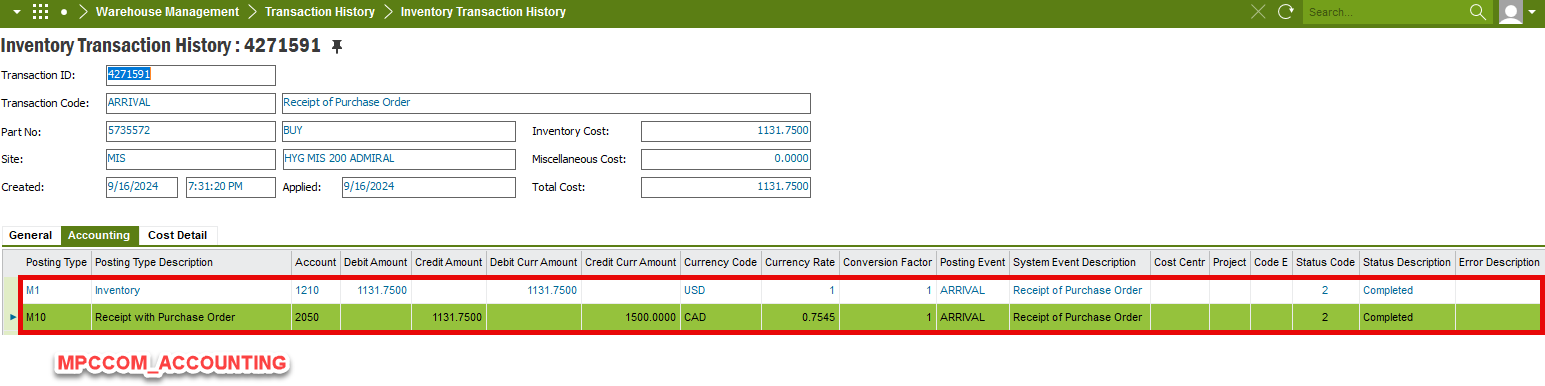
In Inventory Transaction History window, we can see accounting information in Accounting tab. We would like to create a report that show not only inventory transaction ID but also the accounting info. 

when I am browsing the file MPCCOM_ACCOUNTING that are under tab Accounting, I don’t see any data column could be the keys that can be linked with inventory transaction, e.g. Transaction ID, Site, Part No….


how we could make this report? any idea?
 

Best answer by cynthia.wilson

I’m pretty sure the link you are looking for is the accounting_id in mpccom_accounting = transaction_id in inventory transaction views

View original

5 replies

Forum|alt.badge.img+9
  • Hero (Customer)
  • Answer
  • Sep 17, 2024 7:17 PM UTC

I’m pretty sure the link you are looking for is the accounting_id in mpccom_accounting = transaction_id in inventory transaction views


Chanu_Yazi
Hero (Partner)
Forum|alt.badge.img+12
  • Hero (Partner)
  • Sep 17, 2024 8:12 PM UTC

Hi @ronhu 

Could you please review the following communications to determine if they would be helpful in addressing your question?


Regards,

Chanuka


Forum|alt.badge.img+16
  • Author
  • Hero (Customer)
  • Sep 18, 2024 12:54 AM UTC

@cynthia.wilson 

@Chanu_Yazi 


Thank you all for your input.


Michael Kaiser
Hero (Customer)
Forum|alt.badge.img+10

Hi all,
I checked my scripts. Our FACT_ITH contains the following:

...
FROM
 extr_IFS_INVENTORY_TRANSACTION_HIST_TAB            as ITH
LEFT OUTER JOIN
 extr_IFS_MPCCOM_ACCOUNTING_TAB                        as MA
ON 
 ITH.CONTRACT        = MA.CONTRACT
AND
 ITH.ACCOUNTING_ID = MA.ACCOUNTING_ID

Please let me know if your report goes the same direction.

BR

Michael


Forum|alt.badge.img+16
  • Author
  • Hero (Customer)
  • Aug 21, 2025 12:49 PM UTC

​@Michael Kaiser Appreciated your input.