


Solved

Grant Permission Set to User - Filter Options

  • December 11, 2020
  • 3 replies
  • 425 views

Forum|alt.badge.img+10

Hello

IFS8 -Can anyone assist me with using filter in the page ‘Grant Permission Set to User’, how can get multiple columns (Permissions sets).

I tried semi  colon and comma to separate them but that’s not working. which separator should i use to filter my columns.

Thanks

Best answer by durette

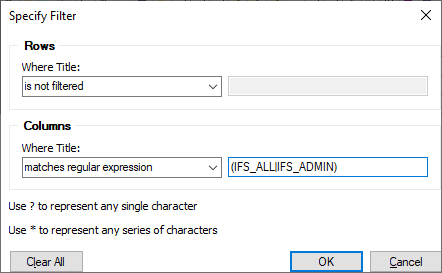
Instead of using “contains”, try “matches regular expression”.

(IFS_ALL|IFS_ADMIN)

Regular expression - Wikipedia

For an exact match that ignores prefixes and suffixes, you can use a more restrictive expression:

(^IFS_ALL$|^IFS_ADMIN$)


This topic has been closed for replies.

3 replies

durette
Superhero (Customer)
Forum|alt.badge.img+19
  • Superhero (Customer)
  • Answer
  • December 11, 2020

Instead of using “contains”, try “matches regular expression”.

(IFS_ALL|IFS_ADMIN)

Regular expression - Wikipedia

For an exact match that ignores prefixes and suffixes, you can use a more restrictive expression:

(^IFS_ALL$|^IFS_ADMIN$)


Forum|alt.badge.img+8
  • Sidekick
  • December 12, 2020

Instead of using “contains”, try “matches regular expression”.

(IFS_ALL|IFS_ADMIN)

Regular expression - Wikipedia

For an exact match that ignores prefixes and suffixes, you can use a more restrictive expression:

(^IFS_ALL$|^IFS_ADMIN$)


Very helpful feedback, Thanks @durette 


Forum|alt.badge.img+10
  • Author
  • Sidekick (Customer)
  • December 14, 2020

@Tj12  Thanks that’s great tip.

@durette  Thanks for helping.


