Solved

Find the right arguments for a custom field

  • December 22, 2020
  • 4 replies
  • 1094 views

Forum|alt.badge.img+9

Hi,

I want to add a custom field to the Shipment Lines.

This field needs to refer to the field ‘Customer PO No’ on the header of a customer order.

I did build a SQL query to fetch desired field:

SELECT c.customer_po_no

FROM Customer_Order c, Shipment_Line s

WHERE c.order_no = s.source_ref1


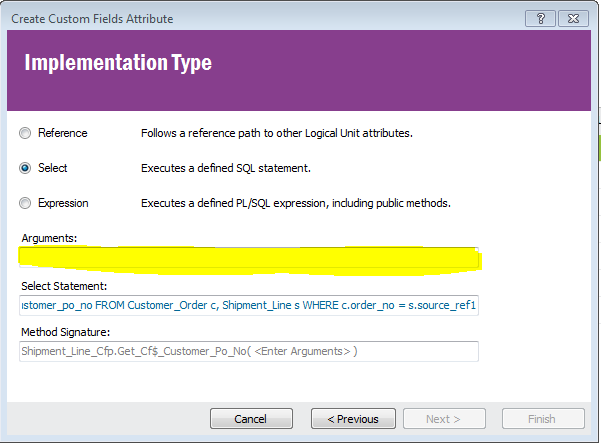
I don’t know what I need to add in the field ‘Arguments’. Can someone help?
 

Best answer by paul harland

Hello,

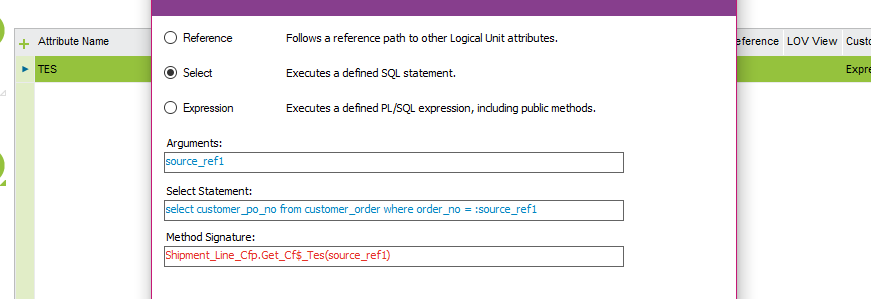
If you want to use SELECT format then the most efficient form would be this:


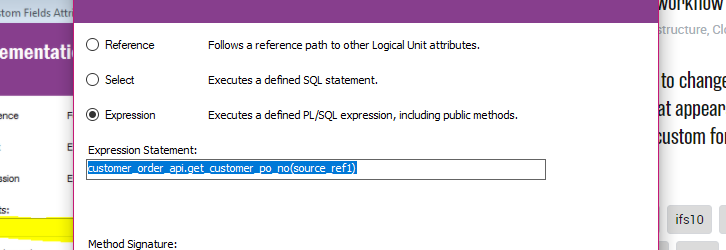
You can also use the Expression format, in which case it would be this:


This topic has been closed for replies.

4 replies

paul harland
Superhero (Employee)
Forum|alt.badge.img+24
  • Answer
  • December 22, 2020

Hello,

If you want to use SELECT format then the most efficient form would be this:


You can also use the Expression format, in which case it would be this:


WyrDavidB
Hero (Partner)
Forum|alt.badge.img+9
  • Hero (Partner)
  • December 22, 2020

You shouldn’t need to join the tables in the select statement.

In the argument section add the variable as v.source_ref1

Then in your SQL section try

select customer_po_no from customer_order where order_no =:source_ref1


you may also be able to run this as an expression using the IFS Customer order API

customer_order_api.get_customer_po_no(source_Ref1)


paul harland
Superhero (Employee)
Forum|alt.badge.img+24

lol, i’m sure one of us is right 


Forum|alt.badge.img+9
  • Author
  • Sidekick (Customer)
  • January 7, 2021

Hi @paul harland  and @VACDBROOKES  


Thank you for your help. We were able to figure it out.