Solved

Error while importing customer orders to IFS

  • Feb 3, 2023 11:01 AM UTC
  • 20 replies
  • 554 views

Link
Superhero (Customer)
Forum|alt.badge.img+23
  • Superhero (Customer)

Hi everybody,

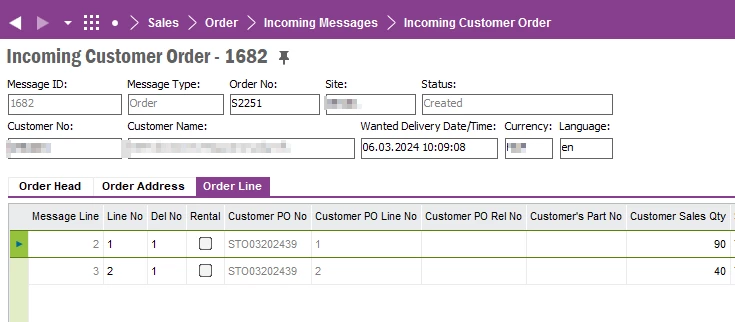
i want to import a customer order via sFTP to IFS but get an error message in application message:. 
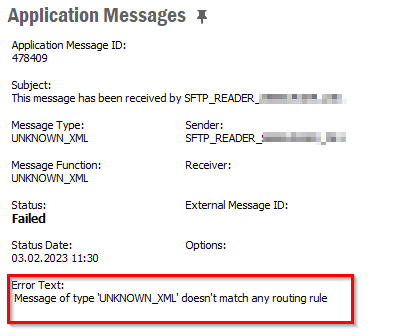
IFS takes the file from our local sFTP server but isn’t able to create an incoming customer order. 
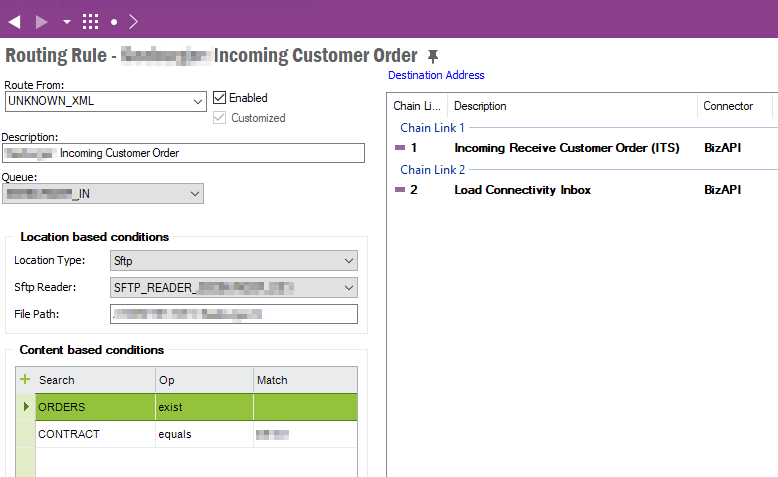
Both conditions (orders and contract) are in the xml file available. 

Can anyone help?

Best answer by Link

Now the import works with SFTP.

I’ve removed the file path.

View original

20 replies

Shehan Chandrasekara
Sidekick (Former Employee)
Forum|alt.badge.img+8

Hi,


Please check if any whitespaces are exists in the tags that you validate in the Routing Rule.


-Sheha-


Link
Superhero (Customer)
Forum|alt.badge.img+23
  • Author
  • Superhero (Customer)
  • Feb 3, 2023 12:14 PM UTC

Hi @Shehan Chandrasekara 

thank you for replying. I’ve just checked the conditions and also the file and both looks good.

Are there other possible causes?


Example:

<?xml version="1.0" encoding="UTF-8"?>
<ORDERS xmlns="urn:ifsworld-com:schemas:inbound_distribution_transactions_create_customer_order_request">
    <CONTACT_REFERENCE>TESTUSER</CONTACT_REFERENCE>
    <CURRENCY_CODE>EUR</CURRENCY_CODE>
    <EAN_LOCATION_DELIVERY_ADDRESS>012345678</EAN_LOCATION_DELIVERY_ADDRESS>
    <EAN_LOCATION_DOCUMENT_ADDRESS>04567893</EAN_LOCATION_DOCUMENT_ADDRESS>
    <EAN_LOCATION_PAYER_ADDRESS/>
    <EAN_SUPPLIER_DOCUMENT_ADDRESS>40188750</EAN_SUPPLIER_DOCUMENT_ADDRESS>
    <HEADER_NOTE>Import XML ORDERS</HEADER_NOTE>
    <ORDER_NO>111222</ORDER_NO>
    <OUR_CUSTOMER_NO>78</OUR_CUSTOMER_NO>
    <WANTED_DELIVERY_DATE>2023-03-20T09:01:01</WANTED_DELIVERY_DATE>
    <CONTRACT>GER</CONTRACT>
    <SENDER_MESSAGE_ID>251645</SENDER_MESSAGE_ID>
    <SENDER_COMMUNICATION_ID>TEST</SENDER_COMMUNICATION_ID>
    <RECEIVER_COMMUNICATION_ID>EDI</RECEIVER_COMMUNICATION_ID>
    <ACTIONTYPE>CREATE</ACTIONTYPE>
    <MESSAGE_SEQUENCE_NO>1</MESSAGE_SEQUENCE_NO>
    <PAY_TERM_ID>10</PAY_TERM_ID>
    <DELIVERY_TERMS>EXW</DELIVERY_TERMS>
    <SHIP_VIA_CODE>TRU</SHIP_VIA_CODE>
    <SALESMAN_CODE>TESTUSER</SALESMAN_CODE>
    <LANGUAGE_CODE>de</LANGUAGE_CODE>
    <ORDER_NO>778899</ORDER_NO>
    <DELIVER_TO>

...


Link
Superhero (Customer)
Forum|alt.badge.img+23
  • Author
  • Superhero (Customer)
  • Feb 3, 2023 12:29 PM UTC

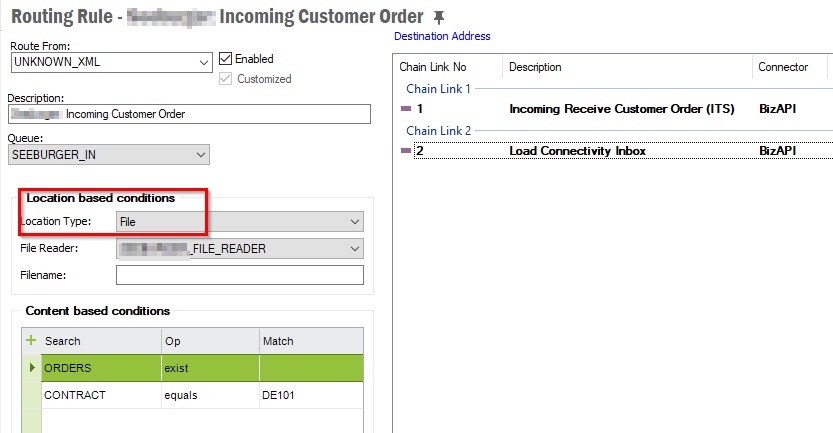
If I use the location type “File” than the import works but not with sFTP.

Doesn’t it support?


Link
Superhero (Customer)
Forum|alt.badge.img+23
  • Author
  • Superhero (Customer)
  • Answer
  • Feb 6, 2023 12:58 PM UTC

Now the import works with SFTP.

I’ve removed the file path.


Forum|alt.badge.img+2
  • Do Gooder (Customer)
  • Oct 14, 2025 8:15 PM UTC

Could you provide a sample of your Chain #1 step please? Thank you in advance.


Link
Superhero (Customer)
Forum|alt.badge.img+23
  • Author
  • Superhero (Customer)
  • Oct 15, 2025 6:01 AM UTC

Could you provide a sample of your Chain #1 step please? Thank you in advance.

Hi ​@CDeslatte 

which part is chain 1 for you?


Forum|alt.badge.img+2
  • Do Gooder (Customer)
  • Oct 15, 2025 1:30 PM UTC

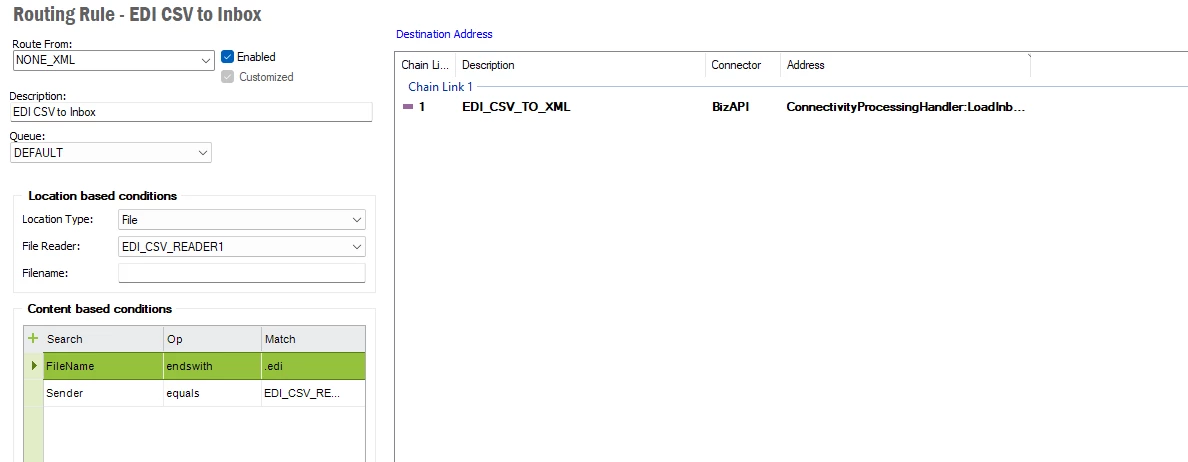
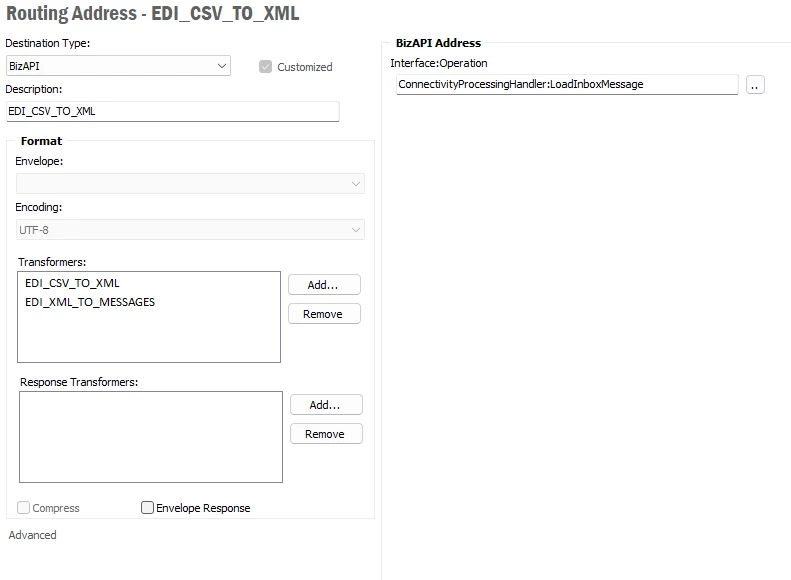
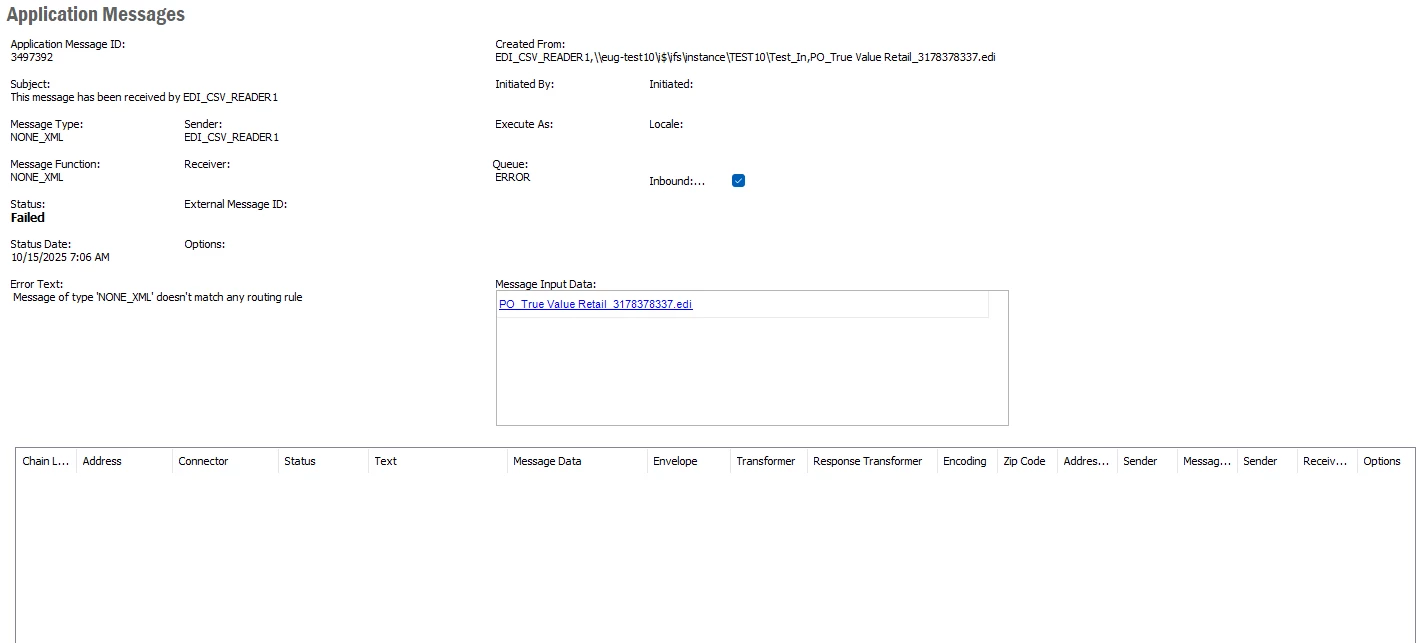
I am trying to do something similar with FILE_READER. The incoming file is a pure CSV format 850 and I have a java/xslt transformer to convert it to XML. I can get it to pickup the drop file but I always get an error message: Message of type 'NONE_XML' doesn't match any routing rule.


Forum|alt.badge.img+2
  • Do Gooder (Customer)
  • Oct 15, 2025 1:32 PM UTC

I was hoping to see how your Incoming Receive Customer Order looked like.


Link
Superhero (Customer)
Forum|alt.badge.img+23
  • Author
  • Superhero (Customer)
  • Oct 15, 2025 1:46 PM UTC

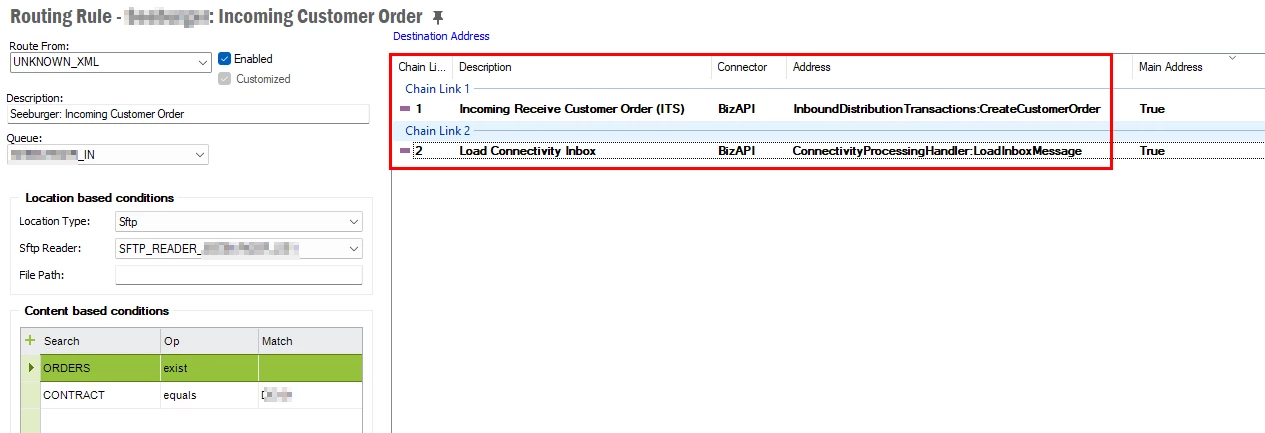
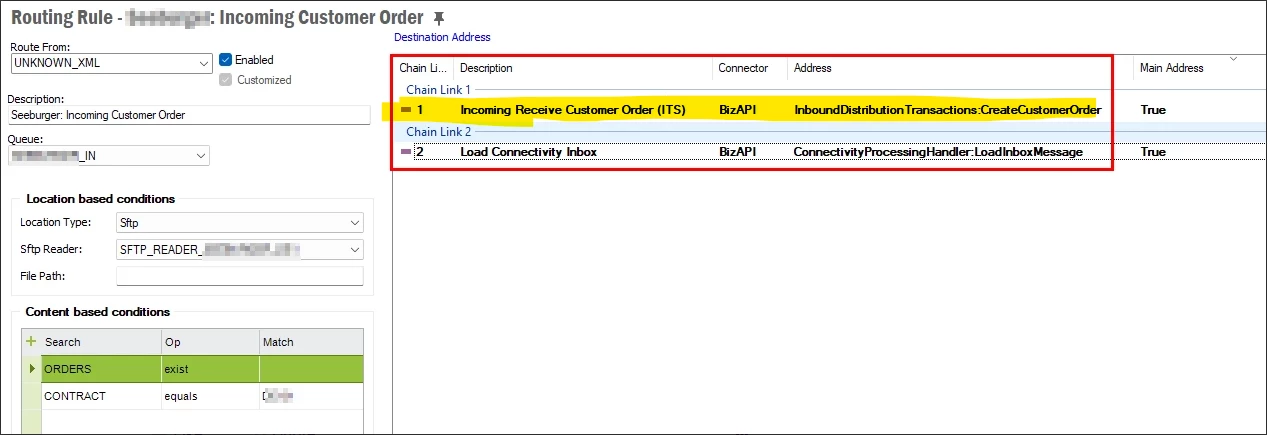
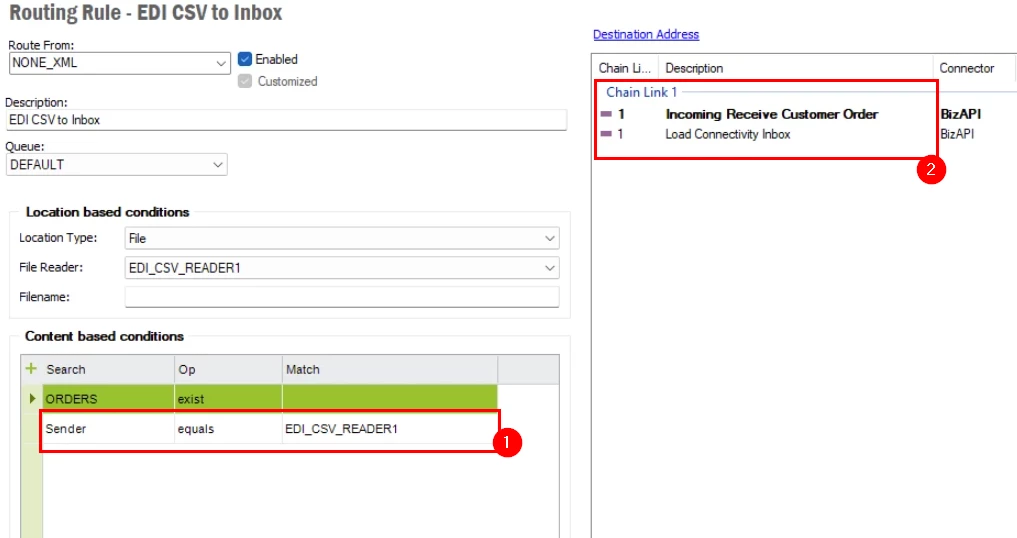
You cant import a customer order without these marked chains:

Can you put them after yours?


Forum|alt.badge.img+2
  • Do Gooder (Customer)
  • Oct 15, 2025 1:48 PM UTC

I’ll give it a try and report back. Thank you.


Link
Superhero (Customer)
Forum|alt.badge.img+23
  • Author
  • Superhero (Customer)
  • Oct 15, 2025 1:49 PM UTC

Here an example for an incoming customer order:


Forum|alt.badge.img+2
  • Do Gooder (Customer)
  • Oct 15, 2025 2:00 PM UTC

Could you assist me possibly with this highlighted part. Forgive me, I am new to setting this up.


Link
Superhero (Customer)
Forum|alt.badge.img+23
  • Author
  • Superhero (Customer)
  • Oct 15, 2025 2:07 PM UTC

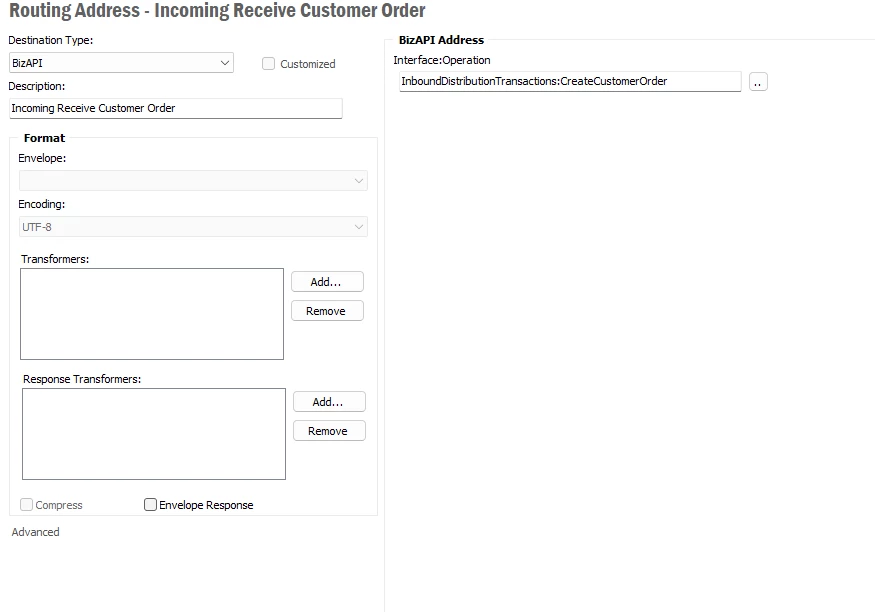
Sure. Just click on “Destination Address” on the top of this screen.

Then you can add new addresses. Also the sequence is important.

I recommend you starting with these addresses. Create a xml file manually for testing purposes.

If the test is successful, you can then add your address.


Forum|alt.badge.img+2
  • Do Gooder (Customer)
  • Oct 15, 2025 2:11 PM UTC

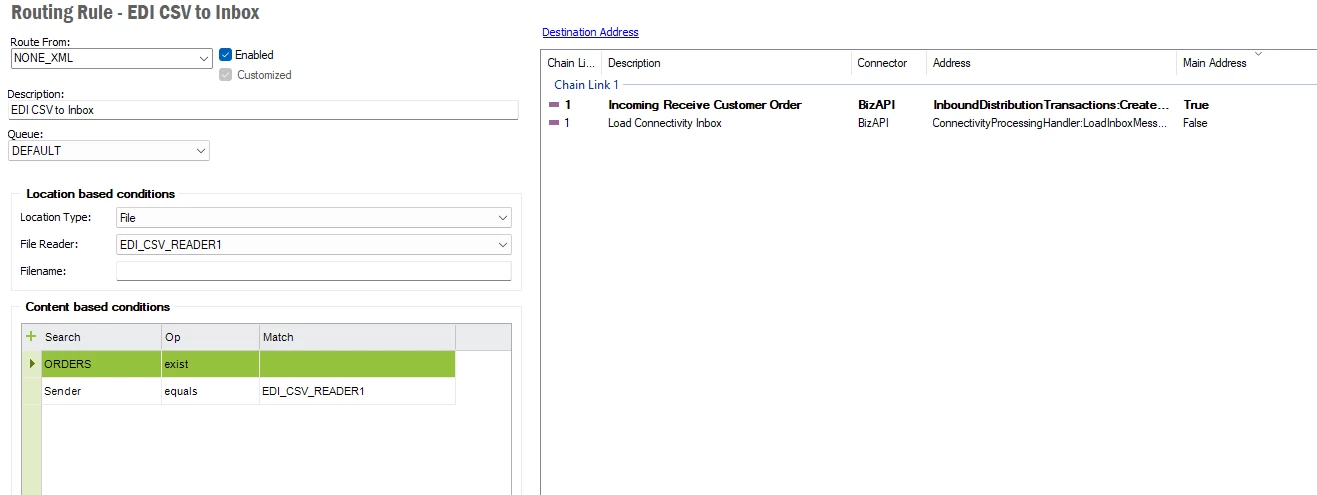
I did this:


and this:


I still get this:


Forum|alt.badge.img+2
  • Do Gooder (Customer)
  • Oct 15, 2025 2:11 PM UTC

Let me convert the CSV to XML as you suggested.


Forum|alt.badge.img+2
  • Do Gooder (Customer)
  • Oct 15, 2025 2:17 PM UTC

No matter what I do I can’t get past this:

Message of type 'UNKNOWN_XML' doesn't match any routing rule


Link
Superhero (Customer)
Forum|alt.badge.img+23
  • Author
  • Superhero (Customer)
  • Oct 16, 2025 7:23 AM UTC

Hi ​@CDeslatte 

1. Why do you type here the file sender name?

Parameters

message_function_
    BizAPI name or message function.

message_type_
    Optional message type.

sender_
    Optional identity of sending organization.

receiver_
    Optional identity of receiving organization.

in_order_
    Flag denoting if the message should be put to an InOrder queue. Default FALSE. If TRUE and it is not possible to find a queue or the found queue is not InOrder, an exception will be raised..

Use the parameter CONTRACT and enter you company (contract).


2. Check this sequence again. It should look like mine.


Forum|alt.badge.img+2
  • Do Gooder (Customer)
  • Oct 21, 2025 3:05 PM UTC

Good day sir,


First and foremost, I would like to say Thank you for assisting me with this stuff. I know you don’t have to and it is appreciated.

I still don’t have my stuff working correctly but I wanted to back up a bit and ask you a couple of questions if possible.

First, are you using XML to get the information into the IN_MESSAGE_TAB and IN_MESSAGE_LINE_TAB? Then internal IFS processes create the PO? If so, could you possibly share what format your XML files are in?

Secondly, we are being given pure CSV formatted files from SPS Commerce who is handling our EDI for us. We will eventually be moving to the Cloud Based IFS, but for the transition I have to get this working with IFS10EE U22.

Do you have any thoughts or suggestions as to how I can get the incoming EDI documents into the two tables first... then we can work on getting the Customer Order to process in?

Thank you in advance I realize there is a time difference between us and I don’t want to bother you while you are trying to work.

I can provide you with a sample EDI document that is provided to us via SPS Commerce if that helps.


Link
Superhero (Customer)
Forum|alt.badge.img+23
  • Author
  • Superhero (Customer)
  • Oct 27, 2025 7:40 AM UTC

Dear ​@CDeslatte 

yes, we import XML files. It is the EDI process.

The views are EXTERNAL_CUSTOMER_ORDER and EXTERNAL_CUST_ORDER_LINE_ALL.

From the view “Internal Customer Order” you need approve the order. Then IFS creates a customer order.


In what screen is this view IN_MESSAGE_TAB?

You can download the xml file from your “IFS Interface Browser”:


Link
Superhero (Customer)
Forum|alt.badge.img+23
  • Author
  • Superhero (Customer)
  • Oct 27, 2025 8:13 AM UTC

I found the example XML file from IFS, which you can import to IFS.