Question

Issues with the event CREDIT_BLOCK

  • Feb 29, 2024 2:36 PM UTC
  • 10 replies
  • 108 views

Link
Superhero (Customer)
Forum|alt.badge.img+23
  • Superhero (Customer)

Hi everybody,

ee receive two emails every day at the same time for a certain customer, informing us that an instant invoice has been created for a customer with a credit block.
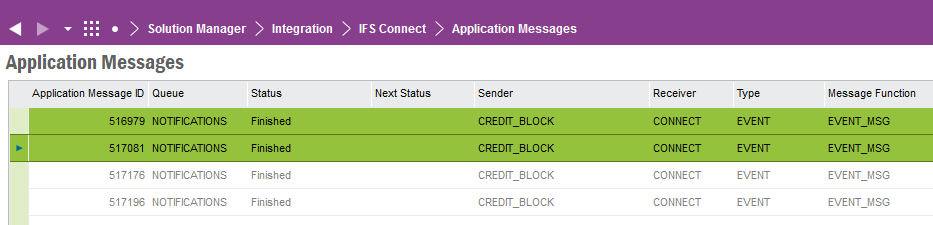
 

But there are no instant invoices created for this customer.

We have activated the event CREDIT_BLOCK.

Is there a background job?

 

10 replies

cperdue
Hero (Partner)
Forum|alt.badge.img+14
  • Hero (Partner)
  • Feb 29, 2024 2:37 PM UTC

Is the user in two user in two groups?


Link
Superhero (Customer)
Forum|alt.badge.img+23
  • Author
  • Superhero (Customer)
  • Feb 29, 2024 2:43 PM UTC

Hi @cperdue 

sorry, I didn’t catch that. Which user and which user group? 😊


cperdue
Hero (Partner)
Forum|alt.badge.img+14
  • Hero (Partner)
  • Feb 29, 2024 2:50 PM UTC

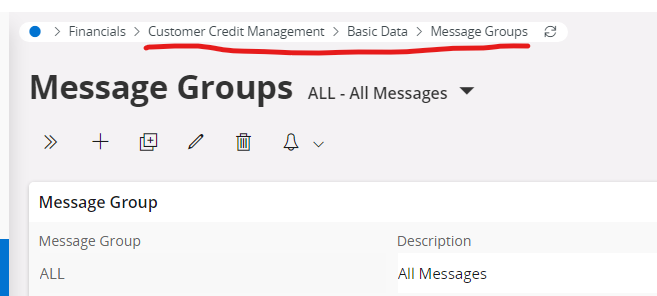
The message groups within the credit management:  


cperdue
Hero (Partner)
Forum|alt.badge.img+14
  • Hero (Partner)
  • Feb 29, 2024 2:50 PM UTC


Marcel.Ausan
Ultimate Hero (Partner)
Forum|alt.badge.img+22
  • Ultimate Hero (Partner)
  • Feb 29, 2024 4:30 PM UTC

@Link in order to find out if the application messages have been created by a background job, you could check when the application messages have been created and then search in Background Jobs +/- 10 mins from that timestamp on when the app messages were created.


Link
Superhero (Customer)
Forum|alt.badge.img+23
  • Author
  • Superhero (Customer)
  • Mar 1, 2024 12:38 PM UTC


Hi @cperdue 

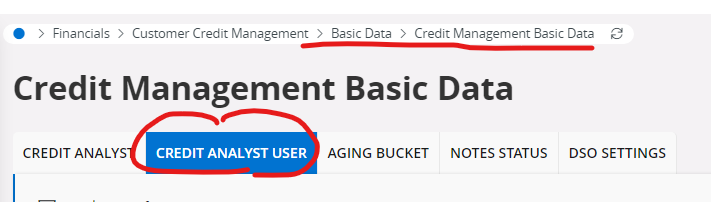
we have only one message group and the user occurs only once in the tab “Credit Analyst User”.

Thank you.


Link
Superhero (Customer)
Forum|alt.badge.img+23
  • Author
  • Superhero (Customer)
  • Mar 1, 2024 12:43 PM UTC

@Link in order to find out if the application messages have been created by a background job, you could check when the application messages have been created and then search in Background Jobs +/- 10 mins from that timestamp on when the app messages were created.

Dear @Marcel.Ausan 

thank you.

Now I’ve found out, that there ist a scheduled database task “Batch Print Customer Invoices”.

Does this database task cause this issue?


Marcel.Ausan
Ultimate Hero (Partner)
Forum|alt.badge.img+22
  • Ultimate Hero (Partner)
  • Mar 1, 2024 1:20 PM UTC

@Link that might very well be the case. When the invoice is printed, it might also run the credit check routine which triggers the CREDIT_CHECK event action. Unfortunately it seems that system defined events are not regular DB triggers to check what’s logic that executes the event action and also from client side there’s no option to see the event (you can see the details of the event action only) :(.


cperdue
Hero (Partner)
Forum|alt.badge.img+14
  • Hero (Partner)
  • Mar 1, 2024 1:59 PM UTC

Is it possible that an event has been enabled?


Best-


Link
Superhero (Customer)
Forum|alt.badge.img+23
  • Author
  • Superhero (Customer)
  • Mar 4, 2024 10:43 AM UTC

Is it possible that an event has been enabled?


Best-

Hi @cperdue 

no, the reason is the database task “Batch Print Customer Invoices”. It doesn’t happen, if I deactivate it. 😀