Question

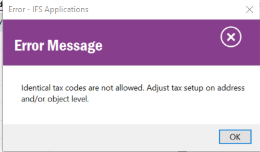
Error: Identical tax codes are not allowed

  • July 18, 2024
  • 3 replies
  • 231 views

Forum|alt.badge.img

Running into this error when trying to create a Return Material Authorization. Any ideas where it’s originating or how to resolve?



3 replies

Forum|alt.badge.img+19

Hi, 

Assuming you have no mods, please send exact steps / screens where this error message appears.  

I’ve never seen that error message. 

Best regards, 

Thomas


Forum|alt.badge.img+5

Hi,

The tax code of the material you have previously sent may expired. You can search and check the tax code of the product you want to receive on the screen below.


Accounting Rules->Tax->Tax Codes


KethakaG
Superhero (Employee)
Forum|alt.badge.img+14
  • Superhero (Employee)
  • July 23, 2024

Hi @jumpmodel_sean ,

RMA can be created either from a Delivered or Invoiced Customer Order OR manually from Return Material Authorization screen.

If this is a one-off instance, I suggest you to try to create another RMA in the other way. For an example, if you have earlier created the RMA via a Customer Order, try creating the RMA manually from Return Material Authorization screen and then connect the Order Number from the header.

Regards,
Kethaka