Solved

How to schedule a workflow to run daily

  • May 16, 2023 5:56 PM UTC
  • 10 replies
  • 1534 views

Forum|alt.badge.img+17

Hello,


I have asked this question before but I would like to get final confirmation that IFS Cloud does not currently support the ability to schedule workflows to get run. Workflows can only be run via an event action or projection action. Is this correct? Everything else is a work around that IFS Cloud is not intended to do. 


Thanks,
Bryan

Best answer by bdoucette

Unfortunately, IFS Cloud does not support scheduling workflow to get run, which is pretty odd to me since they seem to want to push for more workflow and scheduled database task usage over backend modifications. I did think of a workaround/solution for this though


The solution I came across was to schedule a report to get run every day, and create a custom event to see if that report gets created on the print manager screen. From there, you can create an event action off of this and filter based off of the schedule ID field. Tie this event action to your workflow and you should have a working scheduled workflow.

View original

10 replies

Forum|alt.badge.img+17
  • Author
  • Superhero (Customer)
  • Answer
  • May 19, 2023 1:02 PM UTC

Unfortunately, IFS Cloud does not support scheduling workflow to get run, which is pretty odd to me since they seem to want to push for more workflow and scheduled database task usage over backend modifications. I did think of a workaround/solution for this though


The solution I came across was to schedule a report to get run every day, and create a custom event to see if that report gets created on the print manager screen. From there, you can create an event action off of this and filter based off of the schedule ID field. Tie this event action to your workflow and you should have a working scheduled workflow.


Forum|alt.badge.img+3
  • Do Gooder (Partner)
  • Jun 23, 2023 9:35 AM UTC

My Workflows are triggered only when I am working from web client. If the table, where is BPA trigger action, is modified from PL/SQL procedure directly, without Cloud client, then no Workflow are run. I think that because of this issue is also not possible to run Workflow as a scheduled action. 


Forum|alt.badge.img+17
  • Author
  • Superhero (Customer)
  • Jun 23, 2023 12:40 PM UTC

Hi @KarelCZ 


Workflows can get triggered without you working directly in Cloud. If you set your workflow to use an event action as it’s trigger, then you have items get run without a user doing anything (whenever the system does something, the workflow can get triggered). If you use a projection action, this usually means a user did something and the workflow will get triggered off of that. Both scenarios can be run without you being logged in though. I’ve created several workflows that get run while im out of the office. I hope this helps.


Thanks,
Bryan


Forum|alt.badge.img+3
  • Do Gooder (Partner)
  • Jun 23, 2023 12:54 PM UTC

Hi @KarelCZ 


Workflows can get triggered without you working directly in Cloud. If you set your workflow to use an event action as it’s trigger, then you have items get run without a user doing anything (whenever the system does something, the workflow can get triggered). If you use a projection action, this usually means a user did something and the workflow will get triggered off of that. Both scenarios can be run without you being logged in though. I’ve created several workflows that get run while im out of the office. I hope this helps.


Thanks,
Bryan

Maybe we have differents versions (I have 22R2) or some server settings, but my Workflows are triggered only in client. If I run PL/SQL script from SQL Developer which make changes in the table (where is BPA event triggers), BPA is triggered (in debug it goes to Bpa_SYS package) but will do nothing. But from client it works well.


MizanulIslam
Hero (Partner)
Forum|alt.badge.img+8
  • Hero (Partner)
  • Jul 7, 2023 7:33 PM UTC

Hi @bdoucette 

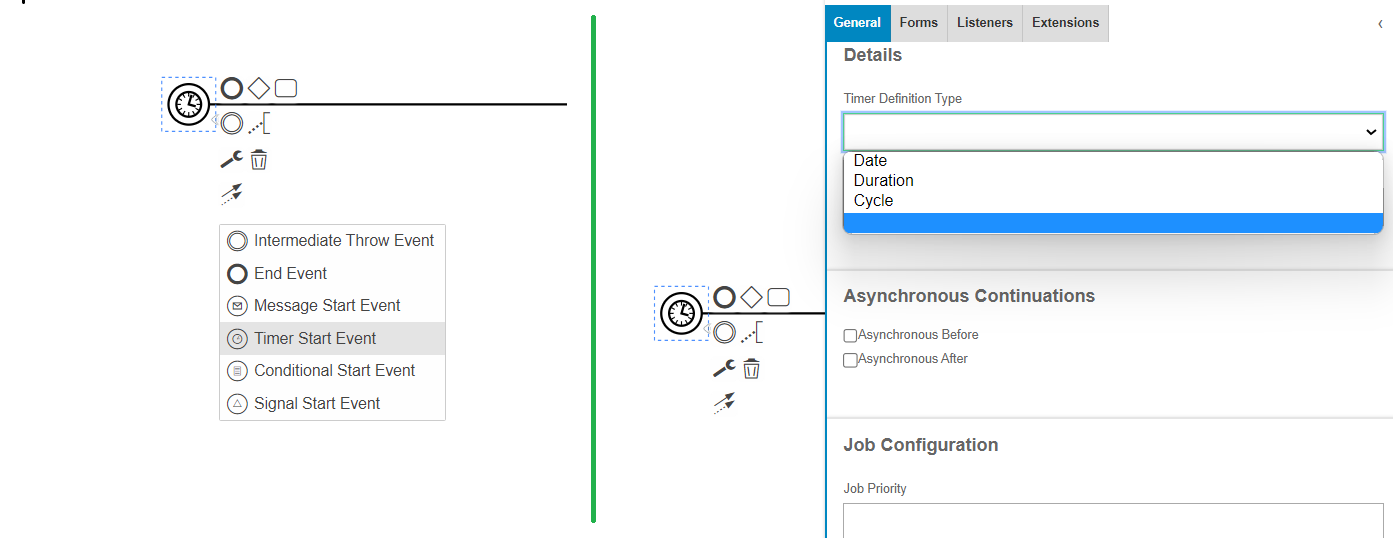
You can see this below options to get the features you are searching for. Please follow below screenshot and link for the examples if that helps.. (This is in IFS Cloud 23R1)

Camunda Doc: https://docs.camunda.org/manual/7.19/reference/bpmn20/events/timer-events/

Thanks


Forum|alt.badge.img+7
  • Sidekick (Partner)
  • Mar 4, 2024 11:13 AM UTC

Hi @MizanulIslam 

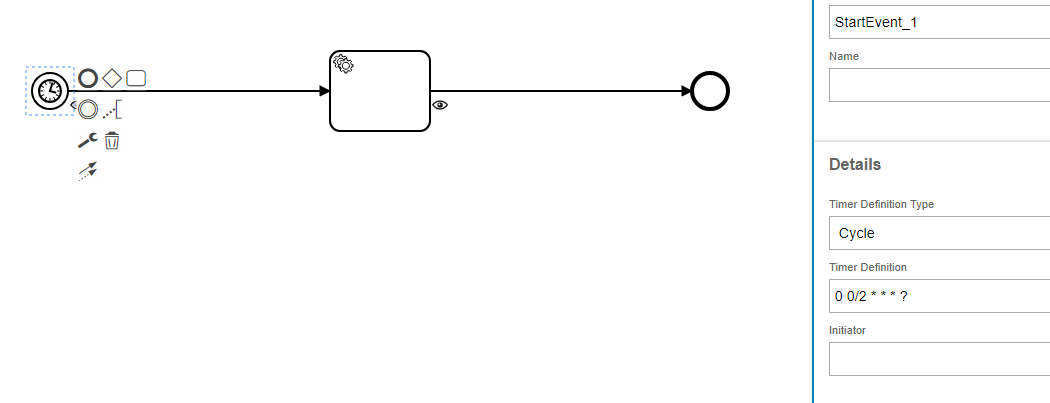
It didn’t work for me; did I do something wrong?

Is this feature available in the latest cloud version?


After the Timer Start event, I am creating a record in CustomerInfoSet. But it is not working, the workflow is not executing periodically.

Any idea?


Thanks,

Rohit.


MizanulIslam
Hero (Partner)
Forum|alt.badge.img+8
  • Hero (Partner)
  • Mar 4, 2024 11:50 AM UTC

Hi @Rohit 

I can see you used for every 2 minutes trigger that will require a Building CronTriggers I think...

0 0/2 * * * ?

Please follow this two docs 
https://docs.camunda.org/manual/7.19/reference/bpmn20/events/timer-events/
https://www.quartz-scheduler.org/documentation/quartz-2.1.7/tutorials/tutorial-lesson-06.html


Thanks                                                                  _

Mizanul Islam

https://www.linkedin.com/in/mizanulislam/


Forum|alt.badge.img+7
  • Sidekick (Partner)
  • Mar 4, 2024 11:58 AM UTC

Hi @MizanulIslam 

Thanks for your response, I did follow those 2 docs.

I don’t know how to create the CronTriggers, I see Java is being used but I don’t know where to put that code.

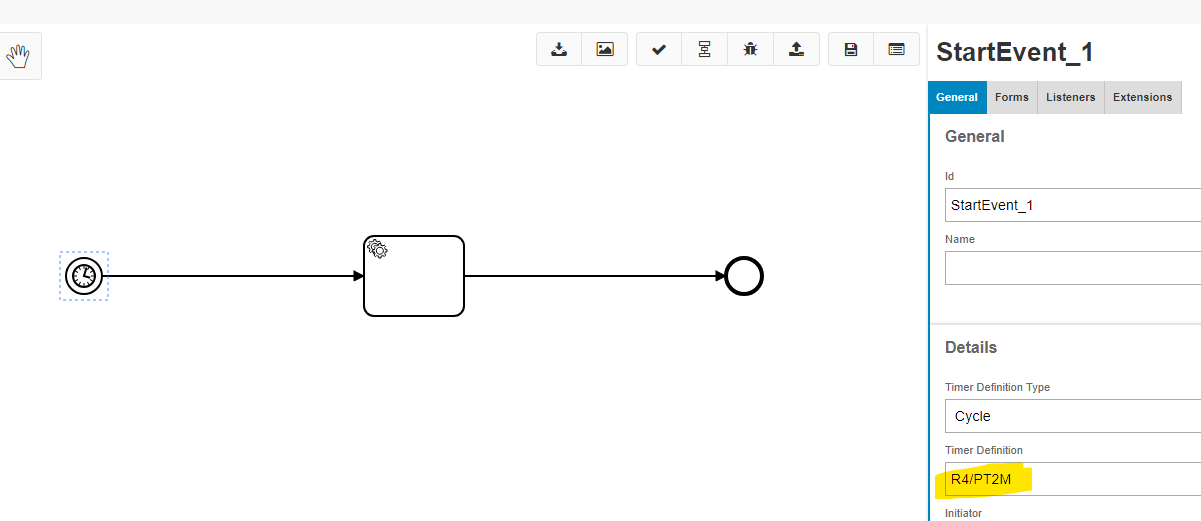
So, I tried this also -

Maybe this is “SimpleTrigger”?

But this also didn’t work. :(


BPA in IFS has too many features and most of it doesn’t work. It is very limited, like it can do only 5-10% of what Camunda engine is capable of.

That’s why, I want to know if anyone was able to achieve this using this Timer start event functionality?

Also, how can I see logs of this workflow as it is not bounded to any Event or Projection.


Thanks,

Rohit.


Forum|alt.badge.img+9
  • Hero (Employee)
  • Mar 12, 2024 3:59 PM UTC

Currently Timer start event is not supported in IFS workflows. you can see more information here 

Timer start event in workflow | IFS Community


Chriswharton22
Sidekick (Partner)
Forum|alt.badge.img+8

Workflow scheduling is coming to 26R2.