

Question

Configurations Lost after RU/SU

  • October 9, 2024
  • 7 replies
  • 114 views

Miruna M
Sidekick (Partner)
Forum|alt.badge.img+8

Hello everyone,


I've been facing a big problem for some time and I would like your help, maybe we can find a solution.

I have made some changes in IFS Cloud (24 R1) such as: creating custom fields, changing some field names according to customer requirements, hiding/deleting some fields etc. 

Each time a release/service update takes place, these changes are lost and the system reverts to the standard version.

Also, if in a new release, the interface of an IFS Cloud page changes its appearance by rearranging fields/windows, introducing a new design, all changes made on that page are lost.

So far, every time this happens, I have to make all the necessary changes manually over and over again.

I need to find a solution so that all existing changes are not lost in the future.

Has anyone else experienced this? Do you know how I could solve this problem?


Thank you in advance for your help!

Kind Regards,

Miruna

7 replies

Forum|alt.badge.img+11
  • Hero (Partner)
  • April 9, 2026

Hi ​@Miruna M 

Were you able to find a solution for this? We are facing similar issues.

Thanks in Advance & Regards,

Malik


Forum|alt.badge.img+9
  • Hero (Customer)
  • April 9, 2026

When a page is modified in core then deployed to customer baseline, the page baseline is now behind core and you need to do what is called Rebase the Configuration : 


https://docs.ifs.com/techdocs/25r2/040_tailoring/225_configuration/200_client_configurations/400_rebase_configurations/?h=


Hope this help


Forum|alt.badge.img+11
  • Hero (Partner)
  • April 9, 2026

@N.GEORGI The problem arises after rebaselining. The custom fields that were made visible, Fields made read only / mandatory are not available after rebaselining. There are over 100 pages with configurations that are lost.

I have reported with to IFS and R&D is currently looking at this . Will keep this thread updated.


Udara Hasantha
Do Gooder (Customer)
Forum|alt.badge.img+4
  • Do Gooder (Customer)
  • April 10, 2026

HI 

You can follow below steps. 

  • Bundle all your page configs into one or more ACPs (under Configuration Packages).
  • Before every RU/SU, export the ACP.
  • After the update, import + rebase inside the package.
     

Forum|alt.badge.img+11
  • Hero (Partner)
  • April 14, 2026

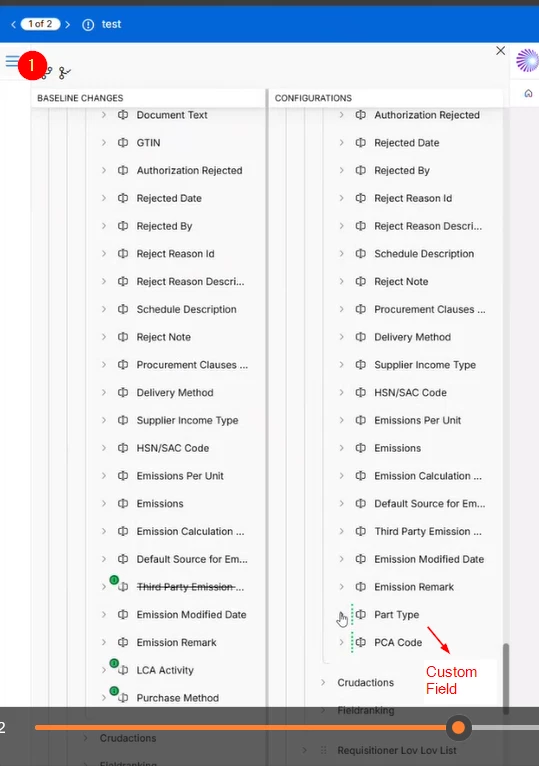
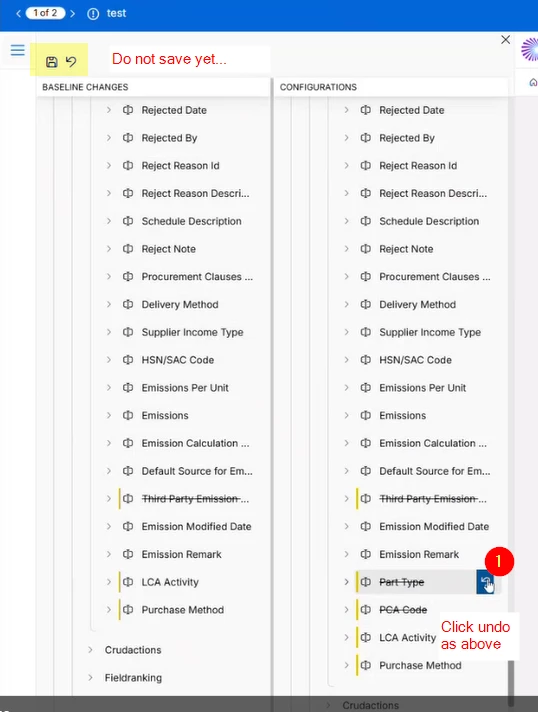
For those following the thread, IFS R&D provided a workaround of re-baseline the page configuration and then to revert the custom field related changes (in order to preserve). This temporarily works. But causes other random issues in the pages (ex: LOV does not filter information properly, MetaData errors etc).

For now, it seems like after re-baseline the custom fields need to be handled manually.


Forum|alt.badge.img+9
  • Hero (Customer)
  • April 14, 2026

@malik.sally , what is the work arround please?


Forum|alt.badge.img+11
  • Hero (Partner)
  • April 14, 2026


Now Save and Publish.
I do not recommend the above solution which was provided by IFS R&D as it is causing issues in the page - at times the page gives ‘Malformed Request...” error at time the behavior is weird with LOV showing values without filtering to Company / Site etc.