Solved

Remove option from assystNET menu

  • Dec 16, 2024 3:54 PM UTC
  • 2 replies
  • 80 views

CHRISTALM
Sidekick (Customer)
Forum|alt.badge.img+6

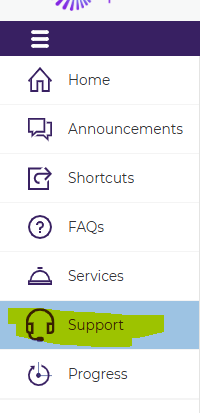
How to remove Support tab - menu options (left-hand side) for ALL USERS.  We are using assyst 11.5


Best answer by Caroline Schaffner

Hello Christal,


Check the licence role of the Contact user who have access to the Self-Service portal and uncheck the option ‘Incident logging’

Self-Service Portal Licensing - assyst11-5Wiki

Hope this helps

Caroline

View original

2 replies

Forum|alt.badge.img+14

Hello Christal,


Check the licence role of the Contact user who have access to the Self-Service portal and uncheck the option ‘Incident logging’

Self-Service Portal Licensing - assyst11-5Wiki

Hope this helps

Caroline


CHRISTALM
Sidekick (Customer)
Forum|alt.badge.img+6
  • Author
  • Sidekick (Customer)
  • Dec 17, 2024 12:23 PM UTC

You are a genius.  Thank you Caroline :-)  I’ve been trying to figure this out on my own FOREVER!  Happy Holidays :)