Question

User Interaction Workflow triggered by update to specific field

  • September 17, 2024
  • 6 replies
  • 281 views

Forum|alt.badge.img+5

Is there a way to trigger a user interaction if, and only if a certain field has changed value?


It seems that no information about the previous state is available to the workflow when a projection action is triggered.

6 replies

AveTonitM
Hero (Partner)
Forum|alt.badge.img+10
  • Hero (Partner)
  • September 17, 2024

You need to define a Custom Event with a event action of type ”workflow”. This connects the triggering (event action) to the workflow. Then you can define the triggering of the event either by changes in a database table or changes in one specific field. Both old and new values of the field can be tracked. This means that when the user modifies a field the event action is triggered and the workflow gets executed. 


Forum|alt.badge.img+5
  • Author
  • Sidekick
  • September 17, 2024

I understand that, but that isn’t supported with Workflows that contain user interactions.

Is there a work-around for that?


Forum|alt.badge.img+10
  • Hero (Partner)
  • September 17, 2024

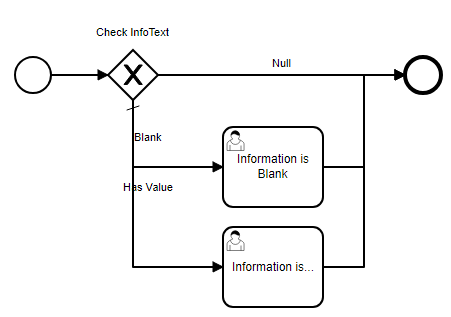
Hmm, this seems more tricker than it should be. I tested with a workflow firing on Update of PartCatalogSet in projection PartHandling. I start the workflow by checking the value of InfoText in the input to see whether it’s null, an empty string (‘’) or has a value using:  execution.getVariable('InfoText')

It works when I edit the Information Text field to have a value on the page, in which case the client sends the following payload: { "InfoText": "x" }

But regardless of whether I blank the field out -  { "InfoText": null } - or change another field - { "VolumeNet": "125" } - the call to execution.getVariable('InfoText') returns null. I.e., I can’t check whether the field is present, unless there’s another smart way.

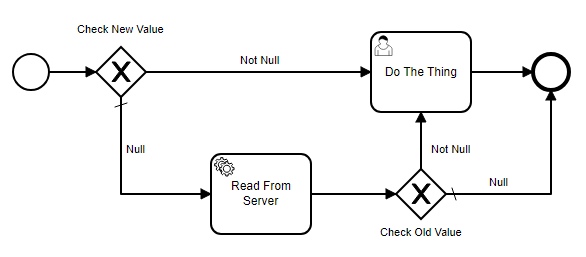
The work-around for this would be to make a projection call in the workflow to get current value of your field from the database, but that might mean a lot of unnecessary server calls. Mockup:


Forum|alt.badge.img+5
  • Author
  • Sidekick
  • September 17, 2024

Very interesting approach. I assumed that the call of the projection event would happen after the persisting to the db had happened.

Have you actually tried this yet?

If not, i might. :)


Forum|alt.badge.img+10
  • Hero (Partner)
  • September 17, 2024

I dabbled with the first approach I mentioned, which is how I found the problem with blanking out the field. I have not tried adding the server call to check the old value. Sorry, I have to focus on my day job now. :P


Forum|alt.badge.img+5
  • Author
  • Sidekick
  • September 18, 2024

Without trying anything, a second (process enrichment) workflow that would buffer the last value of a given attribute in a custom field would surely do the trick without hogging the database for requests.

It would be a really ugly workaround for a rather strange limitation, though.

I will probably try the fetch and compare method tomorrow and report.