Question

Security Setting for Activate Repair Order

  • February 23, 2022
  • 6 replies
  • 129 views

Forum|alt.badge.img+8

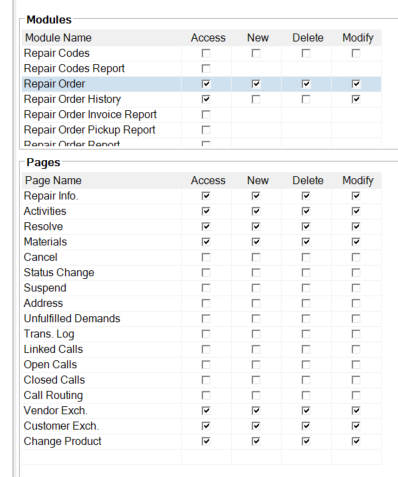
I need to adjust a security role to be able to “activate” a repair order once the product has arrived. I have tweaked a number of settings and this step is still not available. Those that currently have the ability have a much wider range of access. Can you tell me if a specific module or setting controls this feature? Current setting for repair order are set up like the below. We are using Alliance 15.2.

 

6 replies

Forum|alt.badge.img+12
  • Superhero (Employee)
  • February 23, 2022

Hi Leann,

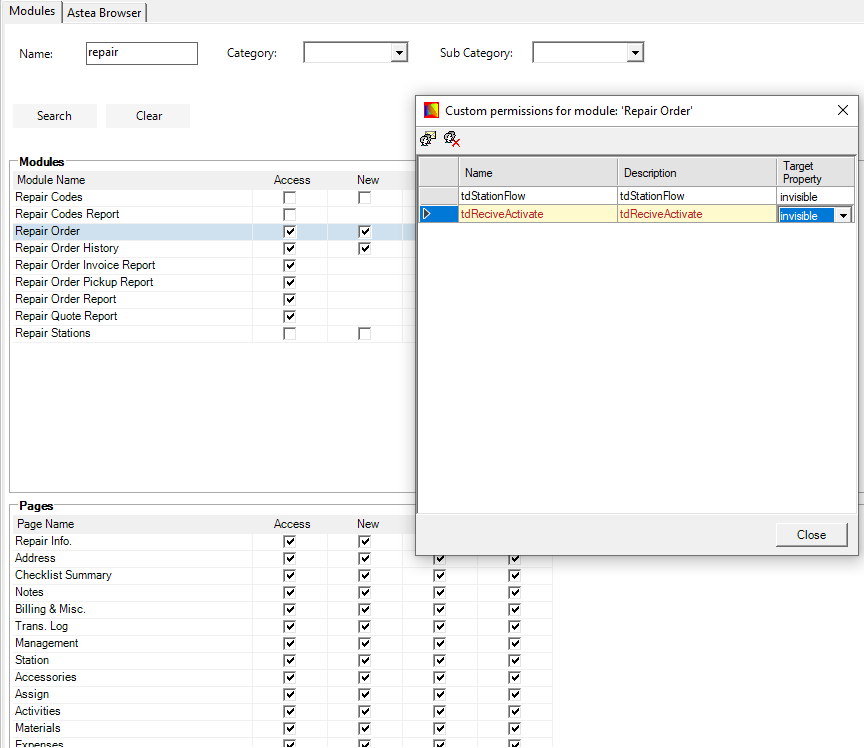
Have you checked the custom permission?
Highlight Repair Order, right mouse click, Custom Permissions.
You should be able to see what are disabled/invisible there.


Regards,

Joshua


Forum|alt.badge.img+8
  • Author
  • Sidekick (Customer)
  • February 24, 2022

Thanks @Joshua Liem

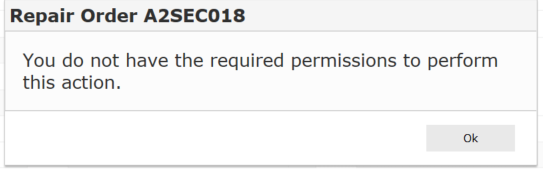
There aren’t any custom permissions listed. The error below is what we get in case the error number helps. 


Forum|alt.badge.img+12
  • Superhero (Employee)
  • February 25, 2022

Hi Leann,

What Alliance portals does the user have?


Phil Seifert
Ultimate Hero (Employee)
Forum|alt.badge.img+24
  • Ultimate Hero (Employee)
  • February 25, 2022

I believe the user needs to have the Depot Repair portal to work with repair orders and I noticed in the original screen shot, the page for Status Change did not have any permissions at all.


Forum|alt.badge.img+6
  • Sidekick (Customer)
  • February 28, 2022

Isn’t it the receiving module that does this? 


Phil Seifert
Ultimate Hero (Employee)
Forum|alt.badge.img+24
  • Ultimate Hero (Employee)
  • February 28, 2022

That is correct. When a product that is linked to the repair order is received, then the status moves from waiting for product to product arrived.