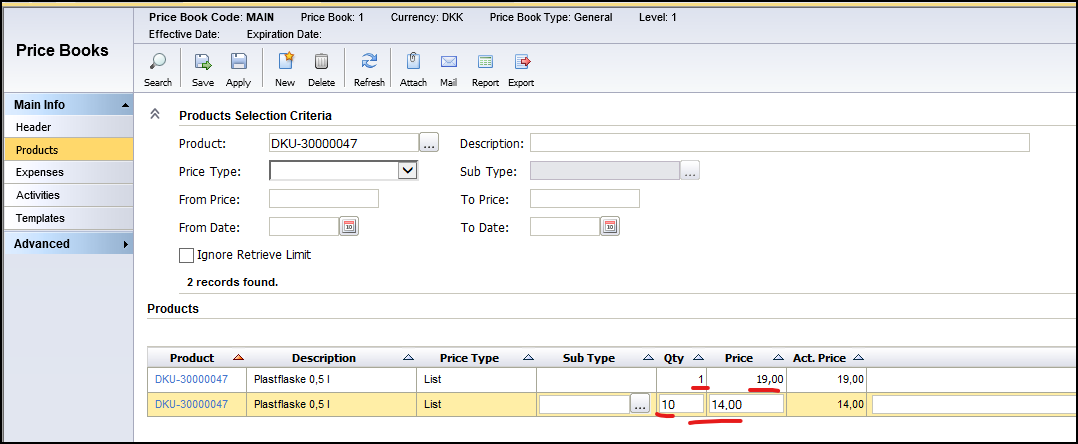
We have some products where we want to have a regular quantity discount price. I try to set this up in the MAIN pricebook as follows: 1-9 qty price = 19/ea. If 10 or more, price = 14/ea.
This is my setup in the pricebook:
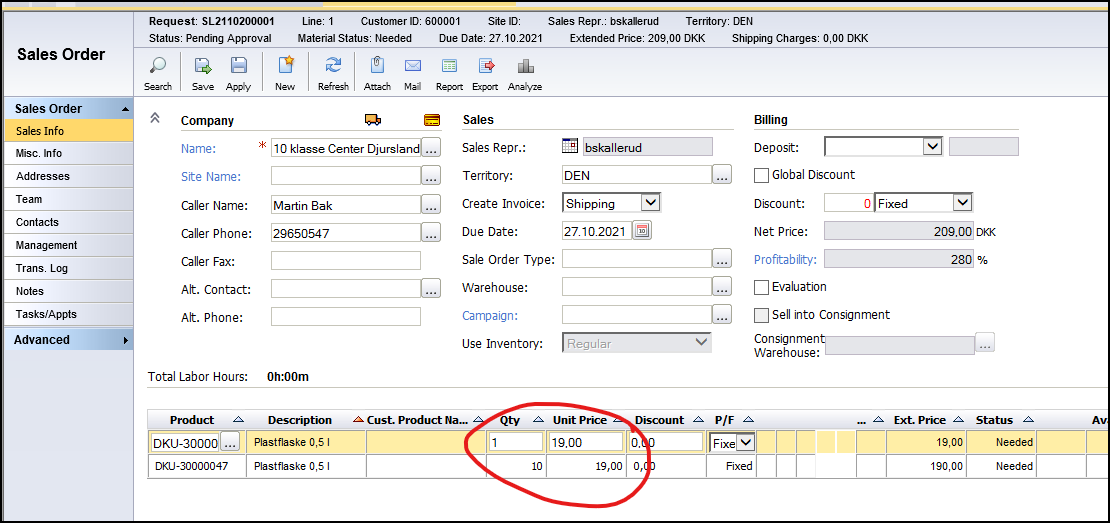
But this is what is shown on the salesorder lines:
Am I missing something? Or is not how the pricebook works?
Best answer by Phil Seifert
Hi Bjørn,
This is the correct method (I just checked it our in our QA for your code base). Suggestion is to remove the lines in the price book and then add them again using the product center (what we just tested that was working) plus remove the sales order line to insert it one more time.
From appearances, it looks like something got corrupted during the first go-round but when we did this again, it worked properly as you confirmed.
This is the correct method (I just checked it our in our QA for your code base). Suggestion is to remove the lines in the price book and then add them again using the product center (what we just tested that was working) plus remove the sales order line to insert it one more time.
From appearances, it looks like something got corrupted during the first go-round but when we did this again, it worked properly as you confirmed.