Solved

Extending the gpsdata retention time

  • September 12, 2023
  • 5 replies
  • 72 views

Forum|alt.badge.img+6

There is a table in the database called gpsdata that logs technicians’ gps coordinates, currently it retains about 3 days worth of gps data per user. We’re wondering if that timeframe is configurable. (We want to extend it to 7 days).

Does anyone know if that is configurable within the application?
Best answer by Reid Gilbert

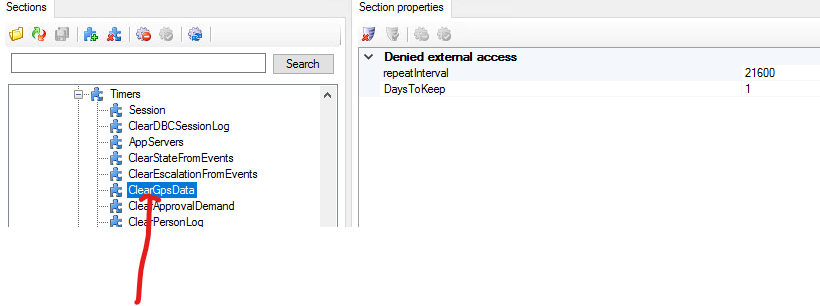
Take a look in the Coniguration Editor (under the Profile got to Timers) and click on the ClearGPSData entry in there:
 

Thanks,
Reid

5 replies

Reid Gilbert
Superhero (Employee)
Forum|alt.badge.img+15
  • Superhero (Employee)
  • Answer
  • September 12, 2023

Take a look in the Coniguration Editor (under the Profile got to Timers) and click on the ClearGPSData entry in there:
 

Thanks,
Reid


Forum|alt.badge.img+6
  • Author
  • Sidekick (Employee)
  • September 12, 2023

Thanks Reid, that’s exactly what I was looking for. However it’s a bit weird, currently we have that set to 1 DaysToKeep, despite our database having data from 5 days ago (although the majority of the data is from the last day). Any idea why it would be retaining records beyond that parameter?

GPS Records by Day


Reid Gilbert
Superhero (Employee)
Forum|alt.badge.img+15
  • Superhero (Employee)
  • September 12, 2023

I suspect maybe it’s really an issue where the timer isn’t firing, so try changing the repeatInterval to 3600 and the DaysToKeep to 2 and then hit SAVE and then do an IISRESET (maybe those values were cached so that should flush/update them).  Then wait an hour and see if it purges everything after 2 days...if that still doesn’t do the trick then log a ticket for it in the support system so we can dig into it further.
Thanks,
Reid


Forum|alt.badge.img+6
  • Author
  • Sidekick (Employee)
  • December 4, 2023

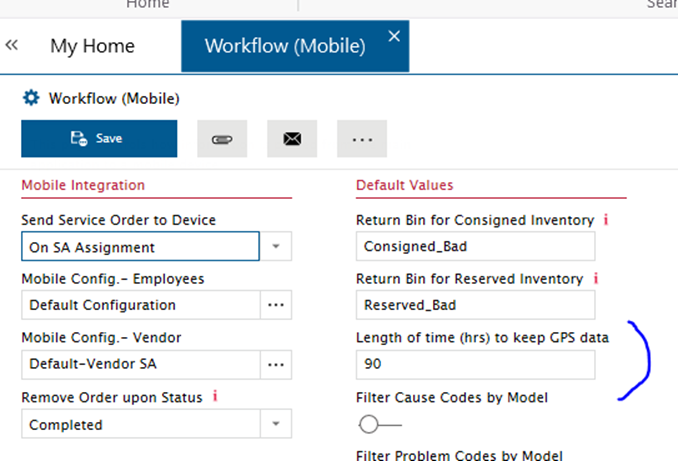
Note for future viewers on this thread. We were recently informed that the parameter above has been deprecated, and this configuration is now controlled on the Workflow(Mobile) settings. 


Phil Seifert
Ultimate Hero (Employee)
Forum|alt.badge.img+24
  • Ultimate Hero (Employee)
  • December 5, 2023

Thank you, Kevin.

Good to know!