Solved

Sending an email with the invoice to the customer

  • May 13, 2026
  • 38 replies
  • 171 views

Show first post

38 replies

Forum|alt.badge.img+11
  • Author
  • Hero (Customer)
  • June 4, 2026

strange, my new message wasn’t sent…

So yes, the pdf file sent is working, but is there a way to choose the report language? our reports must be made in french


Link
Superhero (Customer)
Forum|alt.badge.img+23
  • Superhero (Customer)
  • June 4, 2026

Sure, I posted the following screenshot before the last one. The community ignored it just.

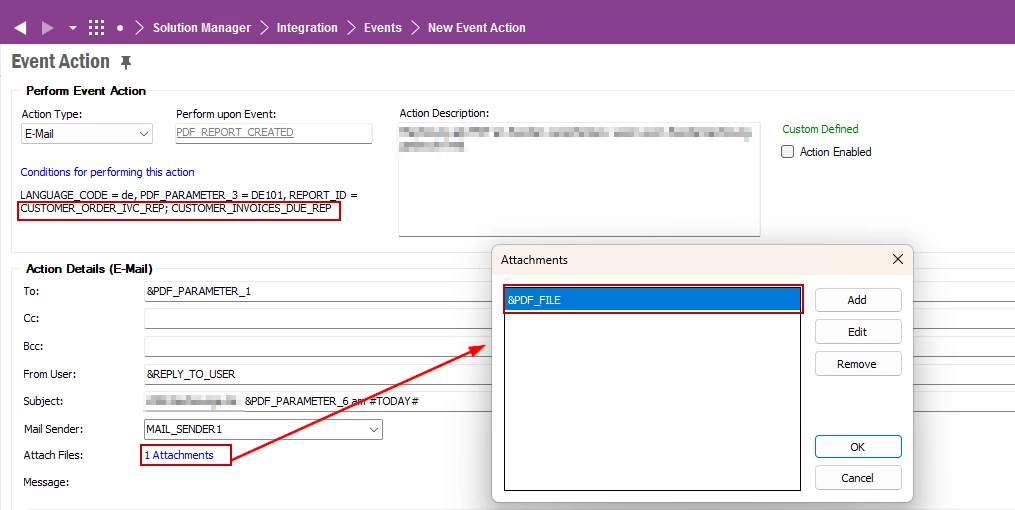
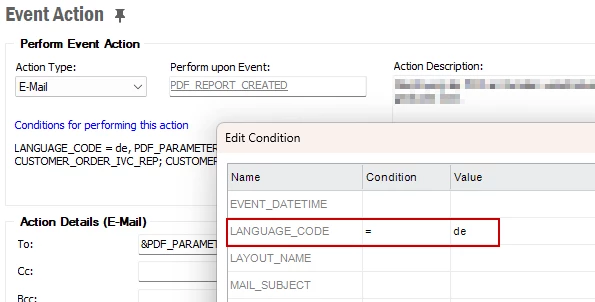
You can set the language by clicking on “Conditions for performing this action”. I used here “de” for German.


Forum|alt.badge.img+11
  • Author
  • Hero (Customer)
  • June 4, 2026

so you mean it’s not possible to set a report language? my goal is to make sure that 100% of the reports to generate are in french


Forum|alt.badge.img+11
  • Author
  • Hero (Customer)
  • June 4, 2026

nevermind, I just noticed the language is already set into french on the report itself. thx anyway, you saved a part of my life


Link
Superhero (Customer)
Forum|alt.badge.img+23
  • Superhero (Customer)
  • June 4, 2026

You definitely need the language code. Just type it as a further condition.


Link
Superhero (Customer)
Forum|alt.badge.img+23
  • Superhero (Customer)
  • June 4, 2026

nevermind, I just noticed the language is already set into french on the report itself. thx anyway, you saved a part of my life

You are welcome. 😊


Forum|alt.badge.img+11
  • Author
  • Hero (Customer)
  • June 8, 2026

@Link I put in my email the different &PDF_PARAMETER_ values but none of them is filled.

What’s the way to get the email address?

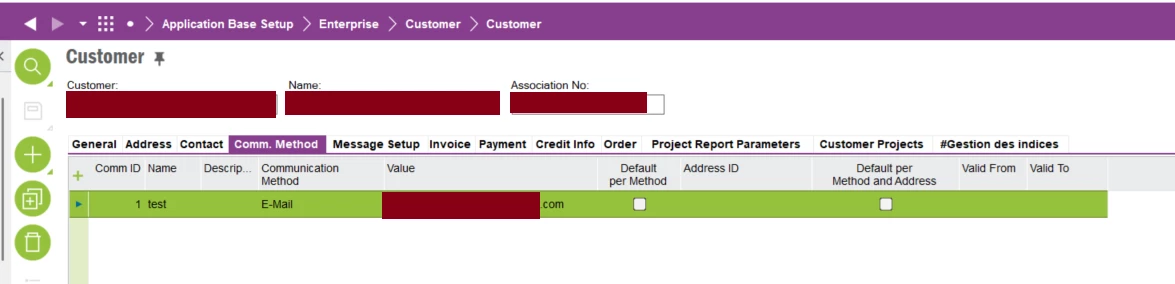
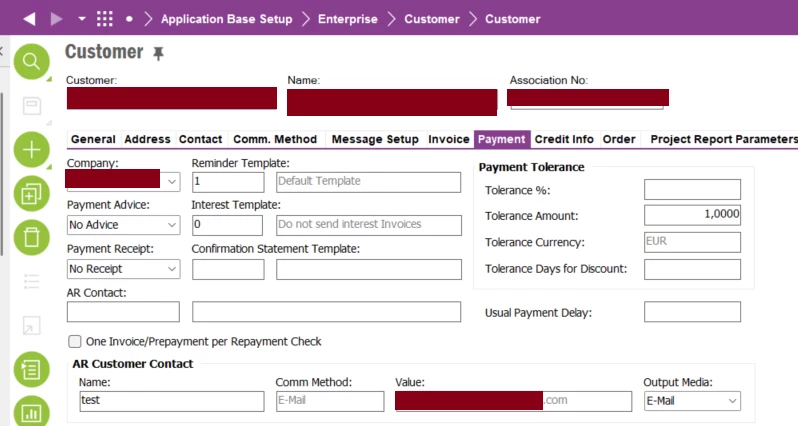
I added a communication method, email type in the customer screen, then, I selected it in payment → AR customer contact

the output media is set to email


Link
Superhero (Customer)
Forum|alt.badge.img+23
  • Superhero (Customer)
  • June 8, 2026

Hello ​@romsar 

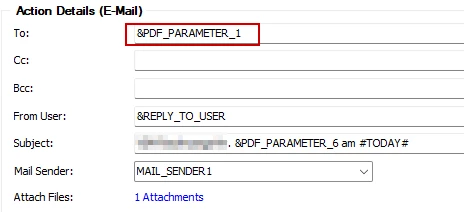
I use the following parameter:

This requires that the necessary customer master data be available. Check my old comments.

You can include all parameters in the body of the email to check their values as well.


Forum|alt.badge.img+11
  • Author
  • Hero (Customer)
  • June 8, 2026

In the custom action event, I made the body like this :

Appel de PDF_REPORT_CREATED


Variables :

REPORT_VARIABLES : &REPORT_VARIABLES


LAYOUT_NAME : &LAYOUT_NAME


NOTES : &NOTES


REPORT_PARAMETERS  : &REPORT_PARAMETERS


PDF_FILE : &PDF_FILE


PDF_FILE_NAME : &PDF_FILE_NAME


PDF_FILE_SENT_TO : &PDF_FILE_SENT_TO


PDF_PARAMETER_1 : &PDF_PARAMETER_1


PDF_PARAMETER_2 : &PDF_PARAMETER_2


PDF_PARAMETER_3 : &PDF_PARAMETER_3


PDF_PARAMETER_4 : &PDF_PARAMETER_4


PDF_PARAMETER_5 : &PDF_PARAMETER_5


PDF_PARAMETER_6 : &PDF_PARAMETER_6


PDF_PARAMETER_7 : &PDF_PARAMETER_7


PDF_PARAMETER_8 : &PDF_PARAMETER_8


PDF_PARAMETER_9 : &PDF_PARAMETER_9


PDF_PARAMETER_10 : &PDF_PARAMETER_10


PDF_PARAMETER_11 : &PDF_PARAMETER_11


PDF_PARAMETER_12 : &PDF_PARAMETER_12


PDF_PARAMETER_13 : &PDF_PARAMETER_13


PDF_PARAMETER_14 : &PDF_PARAMETER_14


PDF_PARAMETER_15 : &PDF_PARAMETER_15


And about the content of the email from my last test :
 

Appel de PDF_REPORT_CREATED


Variables :

REPORT_VARIABLES :


LAYOUT_NAME : xxxxxxxxx.rpt


NOTES : Customer No: xxxxxxx, Order No: xxxxxx, Invoice No: xxxxxxxx, Invoice Id: xxxxxx


REPORT_PARAMETERS  : INVOICE_COPY_NO0^INVOICE_IDxxxxxx^MEDIA_CODE^PRINT_ONLINE^


PDF_FILE : ###1f6e8c3d-8362-4251-a9c5-e62f944322be###32773###171908###Facture_171908.pdf


PDF_FILE_NAME : Facture_171908.pdf


PDF_FILE_SENT_TO :


PDF_PARAMETER_1 :


PDF_PARAMETER_2 :


PDF_PARAMETER_3 :


PDF_PARAMETER_4 :


PDF_PARAMETER_5 :


PDF_PARAMETER_6 :


PDF_PARAMETER_7 :


PDF_PARAMETER_8 :


PDF_PARAMETER_9 :


PDF_PARAMETER_10 :


PDF_PARAMETER_11 :


PDF_PARAMETER_12 :


PDF_PARAMETER_13 :


PDF_PARAMETER_14 :


PDF_PARAMETER_15 :


earlier, you put this screenshot but what’s the screen?


Link
Superhero (Customer)
Forum|alt.badge.img+23
  • Superhero (Customer)
  • June 8, 2026

And all these parameters are empty if you get an email?

Yes, this screenshot. I worte, that you need customer basic data.


Forum|alt.badge.img+11
  • Author
  • Hero (Customer)
  • June 8, 2026

that’s it, the different PDF_PARAMETER are all of them empty, I guess this is a settings issue on the customer side.

What do you mean by “basic data” ? I put a communication method that I set as email type


Link
Superhero (Customer)
Forum|alt.badge.img+23
  • Superhero (Customer)
  • June 8, 2026

Yes. A communication method with columns “Name” and “Address ID”.

Name should be the parameter 8 in the email.


Forum|alt.badge.img+11
  • Author
  • Hero (Customer)
  • June 8, 2026

I did set my communication method this way. Do I need a valid from date to make the communication method valid?


And then, I selected it to fill the AR customer contact part 


but as you saw, none of the parameters had a value. I’m actually wondering if the output media isn’t the right one, but the ifs help can’t help me to confirm my thought :

Output Media:

Documents will be delivered to the AR customer contact based on the selected output media. The output media can be Printout, Email, Mail to Fax or Xml. In order to send a document as an email, the corresponding email address must be shown in the Value field.