StickyQuestion

How can I export/ import multiple USER PROFILES in one(1) action.

  • October 8, 2024
  • 10 replies
  • 619 views

Forum|alt.badge.img+1
  • Do Gooder (Partner)

Cloud 24R1 : We would like to export/ import multiple user profiles in one action. 

When I select two user profiles I do not have the option to export both profiles into one export file?!
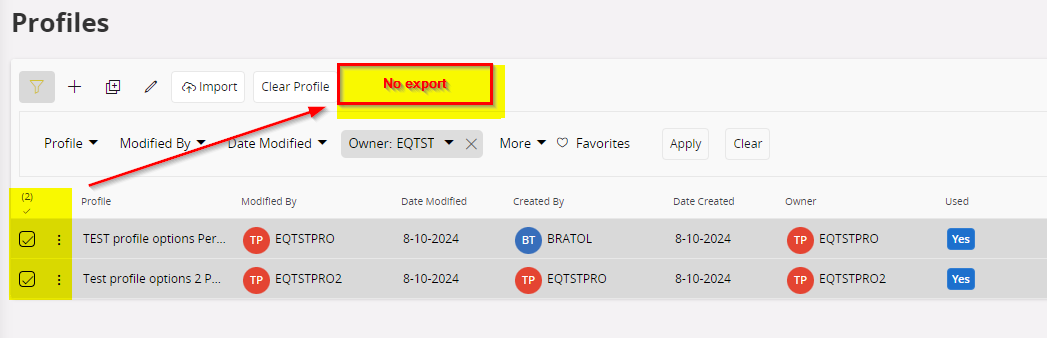
Anyone in the community knows how I can export/ import multiple USER profiles in one go? 

10 replies

wahelk
Hero (Former Employee)
Forum|alt.badge.img+11
  • Hero (Former Employee)
  • November 14, 2024

Let me know if you could fnd a  way to export into one file...


PhillBronson
Hero (Customer)
Forum|alt.badge.img+11
  • Hero (Customer)
  • December 6, 2024

The only way we were able to do it for our current migration was exporting the nodes and values from the database. Then write a script to import them….probably want to break it up into manageable chunks.


Forum|alt.badge.img+1
  • Author
  • Do Gooder (Partner)
  • December 9, 2024

Thank you for your response. 


At the end, ….. I did it one-by-one 🙁.


Regards,

Bram.


eqbstal
Superhero (Partner)
Forum|alt.badge.img+21
  • Superhero (Partner)
  • July 8, 2025

It doesn't help you, ​@BvT, I know, but IFS25R1 has the same issue.


GTVMARBIE
Do Gooder (Customer)
Forum|alt.badge.img+1
  • Do Gooder (Customer)
  • September 24, 2025

As far as I know it’s locked in core code and it can be unlocked after what you are able to export multiple user profiles at once. Of course it creates dedicated file per profile but at least export is easy because importing must be done precisely user by user :(


Forum|alt.badge.img+2
  • Do Gooder (Customer)
  • October 21, 2025

Exporting can be done using this Quick Report SQL statement:

select * FROM CLIENT_PROFILE_NODE_FULL

You can import this using Excel to manipulate the export making it into an xml, but I don’t think it imports at a user level, you can import sections into users profiles (eg. bookmarks and table view layouts) which I have been successful at doing.

I have the instructions on how to do this, but they are a bit long. Essentially, you create an xml table, but don’t include these fields: state, OBJ_VERSION, PROFILE_ID, PROFILE_NAME and OWNER as elements.


Forum|alt.badge.img+1
  • Do Gooder (Customer)
  • November 12, 2025

I was able to write a script to export and import profiles in bulk from the back end. In a nutshell, I called client_profile_handling_svc.do_export_profile_action to generate the profile nodes, then client_profile_node_api.generate_xml_data_for_node to get a blob. From there, you have a couple of options, but I converted it to a clob and wrote it to an xml file with dbms_xslprocessor.clob2file. To import, I did the reverse and read the file into an xmltype and passed that to client_profile_node_api.import_xml_data.


REOGIRARD
Sidekick (Customer)
Forum|alt.badge.img+9
  • Sidekick (Customer)
  • February 20, 2026

Hello,

I built a tool using nodejs and newman postman CLI
You can achieve this throught REST calls.
It’s working, i can mass export, mass import, and import service profile for service users.

Have a good day


Forum|alt.badge.img+7
  • Sidekick (Customer)
  • March 5, 2026

Hello,

I built a tool using nodejs and newman postman CLI
You can achieve this throught REST calls.
It’s working, i can mass export, mass import, and import service profile for service users.

Have a good day

We had the same issue, and ended up by creating stand-alone API calls for

  • Update the Directory (WebUser) from the Identity
  • Reset a user's password
  • Update the Directory from the email

It is based using WebDev.
But I’m interested in your tools.


REOGIRARD
Sidekick (Customer)
Forum|alt.badge.img+9
  • Sidekick (Customer)
  • March 6, 2026

@MCIPSTEV

Hello,

Thank you for your interest.

Unfortunately, we cannot share our internal tooling, but I can explain the overall approach.

The tool is based on a Postman collection orchestrated through Newman and Node.js to automate the mass export and import of IFS Cloud personalization profiles across environments.

For the export phase, the collection calls the ClientProfileHandling projection through the IFS REST API.

First, it queries the ClientProfileSet entity to retrieve all available profiles. A Postman script then parses the response and extracts the PROFILE_ID values from the keyref field, storing them in collection variables to dynamically loop over all profiles.

For each profile:

  1. The collection calls the ExportProfileAction action.

  2. The response returns a requestkey used to retrieve the generated XML file.

  3. The XML is downloaded through the corresponding endpoint.

The collection itself only retrieves the HTTP response. The actual file extraction is handled by a Node.js wrapper around Newman.

The Node script listens to Newman request events, captures the XML response stream, extracts the PROFILE_ID using a regex, and writes each profile as a separate XML file.

This produces a clean export directory containing:

PROFILE_A.xml
PROFILE_B.xml
PROFILE_C.xml

For the import phase, another Postman collection reproduces the same workflow used internally by the IFS web client.

The process is slightly more complex because the API requires temporary entities:

  1. Initialize an XmlVirtualSet

  2. Upload the XML profile using the FileData endpoint (octet-stream)

  3. Create a temporary LOB through FndTempLobs

  4. Attach the profile selection to the temporary LOB

  5. Execute ImportProfileAction

  6. Clean up the temporary virtual entities

The import is orchestrated by a second Node.js script, which scans the export directory and executes the Newman collection once per XML file.

Each run dynamically injects environment variables such as:

  • bearer token

  • file path

  • profile name

  • x-ifs-content-disposition header used by IFS to identify the uploaded file

This allows us to mass migrate personalization profiles between environments (DEV → PREPROD → PROD) entirely from the command line.

Originally the tool also implemented multi-user profile import logic, but since IFS Cloud 24R1 has that feature, that part became unnecessary.

I initially built this with the help of AI so I could focus on other ERP topics in parallel, but it turned out to be a very efficient way to automate profile migrations.