Solved

After the custom Attribute - CDB file

  • February 6, 2026
  • 8 replies
  • 103 views

ZTC ZTC JGOTA
Hero (Customer)
Forum|alt.badge.img+14

Hello IFS Community,

After creating a custom attribute using IFS Studio Developer and compiling the .cre file, I have a question regarding the .cdb file creation.

When creating the .cdb file, do I need to copy the entire content of the .cre file, or only the section where the custom attribute is declared?

For example:

DECLARE
   table_name_ VARCHAR2(30) := 'TRANSPORT_TASK_TAB';
   columns_    Database_SYS.ColumnTabType;
   column_     Database_SYS.ColRec;
BEGIN
   Database_SYS.Reset_Column_Table(columns_);
   Database_SYS.Set_Table_Column(columns_, 'TRANSPORT_TASK_ID', 'NUMBER', 'N');
   Database_SYS.Set_Table_Column(columns_, 'PRINTED_FLAG', 'NUMBER', 'N');
   Database_SYS.Set_Table_Column(columns_, 'CREATE_DATE', 'DATE', 'N');
   Database_SYS.Set_Table_Column(columns_, 'NOTE_TEXT', 'VARCHAR2(2000)', 'Y');
   Database_SYS.Set_Table_Column(columns_, 'FIXED', 'VARCHAR2(5)', 'N');
   Database_SYS.Set_Table_Column(columns_, 'SPLIT_BY_HU_CAPACITY', 'VARCHAR2(5)', 'N');
   Database_SYS.Set_Table_Column(columns_, 'CREATED_BY', 'VARCHAR2(120)', 'Y');--Custom attribute
   Database_SYS.Set_Table_Column(columns_, 'ROWVERSION', 'DATE', 'N');
   Database_SYS.Set_Table_Column(columns_, 'ROWKEY', 'VARCHAR2(50)', 'N', 'sys_guid()');
   Database_SYS.Create_Or_Replace_Table(table_name_, columns_, '&IFSAPP_DATA', NULL, TRUE);
END;
-- [END IFS COMPLETE BLOCK]
/

Or Do I need need to copy the entire cre file?
Best answer by InfFilipV

Hi,
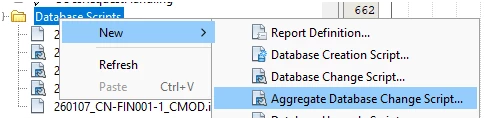
use this menu for creation of CDB. - so it is safely reexecutable.


never include -- [END IFS COMPLETE BLOCK] in cdbs


and only include as less as possible, but this is minimum

DECLARE
table_name_ VARCHAR2(30) := 'TRANSPORT_TASK_TAB';
columns_ Database_SYS.ColumnTabType;
column_ Database_SYS.ColRec;
BEGIN
Database_SYS.Reset_Column_Table(columns_);
Database_SYS.Set_Table_Column(columns_, 'CREATED_BY', 'VARCHAR2(120)', 'Y');
Database_SYS.Create_Or_Replace_Table(table_name_, columns_, '&IFSAPP_DATA', NULL, TRUE);
END;


8 replies

CallumW
Superhero (Partner)
Forum|alt.badge.img+16
  • Superhero (Partner)
  • February 6, 2026

You only need to add the new column.


P.s. when customising standard IFS, you should prefix your fields with C_ e.g. C_CREATED_BY


Naming and Syntax Guidelines - Technical Documentation For IFS Cloud


DECLARE
   table_name_ VARCHAR2(30) := 'TRANSPORT_TASK_TAB';
   columns_    Database_SYS.ColumnTabType;
   column_     Database_SYS.ColRec;
BEGIN
   Database_SYS.Reset_Column_Table(columns_);
   Database_SYS.Set_Table_Column(columns_, 'C_CREATED_BY', 'VARCHAR2(120)', 'Y');
   Database_SYS.Create_Or_Replace_Table(table_name_, columns_, '&IFSAPP_DATA', NULL, TRUE);
END;


Update to add more information for completeness/ future IFS Versions

You do not need to copy the indexing / key sections.

25R2 specific: You must copy the creation of the Editioning View as well.


InfFilipV
Hero (Partner)
Forum|alt.badge.img+13
  • Hero (Partner)
  • Answer
  • February 6, 2026

Hi,
use this menu for creation of CDB. - so it is safely reexecutable.


never include -- [END IFS COMPLETE BLOCK] in cdbs


and only include as less as possible, but this is minimum

DECLARE
table_name_ VARCHAR2(30) := 'TRANSPORT_TASK_TAB';
columns_ Database_SYS.ColumnTabType;
column_ Database_SYS.ColRec;
BEGIN
Database_SYS.Reset_Column_Table(columns_);
Database_SYS.Set_Table_Column(columns_, 'CREATED_BY', 'VARCHAR2(120)', 'Y');
Database_SYS.Create_Or_Replace_Table(table_name_, columns_, '&IFSAPP_DATA', NULL, TRUE);
END;


ZTC ZTC JGOTA
Hero (Customer)
Forum|alt.badge.img+14
  • Author
  • Hero (Customer)
  • February 24, 2026

Thanks Both ​@CallumW ​@InfFilipV  , both answer are correct


RakeshChangeshpur
Sidekick (Partner)
Forum|alt.badge.img+10

You only need to add the new column.


P.s. when customising standard IFS, you should prefix your fields with C_ e.g. C_CREATED_BY


Naming and Syntax Guidelines - Technical Documentation For IFS Cloud


DECLARE
   table_name_ VARCHAR2(30) := 'TRANSPORT_TASK_TAB';
   columns_    Database_SYS.ColumnTabType;
   column_     Database_SYS.ColRec;
BEGIN
   Database_SYS.Reset_Column_Table(columns_);
   Database_SYS.Set_Table_Column(columns_, 'C_CREATED_BY', 'VARCHAR2(120)', 'Y');
   Database_SYS.Create_Or_Replace_Table(table_name_, columns_, '&IFSAPP_DATA', NULL, TRUE);
END;


Update to add more information for completeness/ future IFS Versions

You do not need to copy the indexing / key sections.

25R2 specific: You must copy the creation of the Editioning View as well.

you dont need to copy the Editioning view right? @call


InfFilipV
Hero (Partner)
Forum|alt.badge.img+13
  • Hero (Partner)
  • May 14, 2026

Hi,
when you modify entity, it automaticaly regenerate all files needed to redeploy. This remain same as previously.

Of course, when you are following NZD, you should use ddlsource instead of cdb.


RakeshChangeshpur
Sidekick (Partner)
Forum|alt.badge.img+10

Hi ​@InfFilipV ,


Lets consider the below example to understand more in detail


We have a new entity or customise core entity to add some attributes 


before 25R2 we used to move the piece of code in cdb ( for columns, keys,indexes etc..)

now in 25R2 and beyond do we still have the cdb’s or only the ddlsource files?

considering the NZD as false


Let me know your thoughts also the ddlsource doesnt allow to include the code for Editioning view as this is taken care by the .edv files


correct me if i am wrong 


InfFilipV
Hero (Partner)
Forum|alt.badge.img+13
  • Hero (Partner)
  • May 14, 2026

Hi,

If you do not need your code to be NZD-compliant, you can continue in the same way as before.

The CDB should still contain only tables, keys, and indexes.

The EDV is a generated file and is handled automatically. Changes there still cannot be placed anywhere else.

The only difference could be during the application of an RU, when you need to call Database_SYS.Prepare_M_V_For_EBR for all custom tables. Whether this should be done first or last depends on the usage of TAB or RTB in the CDB executed in the delivery. However, this is relevant only for the very first delivery to 25R1 or higher.


DDLSOURCE allows you to use slightly better structured change handling. You have one DDLSOURCE with @CodeRegistration stamps and ordering per entity, so it is nicely separated, instead of mixed CDB files where changes for one entity are spread across multiple files.

DDLSOURCE then generates a DDL file, which is executed.

DDLSOURCE files can also be used in parallel with CDBs.

However, the code inside should be NZD-compliant. Unlike CDBs, it often cannot simply be copied from CRE files.


RakeshChangeshpur
Sidekick (Partner)
Forum|alt.badge.img+10

Thanks for the clear explanation ​@InfFilipV