Question

25R1 Permissions at Workflow level not working for me

  • September 26, 2025
  • 16 replies
  • 345 views

Forum|alt.badge.img+2

Hello everyone,

I was excited when they announced that in 25R1 users can be granted permissions to execute workflows on projections they normally do not have access to - see here: 

However I don’t seem to be able to make it work. I have a very simple test workflow run by clicking a button just reading from a projection not normally accessible to the basic user, I granted Internal access (also tried Full access out of frustration) for the workflow for the relevant permission set and I still get the FndProjectionGrant.SRV_NOT_ACCESS error.

Has anyone else experienced the same issue? Or were you able to make it work? I couldn’t find any posts on this topic, which suggests to me I might be doing something wrong...

16 replies

Forum|alt.badge.img+1
  • Do Gooder (Employee)
  • September 26, 2025

Hi,


I investigated the issue you mentioned. It appears you're attempting to execute a Workflow using the Workflow command. This requires either External Access or Full Access, as it does not work with Internal Access.

If you're encountering the issue even after granting Full Access, it could be due to one of the following reasons:

  1. There may be a cascade Workflow involved that hasn't been granted the necessary access.
  2. The newly created user may not have the necessary permissions to execute the REST endpoint

Forum|alt.badge.img+2
  • Author
  • Do Gooder (Customer)
  • September 26, 2025

Hi,


I investigated the issue you mentioned. It appears you're attempting to execute a Workflow using the Workflow command. This requires either External Access or Full Access, as it does not work with Internal Access.

If you're encountering the issue even after granting Full Access, it could be due to one of the following reasons:

  1. There may be a cascade Workflow involved that hasn't been granted the necessary access.
  2. The newly created user may not have the necessary permissions to execute the REST endpoint

Thank you for your answer, but I do not think any of the reasons apply.

Ad 1.: I am certain no other workflows cascade from this.

Ad 2.: I double checked the basic users indeed has the basic permission set with the workflow.


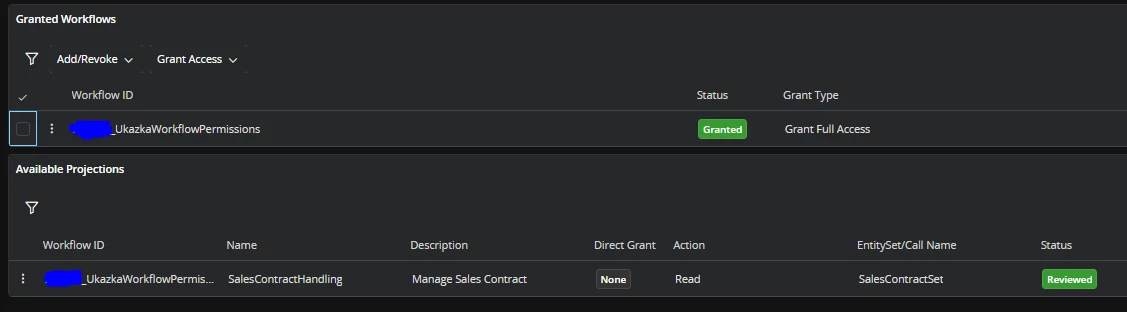
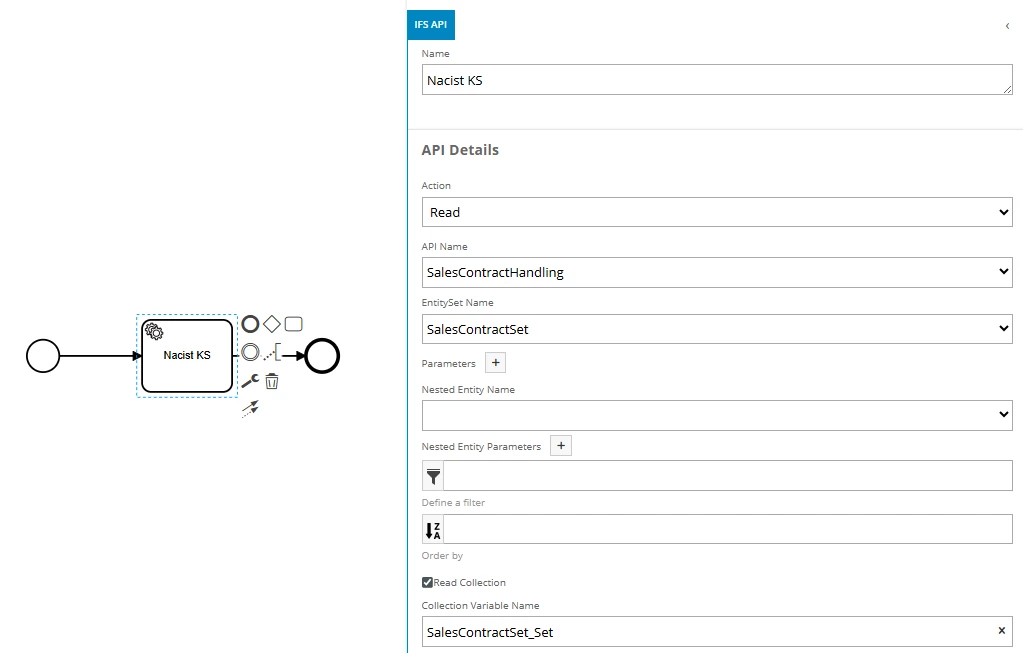
This is my workflow (it is not actually useful, just a test):

(SalesContractHandling projection is normally not accessible to basic user)

To dispel any doubts around triggering the workflow from a Workflow command, I switched to this trigger (again, not actually useful, just something I can easily trigger for test purposes):

And here is the grant on our basic user permission set (with full access to make sure):


User who normally has access to the projection can trigger and execute the workflow without issue. User with our basic permission set still gets the error. I can’t be entirely sure it is the exact error I wrote about in my original post (FndProjectionGrant.SRV_NOT_ACCESS) because I get that from rerunning the workflow for inspection from the observed run, but it certainly is some 403-unauthorized error.


Any other ideas would be greatly appreciated :)


Forum|alt.badge.img+1
  • Do Gooder (Employee)
  • September 26, 2025

Hi,

By design, Workflow Level Permission Sets are only supported in Production Mode. If the workflow is running in Troubleshoot Mode, it should return an error that you mentioned (FndProjectionGrant.SRV_NOT_ACCESS) .This is the expected behavior for Workflow Level Permission Sets. We will mention this in Techdoc and update it.


Forum|alt.badge.img+2
  • Author
  • Do Gooder (Customer)
  • September 26, 2025

Yes, I get that, but even when the basic viewer triggers the workflow the “correct way” - via the projection action, the workflow triggers but runs into an error.


Forum|alt.badge.img+2
  • Author
  • Do Gooder (Customer)
  • September 26, 2025

*basic USER not viewer, sorry


Forum|alt.badge.img+1
  • Do Gooder (Employee)
  • September 29, 2025

Hi,

If you do not have permission to trigger the Projection Action or execute the workflow, the following error message should be returned in Production Mode.


Therefore, it would be great if you could share the error message along with relevant screenshots.


Additionally, I’d like to know how permissions are granted to users. Are they assigned individually or through a group?
We’ve already identified and resolved an issue related to Group-based permission grants, and the fix will be available in the next release.
However, if permissions are granted individually, everything should work as expected.
In our environments, we haven’t observed any issues when triggering workflow via read projection action while using individual grants.


Forum|alt.badge.img+2
  • Author
  • Do Gooder (Customer)
  • September 29, 2025

I see, permission sets are indeed granted via user groups. I will try again later with a direct grant of the workflow to the user and let you know. Thank you!

The error message is exactly what you shared.


Forum|alt.badge.img+2
  • Author
  • Do Gooder (Customer)
  • November 27, 2025

Just to update: I tried granting the permission set (which contains the workflow) directly to the user (not via a user group) and it works.

Sadly, until the fix for group-based permissions is available, we won’t be able to use permissions at workflow level, as we assign permission sets via user groups. Looking forward to the fix :)


Forum|alt.badge.img
  • Do Gooder (Partner)
  • January 9, 2026

Hi,


I investigated the issue you mentioned. It appears you're attempting to execute a Workflow using the Workflow command. This requires either External Access or Full Access, as it does not work with Internal Access.

If you're encountering the issue even after granting Full Access, it could be due to one of the following reasons:

  1. There may be a cascade Workflow involved that hasn't been granted the necessary access.
  2. The newly created user may not have the necessary permissions to execute the REST endpoint

I have the same issue, with a cascaded workflow.
Both workflows are granted with External Access, The first workflow fails with:
FndProjectionGrant.SRV_NOT_ACCESS: You cannot access the service JtTaskEntity


Forum|alt.badge.img+5
  • Do Gooder (Employee)
  • January 27, 2026

Hi ​@RHam23 ,

Is your cascade workflow triggered by an event action for the JtTaskEntity LU?


Forum|alt.badge.img
  • Do Gooder (Partner)
  • January 28, 2026

Hi ​@RHam23 ,

Is your cascade workflow triggered by an event action for the JtTaskEntity LU?

Yes: The cascaded WF is connected to the JtTask entity using Custom events


Forum|alt.badge.img+5
  • Do Gooder (Employee)
  • January 29, 2026

Hi ​@RHam23 ,

From the Permissions at Workflow level feature, the following is covered: if you use a projection in an IFS API task within a workflow that is not granted to the user, but you grant workflow permission to that permission set, then the user can execute the workflow.

However, in this case, the issue occurs before executing the workflow. There is a step to resolve the data types, and during that step it tries to get an authorized connection using the JtTaskEntity entity service API in your case. Since the projection is not granted to the user, the issue may occur with the error:
FndProjectionGrant.SRV_NOT_ACCESS: You cannot access the service JtTaskEntity.

As a workaround for now, if the JtTaskEntity API is not active, you can activate it from the API Explorer and grant the permission to the user.

A fix is planned for this issue in the following releases:

24.1.21 - 24R1 SU21, 24.2.15 - 24R2 SU15, 25.1.9 - 25R1 SU9, 25.2.3 - 25R2 SU3, 26.2E.0 - 26R2 EA


Forum|alt.badge.img
  • Do Gooder (Partner)
  • February 2, 2026

Hi ​@RHam23 ,

From the Permissions at Workflow level feature, the following is covered: if you use a projection in an IFS API task within a workflow that is not granted to the user, but you grant workflow permission to that permission set, then the user can execute the workflow.

However, in this case, the issue occurs before executing the workflow. There is a step to resolve the data types, and during that step it tries to get an authorized connection using the JtTaskEntity entity service API in your case. Since the projection is not granted to the user, the issue may occur with the error:
FndProjectionGrant.SRV_NOT_ACCESS: You cannot access the service JtTaskEntity.

As a workaround for now, if the JtTaskEntity API is not active, you can activate it from the API Explorer and grant the permission to the user.

A fix is planned for this issue in the following releases:

24.1.21 - 24R1 SU21, 24.2.15 - 24R2 SU15, 25.1.9 - 25R1 SU9, 25.2.3 - 25R2 SU3, 26.2E.0 - 26R2 EA

This worked. Looking forward for the fix


Forum|alt.badge.img+6
  • Sidekick (Customer)
  • March 21, 2026

@pdollk Is there any known limitation that does not allow workflow grants to be inherited from nested functional role permission sets? Our permission structure looks something like this: 1 end user role is granted to a user group. That end user role has no projection permissions, but it has a group of functional role permission sets granted to it.


The functional role permission sets are where the projection permissions are assigned. This is great because different end user permission sets can use the same functional role permission set and if something is changed, all end users inherit the change at the same time. However, I also granted workflows at the functional role level, and I kept getting a permission error when the workflow got run by a user with an end user set that inherited the functional role set. When I moved the workflow out of the inherited functional role and into the end user permission set, the permission error was resolved. Shouldn’t the workflow grants from the functional role be inherited by end user roles (or other functional roles, for that matter) that the functional role is granted to, just like projection grants?


We are on 25.2.3


Forum|alt.badge.img+5
  • Do Gooder (Employee)
  • March 23, 2026

Hi ​@dritter 

I tried to recreate your issue. I hope I recreated it correctly.

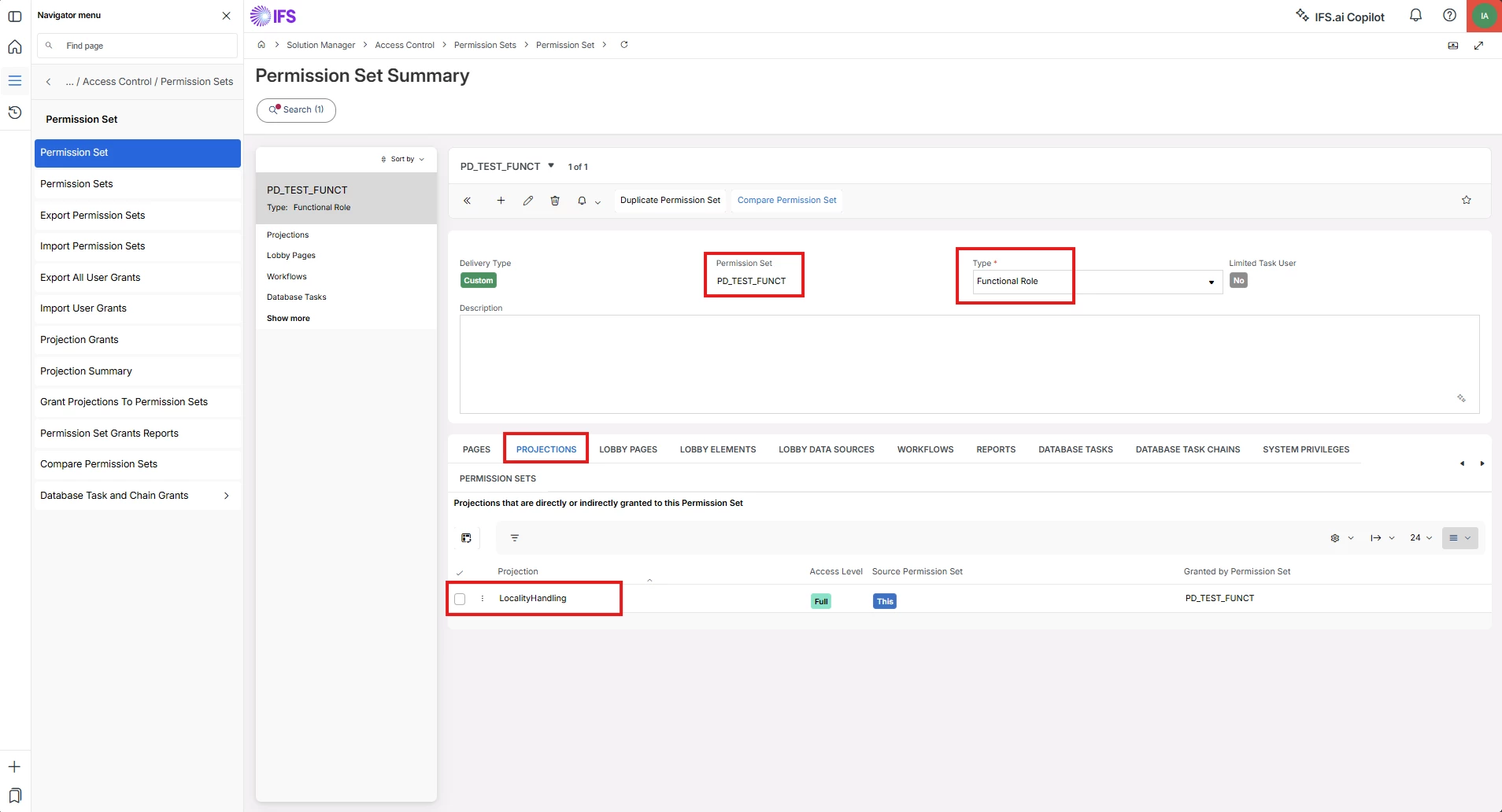
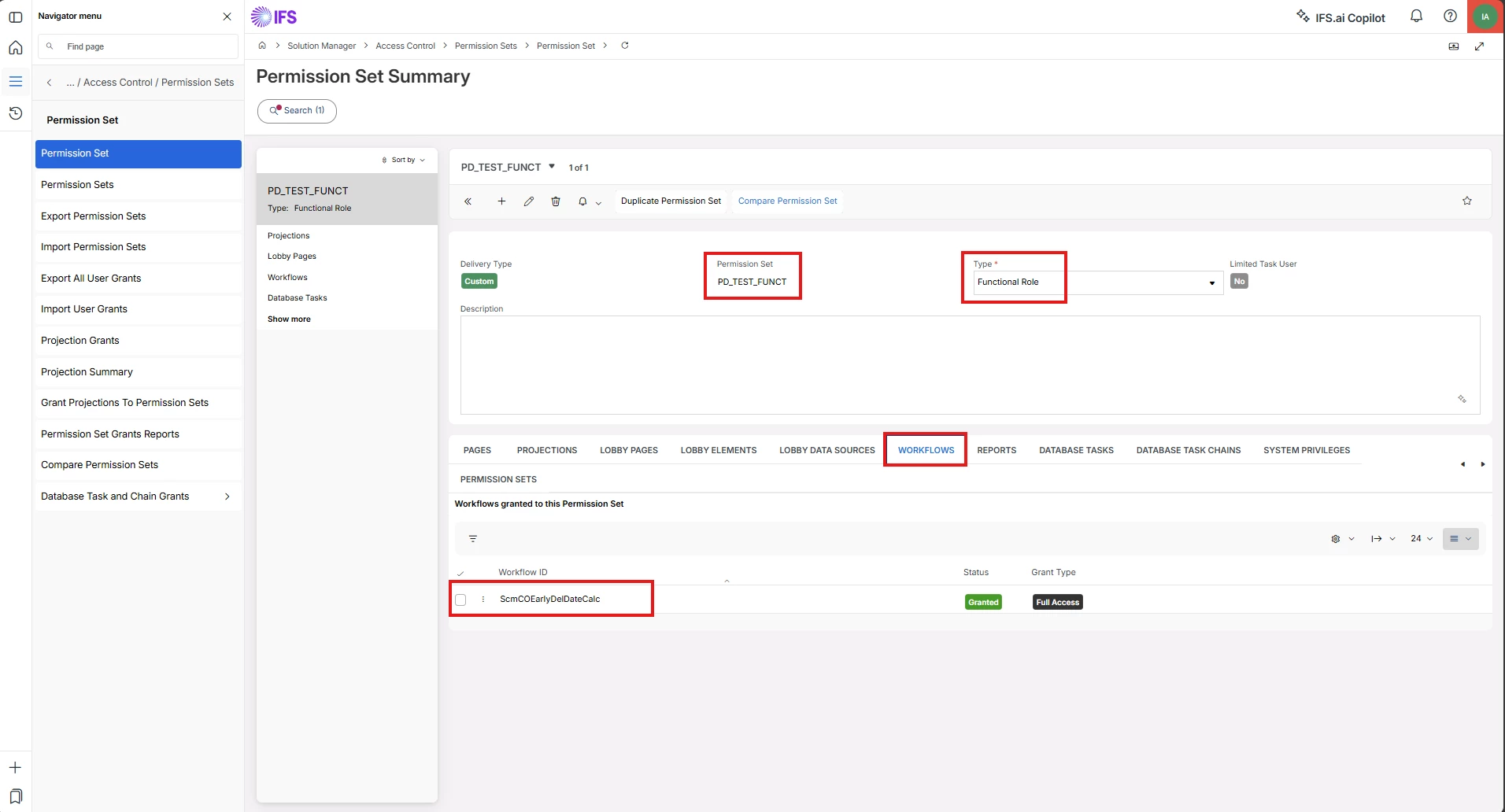
Created a functional role permission set PD_TEST_FUNCT and granted a projection and a workflow (not related to each other)


Created an end user role permission set PD_TEST_USER and did not grant a projection or workflow, but granted PD_TEST_FUNCT
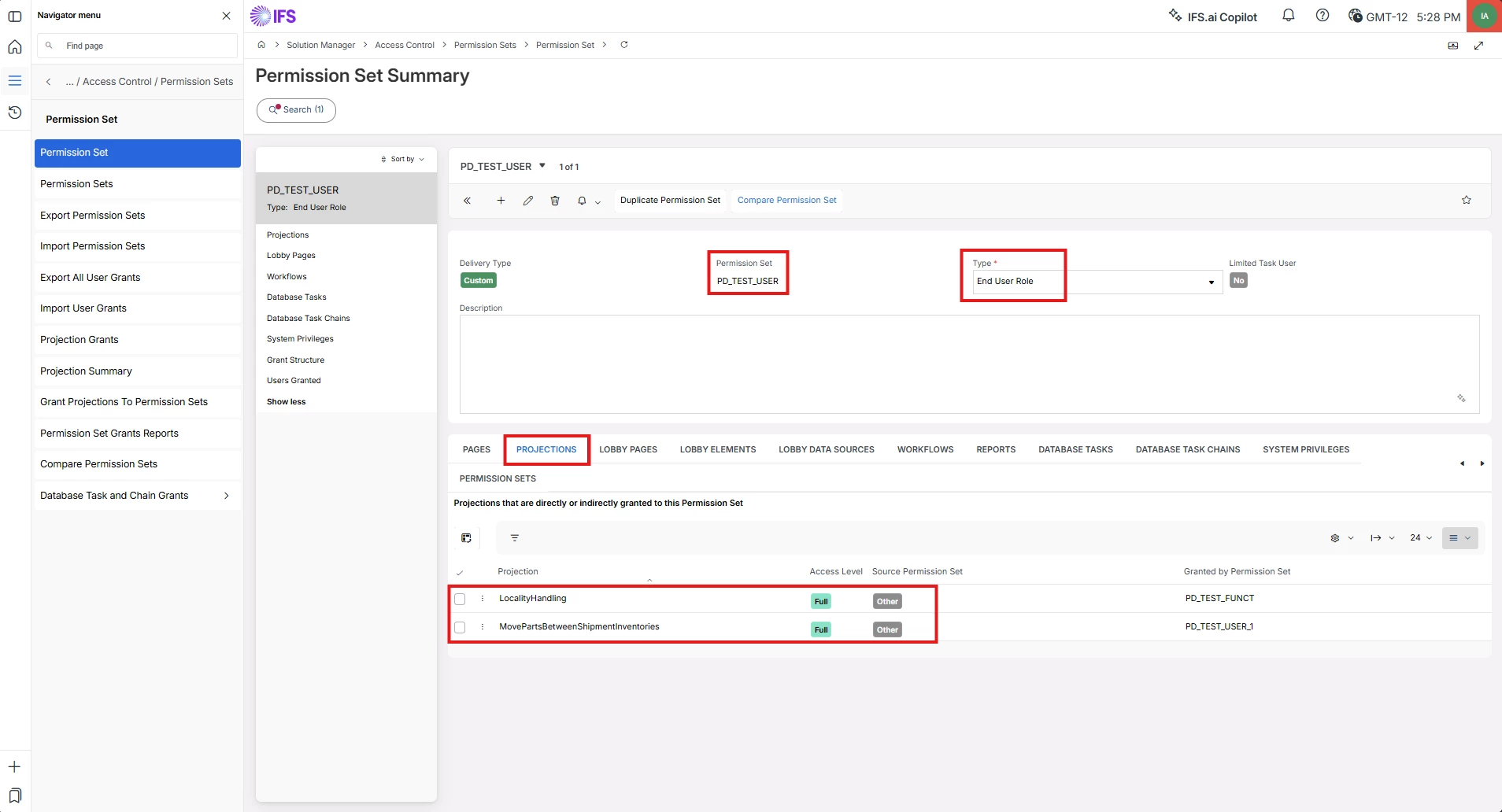
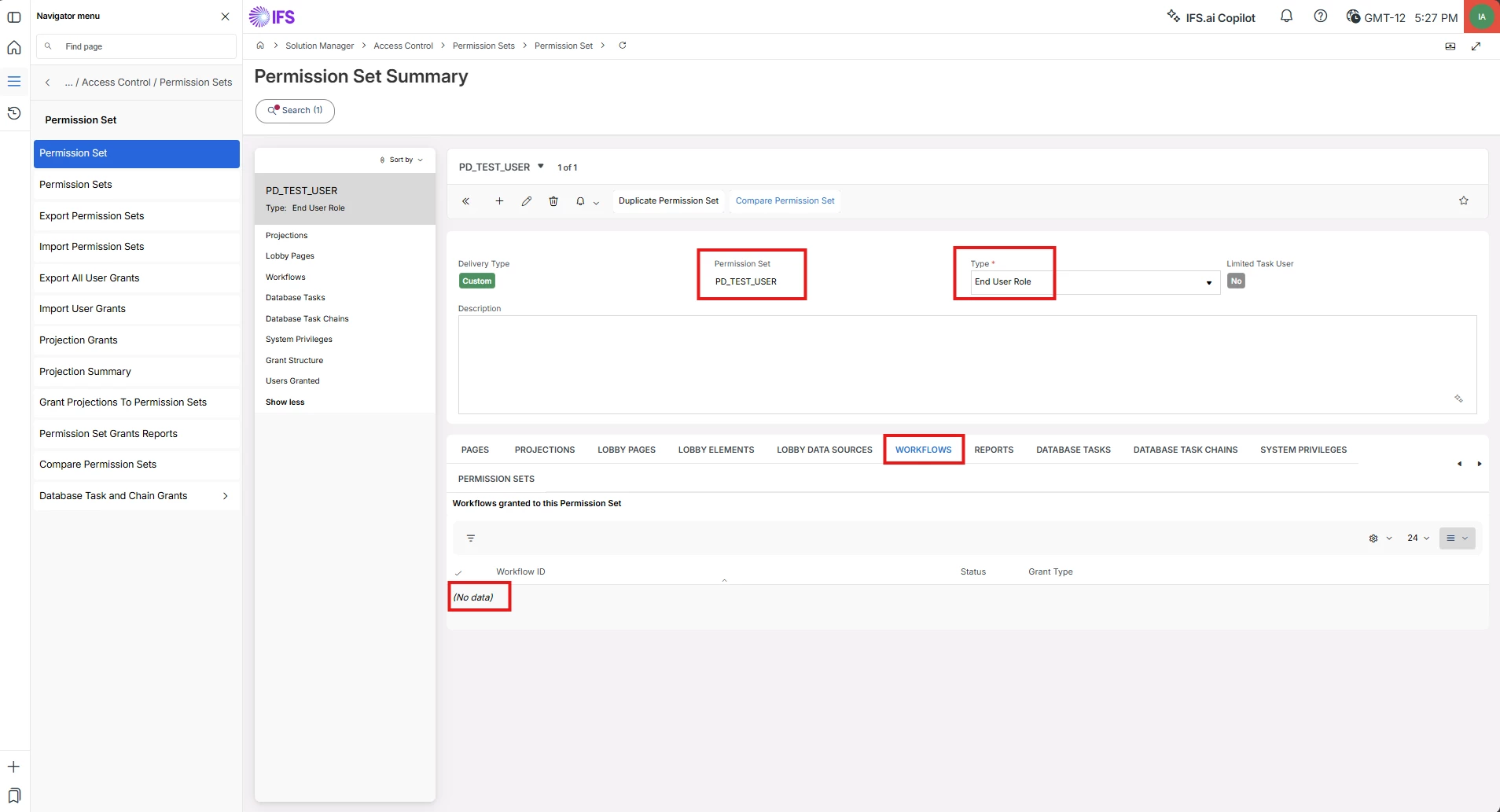
Checked that the projection and workflow are listed under PD_TEST_USER, which are granted from PD_TEST_FUNCT
Observations: only the projection is listed, no workflows

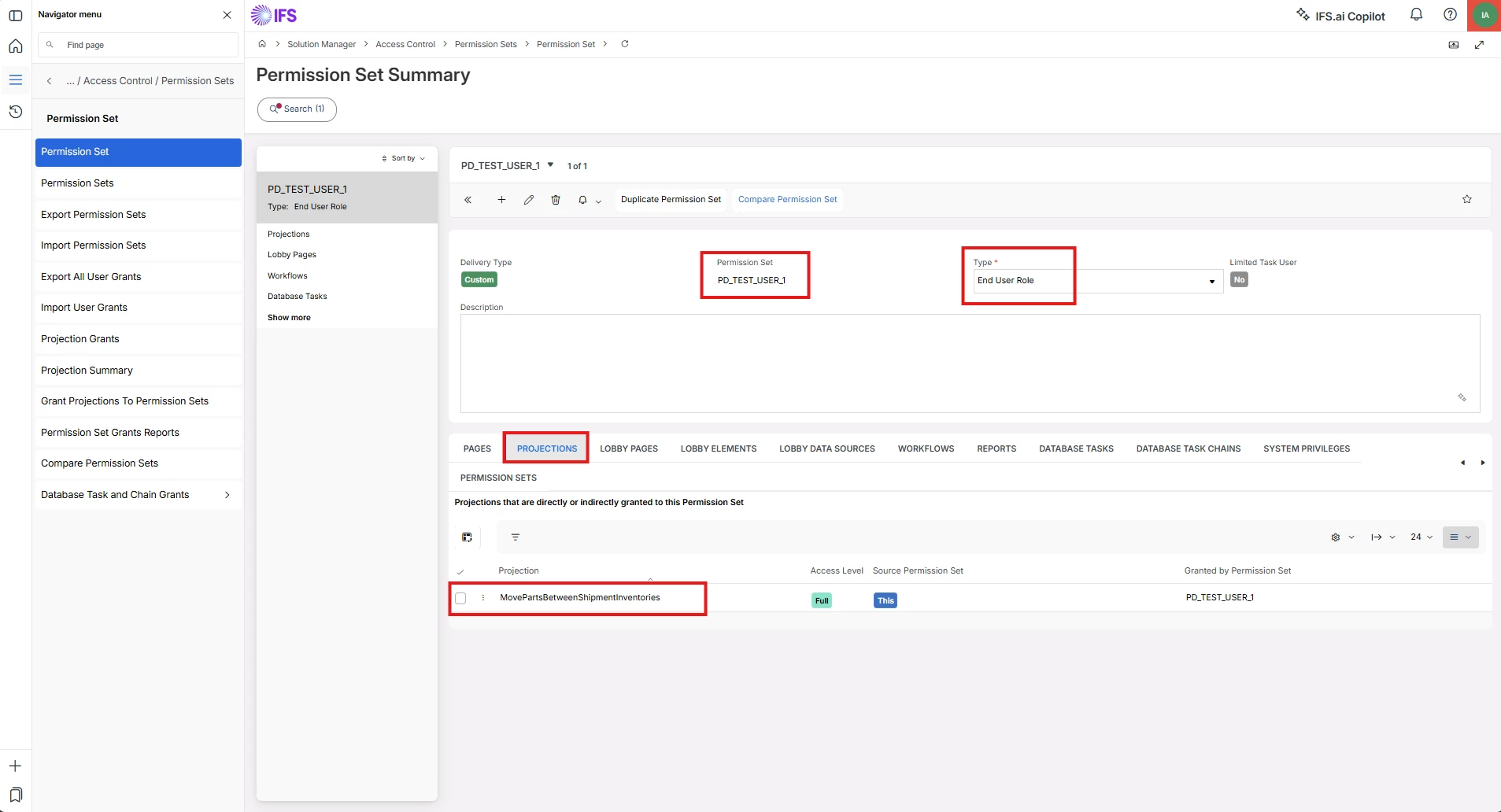
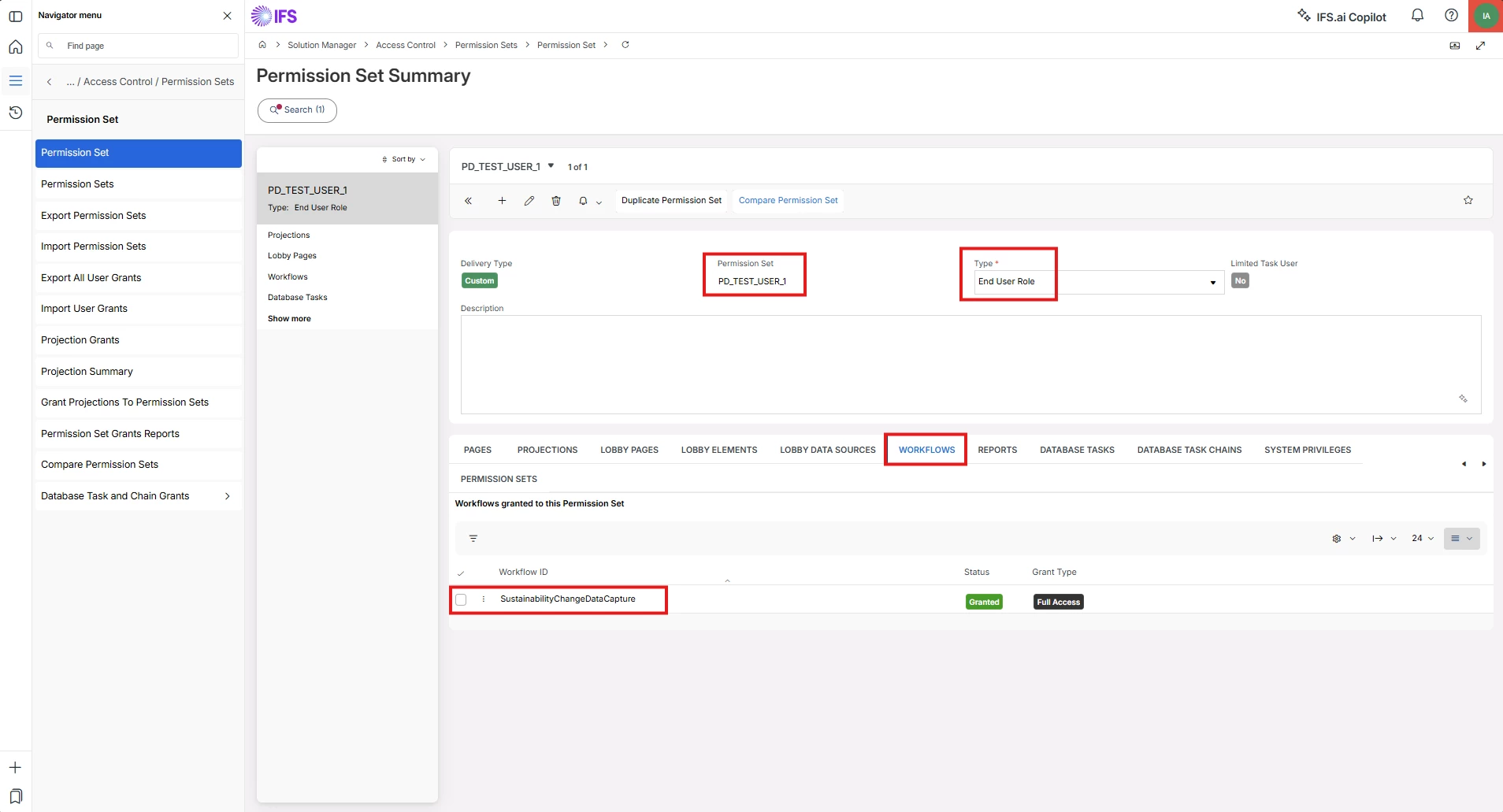
Created another end user role permission set PD_TEST_USER_1 and granted a projection and a workflow

Granted PD_TEST_USER_1 to PD_TEST_USER, and the projection and workflow are listed under PD_TEST_USER, which are granted from PD_TEST_USER_1
Observations: only the projection is listed, no workflows

(Here are the common screenshots for both scenarios for the PD_TEST_USER permission set)

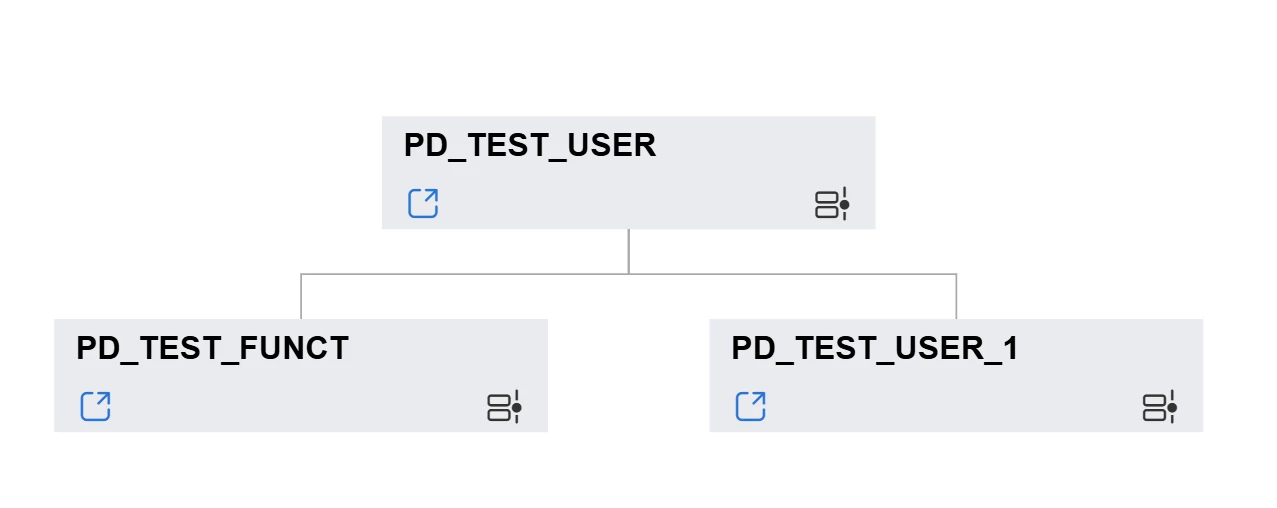
Permission set hierarchy showed like this

It seems that workflow grants are not allowed to be inherited from nested functional or end user role permission sets. It might be a limitation, and you should move the workflow-level permission grant out of the inherited functional user role and into the parent end user permission set (as in this example, PD_TEST_USER)


Forum|alt.badge.img+6
  • Sidekick (Customer)
  • March 23, 2026

Hi ​@dritter 

I tried to recreate your issue. I hope I recreated it correctly.

Created a functional role permission set PD_TEST_FUNCT and granted a projection and a workflow (not related to each other)


Created an end user role permission set PD_TEST_USER and did not grant a projection or workflow, but granted PD_TEST_FUNCT
Checked that the projection and workflow are listed under PD_TEST_USER, which are granted from PD_TEST_FUNCT
Observations: only the projection is listed, no workflows

Created another end user role permission set PD_TEST_USER_1 and granted a projection and a workflow

Granted PD_TEST_USER_1 to PD_TEST_USER, and the projection and workflow are listed under PD_TEST_USER, which are granted from PD_TEST_USER_1
Observations: only the projection is listed, no workflows

(Here are the common screenshots for both scenarios for the PD_TEST_USER permission set)

Permission set hierarchy showed like this

It seems that workflow grants are not allowed to be inherited from nested functional or end user role permission sets. It might be a limitation, and you should move the workflow-level permission grant out of the inherited functional user role and into the parent end user permission set (as in this example, PD_TEST_USER)


Yes, that is exactly my problem. For now we will assign the workflow grants directly to the end user role, but it would be nice if they could be inherited in the future, like other permission grants.


Thank you,

Dylan