


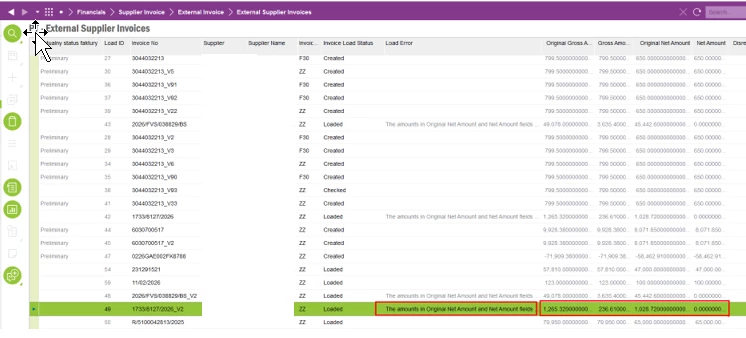
It's identified that user encountered an error when uploading external supplier invoices: "The amounts in Original Net Amount and Net Amount fields do not match for ZZ 1733/8127/2026 invoice. Select the Disregard Net Amount Differences check box if you want to continue. Otherwise, change the net amount for the invoice lines before you continue." And also, original gross amount, Gross amount, original net amount and the net amount also have different values in external supplier invoice window.
Following details provide the overview about the how Polish E invoice system works as customer is operating in Polish Localization.
“E-Invoice XML files can be generated only when the B2C parameter is not set for the customer. The XML file generated by the IFS application is converted into the Polish KSeF format through a third-party vendor (for example, Pagero). The third-party vendor then submits the Polish e-invoice in KSeF format to the KSeF platform.
Subsequently, a response message in KSeF format is received from the KSeF platform and converted back into IFS format by the third-party vendor. This response message in IFS format is placed in the IN folder of IFS Connect. From there, it is automatically uploaded into IFS Applications, and the response status on the Sent Invoices page is updated to Accepted.
Once the invoice is accepted, the general ledger is updated, and the Fetch Tax Ledger Info process is executed. Only after this step are the tax transactions fully retrieved.”
Initial investigation revealed that the Invoice Raw section of the XML file includes tags that are different from those in the core XML file and in other customers’ files, which upload without any issues.
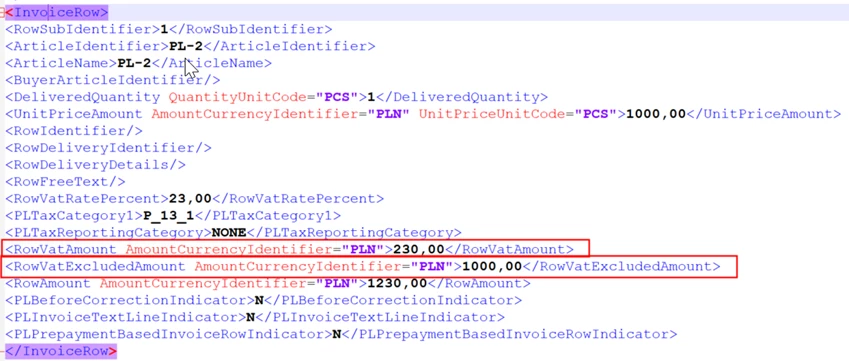
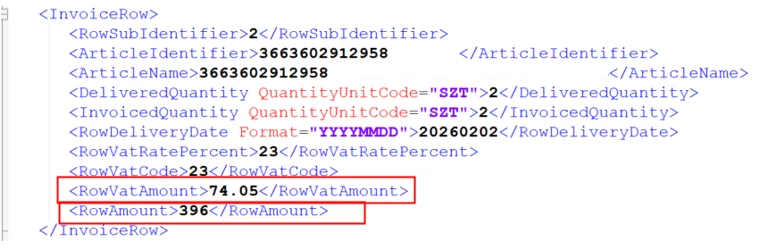
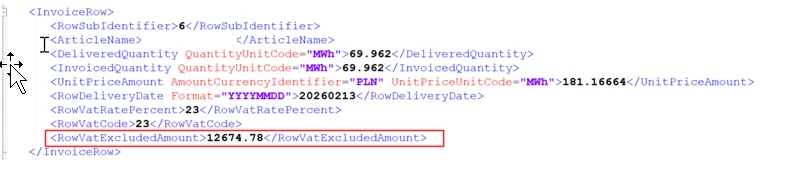
From the preliminary investigation analysis, identified that:
- The “Original Gross Amount” is derived from the <InvoiceTotalVatAmount> tag.
- The “Original Net Amount” is derived from the <InvoiceTotalVatExcludedAmount> tag.
- The Gross Amount and Net Amount displayed in the invoice header are calculated based on the summation of tax-related tags within each <InvoiceRow> section.
Following points also identified from the investigation performed with product experts and subject matter experts.
For the reported scenario, there is no specific Polish e-Invoice related functionality. The only specific, Polish e-Invoice related functionality when loading Supplier E-Invoice in XML is in connection to prefixes of Tax ID Number of company and supplier. Loading of amounts is handled in standard way.
When it comes to handling of net and gross amount.
When E-Invoice XML is created from IFS Applications, regardless the country, it includes
* Value in <RowVatExcludedAmount> tag fetched from Net Amount column
* Value in <RowVatAmount> tag fetched into Tax Amount column
* Value in <RowAmount> tag fetched from Gross Amount column
In the External Supplier Invoice Lines page, only Net Amount and Tax Amount columns are available. There is no Gross Amount column. When invoice line amounts are loaded (regardless the country),
* Value from <RowVatExcludedAmount> tag is fetched into Net Amount column
* Value from <RowVatAmount> tag is fetched into Tax Amount column
* Value from <RowAmount> tag is ignored (there is no column to load this value)
External Supplier Invoice Line page is primary designed for net amount scenarios. It can handle scenarios when tax amount was calculated from gross amount but still it required to have <RowVatExcludedAmount> tag in the source file.
If this happens, during file conversion, net amount, <RowVatExcludedAmount> tag, must be explicitly added to the xml file, indicating a difference between gross amount and vat amount. Without this value, only line level tax amount is loaded which results in data loss and the data loss leads to reported error message.
This tag must be created when service provider is converting invoice from XML file in KSeF format to XML file in IFS Style. This tag must be created regardless of if original KSeF file included net amounts or gross amounts.
From this idea article, it suggests that evaluate the possibility of allowing IFS customers to process invoices issued in gross amounts, where inclusion of the <RowVatExcludedAmount> tag is not mandatory by considering the considering its compliance impact caused for the users.