Solved

Boomi File Upload HTTP vs Aurena connector

  • July 5, 2023
  • 7 replies
  • 238 views

Forum|alt.badge.img+7

IFS Environment: Apps 10 UPD14.

I created a Boomi process that uploads a file into the document attachment section in IFS.

This was done using the Boomi HTTP Client connector using method PATCH. 


I was wondering if this could also be done using the Boomi IFS Aurean connector?

  • Projection: CreateAndImportDocument
  • Object: EdmFileSet

Best answer by DavidWiafe

@Mathias Dahl I want to use a projection because this will save us a connector.


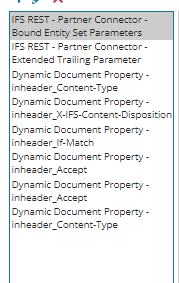
Also I figured this out by setting a set property shape that sets the parameters. 


7 replies

Mathias Dahl
Superhero (Employee)
Forum|alt.badge.img+33
  • Superhero (Employee)
  • July 5, 2023

Probably, and I think there are posts here on Community about it.

If this already works, why do you want to do it using a projection?


Forum|alt.badge.img+7
  • Author
  • Sidekick (Customer)
  • Answer
  • July 13, 2023

@Mathias Dahl I want to use a projection because this will save us a connector.


Also I figured this out by setting a set property shape that sets the parameters. 


Mathias Dahl
Superhero (Employee)
Forum|alt.badge.img+33
  • Superhero (Employee)
  • August 12, 2023

Thanks!


DumeeW
Sidekick (Partner)
Forum|alt.badge.img+2
  • Sidekick (Partner)
  • October 23, 2023

Hi @DavidWiafe ,

Have you done it using DocumentHome.svc ?


Forum|alt.badge.img+4
  • Sidekick (Partner)
  • April 22, 2026

Hi @DavidWiafe ,

Were you able to checkin the document to IFS by calling any of the following projections via Boomi IFS REST Connector ?

CreateAndImportDocument

DocReferenceObjectAttachmentHandling

Whilst it is possible to upload the file by calling he above projections via postman, it seems not possible to do via IFS REST connector for Boomi.

/Artha


Forum|alt.badge.img+7
  • Author
  • Sidekick (Customer)
  • April 22, 2026

@Artha I was able to check in the document using projection CreateAndImportDocument

I have not tried uploading the file via postman.

Steps I followed in Boomi

  1. First Create the document
    • Object: CreateDocument
    • Projection Name: CreateAndImportDocument
  2. Connect the Object
    • Object: ConnectObject
    • Projection Name: CreateAndImportDocument
  3. Get the Document URL
    • Object: GetDocumentUrl
    • Projection Name: CreateAndImportDocument
  4. Upload the file
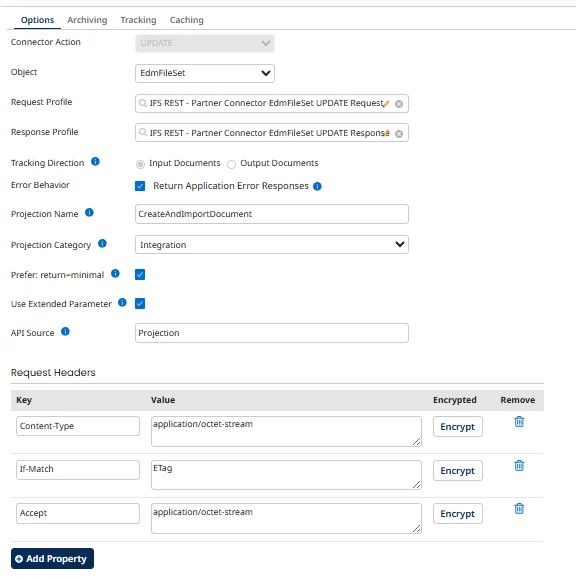
    • Object: EdmFileSet
    • Projection Name: CreateAndImportDocument 


Forum|alt.badge.img+4
  • Sidekick (Partner)
  • May 26, 2026

@DavidWiafe - Thanks David. Forgot to follow-up on this post. Unfortunately, I cannot seem to access the said projection via Boomi and when try to import he operation I get “Unable to browse connector: Projection not found, or not Included in Compatibility Application Type” error.

  1. The projection CreateAndImportDocument is available via API Explorer (IFS Cloud 25R2) and is Active
  2. The projection is granted to relevant IFS permission set (refreshed Security and Projection cache)
  3. Can access the said projection and perform all operations above via postman (as the same use as Boomi)
  4. In Boomi I am using Projection Category ‘Integration’

Wonder whether its a defect in Boomi (current version) ?